How to Give Constructive Feedback on Lab Notebooks: A Template
By Dr. Zubair Khalid, DVM, MS, PhD ·

By the end of this article you will be able to review a lab notebook (paper, electronic, or computational), score it against a fixed checklist, and deliver written feedback that a trainee can act on within a week. You need the notebook itself, about 30 minutes of uninterrupted time, and a copy of the feedback template in this article. If your lab uses an electronic lab notebook (ELN), have read access to the entry history so you can check timestamps and revisions.
Why Notebook Feedback Deserves a Template
A lab notebook is the permanent record of what was done, when, by whom, and with what materials. When data on which research is based becomes more openly available, concerns such as data integrity, revision history, permanence, and unchangeable timestamps move to the center of research data management, and the notebook is where those properties live or die [1]. A well-kept notebook also protects authorship claims and lets a lab defend or audit its work after the fact.
Feedback is how those standards get transmitted. Without a fixed structure, reviewers default to vague comments ("add more detail") or tone problems ("this is sloppy"), and the trainee cannot act on either. A template fixes three things at once: the scope of the review, the criteria being scored, and the tone of the delivered comments.
A template also prepares notebooks for a wider audience. The open notebook movement, in which researchers share protocols, positive results, and negative results online in near real time, depends on notebooks that a stranger can follow, and initiatives such as openlabnotebooks.org have grown to more than 20 active contributors within a year of launch [2]. Notebooks that survive outside review are notebooks that were reviewed inside the lab first.
What "Good" Looks Like Before You Review Anything
Before giving feedback, you need a definition of a reviewable entry. Standard notebook practice, taught across wet-lab training programs, asks for the following in every entry:
- A date, and for electronic systems, a timestamp you cannot edit.
- A heading that states the experiment's purpose in one sentence.
- Continuous entries with no blank gaps, so later readers can tell that nothing was done on a given day.
- Corrections made with a single line through the original text and initials beside the change, never erasure or deletion that hides what was first written.
- Reagent names, lot numbers, concentrations, equipment identifiers, and instrument settings.
- Raw data (file names, plate scans, instrument output) referenced by a location anyone in the lab can reach.
- Deviations from the protocol written down at the time they happened, not reconstructed later.
- Attestation that the entries belong to the person who made them, through signature, initials, or a login account.
On electronic platforms, some of these criteria are enforced by the software itself. A well-designed ELN provides data integrity, security, revision history, permanence, and unchangeable timestamps as features rather than habits. That changes what your feedback should target. In a paper notebook you check correction style. In an ELN you check whether the trainee is using the audit features the platform already provides.
The Constructive Feedback Lab Notebook Template
Here is the template format used throughout the rest of this article. Copy it into a shared document, a wiki page, or a plain-text file so every review in your lab uses the same structure.
# Lab Notebook Feedback Form

**Notebook owner:**
**Reviewer:**
**Date of review:**
**Entries reviewed:** (page range, entry IDs, or ELN section)
**Time spent:** (for your own workload tracking)

## 1. Purpose of the reviewed work (2 sentences, reviewer's paraphrase)
Write what you understood the entries to describe. If you cannot
summarize the experiment from the notebook alone, that is itself
finding number one.

## 2. What worked (at least 2 specific items)
Quote or cite the exact entry, page, or section. No generic praise.

## 3. Criteria checklist (Y / N / N/A + one-line comment each)
- [ ] Date and timestamp present on every entry
- [ ] Purpose stated at the top of each experiment
- [ ] Continuity maintained (no unexplained gaps)
- [ ] Corrections made per lab convention (strike-through + initials
      on paper, revision history preserved in ELN)
- [ ] Reagents, lot numbers, concentrations, and equipment IDs recorded
- [ ] Raw data referenced with a findable location
- [ ] Deviations from protocol noted at the time
- [ ] Entries attributable (signature, initials, or account login)

## 4. Top three priority fixes
Rank by how much each fix would shorten the path from notebook
to publishable figure or reproducible run. One action per item.

## 5. One question the notebook left unanswered
A genuine question you had as a reader. This teaches the writer
that notebooks are read, not graded.

## 6. Agreed follow-up
Date and the specific entries the reviewer will re-read.
The format matters less than the discipline behind it. Every section forces the reviewer to be specific, balanced, and forward-looking, and every section produces something the trainee can act on without guessing.
Step-by-Step Walkthrough of a Review
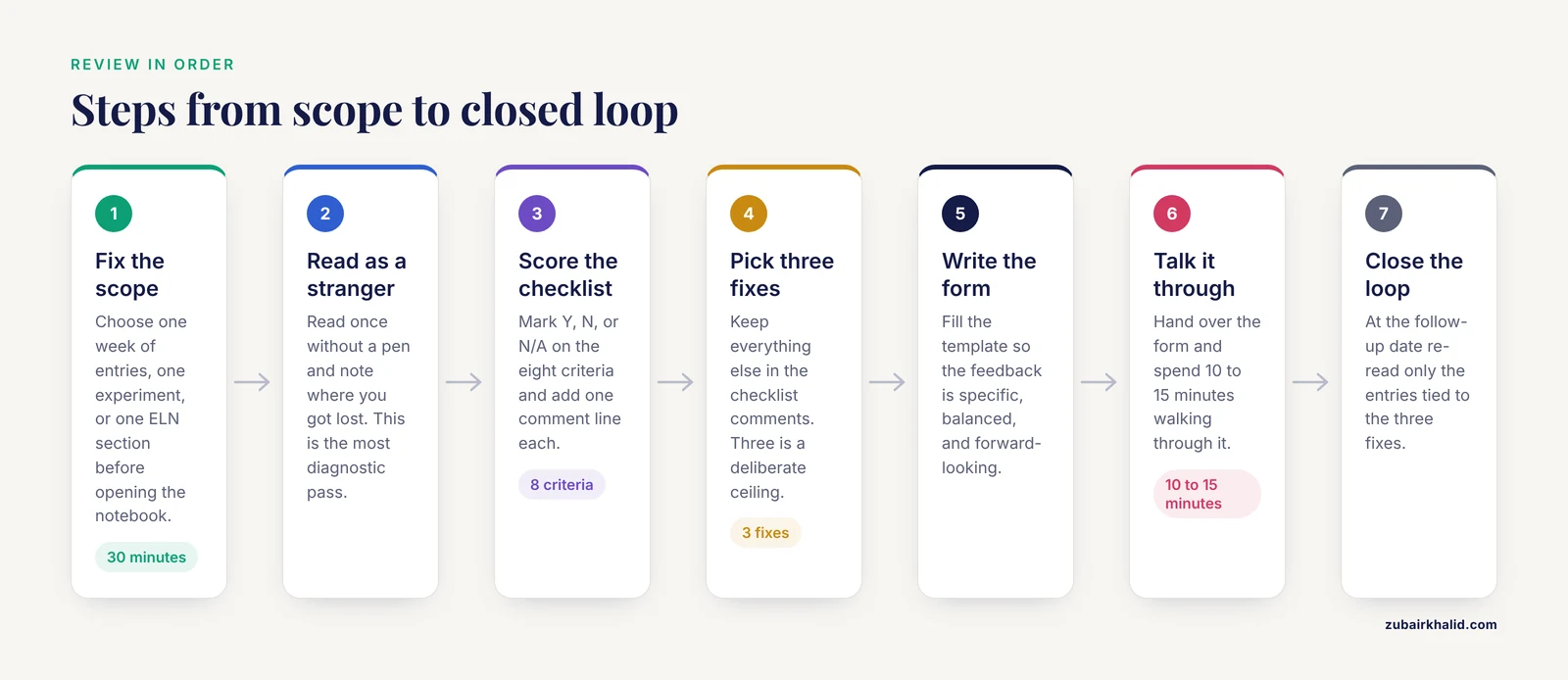
Step 1. Fix the scope before you open the notebook. Decide which entries you are reviewing. A week of entries, one experiment, or one ELN section is the right unit. Reviewing "the notebook in general" produces feedback nobody can apply.
Step 2. Read as a stranger first. Read the assigned entries once without a pen, pretending you were never in the lab meeting where the experiment was planned. If you cannot reconstruct the purpose, materials, and outcome from the entries alone, note where you got lost. This is the single most diagnostic pass in the whole process, because the standard for a notebook is that an outside reader can follow it. Open notebooks aim for exactly this property, sharing detailed protocols and results so peers can build on them [2].
Step 3. Score the checklist. Go through the eight criteria and mark Y, N, or N/A. Resist the urge to score on impression. If reagent lot numbers appear on page 14 but not page 15, that is a Y with a comment, not a vague "sometimes records lots."
Step 4. Pick three fixes and rank them. Everything else stays in the checklist comments. Three is a deliberate ceiling. Trainees who receive twelve simultaneous corrections change nothing, while trainees who receive three ranked corrections usually clear all three before the next review.
Step 5. Write the feedback using the template. Here is a filled example so you can see the expected output:
# Lab Notebook Feedback Form

**Notebook owner:** J. Okafor
**Reviewer:** M. Chen
**Date of review:** 2026-11-11
**Entries reviewed:** ELN section "Project B, entries 41-58"
**Time spent:** 25 minutes

## 1. Purpose of the reviewed work
These entries describe three independent transfections of construct
pB4 into HEK293 cells, followed by a luciferase assay, intended to
test whether the promoter fragment increases expression relative to
the empty-vector control.

## 2. What worked
- Entry 44 records the exact cell count, passage number, and
  confluency at transfection, which let me verify the two runs
  were comparable.
- Entry 51 links the plate reader output file by name and folder
  path, and I found the file on the first try.
- The negative transfection control is labeled and reasoned about,
  not just listed.

## 3. Criteria checklist
- [Y] Date and timestamp present on every entry
- [Y] Purpose stated at the top of each experiment
- [N] Continuity: two-day gap between entries 47 and 48 with no
      note. Comment: "Write 'no lab work, instrument maintenance'
      so readers know the gap was planned."
- [Y] Corrections made per lab convention
- [N] Reagents: entries 48-50 use "the antibody" without lot
      number or vendor. Comment: "Add lot and vendor on first use
      in each experiment."
- [Y] Raw data referenced with a findable location
- [N] Deviations: entry 49 mentions the incubation 'ran long'
      without stating how long. Comment: "Record the actual
      duration, since the reader cannot judge the effect without it."
- [Y] Entries attributable

## 4. Top three priority fixes
1. Add reagent lot numbers and vendors at first use in every
   experiment (affects 3 of 18 entries reviewed).
2. Record actual durations for any protocol step that deviates.
3. Close continuity gaps with a dated one-line status note.

## 5. One question the notebook left unanswered
Why was the third transfection run on a different cell passage?
If this was deliberate, one sentence in entry 52 would make the
comparison interpretable.

## 6. Agreed follow-up
M. Chen re-reads entries 59-70 on 2026-11-25 and checks the three
priority fixes.
Step 6. Deliver it in a short conversation, not by email alone. Hand over the written form and spend 10 to 15 minutes walking through it. Ask the trainee to paraphrase each priority fix back to you. The written record prevents the conversation from being forgotten, and the conversation prevents the written record from being misread as a verdict.
Step 7. Close the loop. At the follow-up date, re-read only the entries tied to the three fixes. If they are fixed, say so explicitly and in writing. Feedback loops that never confirm improvement train people to ignore feedback.
A Rubric Table You Can Reuse
| Criterion | What good looks like | Common failure | Feedback phrasing that works |
|---|---|---|---|
| , - | , - | , - | , - |
| Date and timestamp | Every entry dated, ELN timestamps untouched | Backfilled entries with no original time | "Entry 12 needs the date it was written. If it was reconstructed, label it as reconstructed." |
| Purpose statement | One sentence at the top of each experiment | Reader must infer the goal | "I could not tell from entry 8 what question this run answers. Add one sentence at the top." |
| Continuity | No unexplained gaps between entries | Blank pages or skipped days | "Write a one-line dated note for days with no lab work." |
| Corrections | Single strike-through plus initials on paper, preserved revision history in an ELN | Erasure, deleted ELN fields, overwritten text | "Keep the original visible. The correction history is evidence the entry is honest." |
| Reagents and conditions | Lot numbers, vendors, concentrations, instrument IDs | "the antibody," "same buffer as before" | "Someone outside this lab needs to rebuild this reaction from the entry. What would they be missing?" |
| Raw data | Named files, folder paths, linked attachments | "data on my desktop" | "Move the file to the project folder and put the path in the entry." |
| Deviations | Actual values recorded when protocol is not followed | "ran long," "slightly different" | "Write the measured value. 'Ran long' cannot be compared across runs." |
| Attribution | Signature, initials, or named account | Shared or anonymous entries | "Initial and date each page (or commit under your own account) so attribution is unambiguous." |
How Feedback Changes on Electronic Lab Notebooks
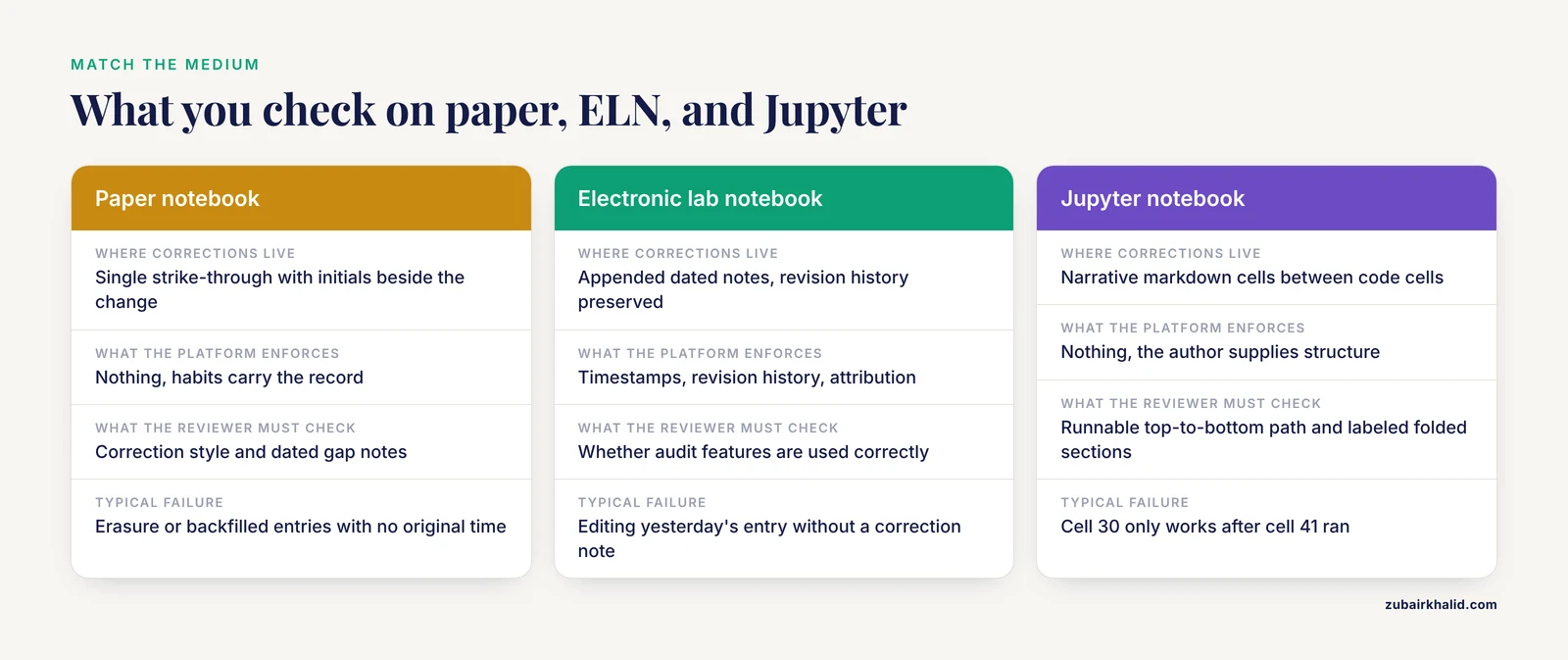
An ELN changes both what you review and what you can stop worrying about. In an environmental scan of 35 major US research universities, 8 (23 percent) held an enterprise-wide ELN license and 10 (28 percent) provided some form of ELN support, and of those 10, 9 involved the library [3]. Academic ELN adoption is real but uneven, so your lab may be on paper, on a platform, or in between, and the feedback you give should match the medium.
When reviewing ELN entries, the audit trail does part of your job. Requirements analyses for modern ELNs converge on a recurring set of properties: modularity, usability, regulatory compliance, interoperability, scalability, auditability, and cost efficiency [4]. Use those same properties as your review lens. A few practical points:
- Check the revision history, not just the current text. A trainee who edits yesterday's entry without an appended correction note is defeating the auditability the platform provides [4]. The fix is behavioral: correct by adding, never by replacing.
- Check attachment hygiene. Raw instrument output should be attached or linked, not summarized from memory.
- Check templates the lab has configured. A modular, self-configurable ELN can be assembled from reusable modules on widely available platforms, and implementation walkthroughs on Microsoft SharePoint and Google Workspace have demonstrated that core ELN functions can be realized with low-code tools [4]. If your lab built a template module for, say, cell culture entries, review whether trainees actually fill the structured fields instead of pasting everything into a free-text box.
- Cost is not a reason to skip review. No-cost ELN implementations in engineering courses show that structured digital record-keeping does not require a commercial license [5], and surveys of STEM instructors report that adoption barriers include cost, training, and fit to local workflows rather than any single blocking technical issue [6].
For an electronic lab notebook comparison aimed at feedback workflows, score candidate platforms on the factors in this table rather than on feature-list length.
| Factor | Why it matters for feedback |
|---|---|
| , - | , - |
| Immutable audit trail and timestamps | Lets the reviewer verify when entries were written, the core integrity property of digital records [1] |
| Structured templates and required fields | Makes checklist scoring fast, because missing fields are visible |
| Revision history that cannot be silently overwritten | Preserves corrections as first-class events [4] |
| Interoperability with data and code repositories | Lets one review cover data, documents, and analysis in one place [7] |
| Low configuration cost and self-configurability | Labs can build the feedback-friendly fields themselves [4] |
| Usability on the bench | Entries written at the bench are accurate, entries written days later are reconstructions [6] |
Some platforms go further and certify research activities with cryptographically signed, immutable records to guarantee authorship and data integrity, as in a blockchain-enabled ELN framework built for reproducible neuroimaging research that unifies data, documents, and code in one web-based system [7]. If your institution runs such a system, part of your feedback shifts from "record this" to "certify and link this."
Feedback for Computational Notebooks
If your lab keeps Jupyter or R Markdown notebooks alongside the wet-lab record, review them with a related but distinct checklist. Research on collaborative reuse of computational notebooks found that as notebooks grow they become hard to navigate and understand, which discourages sharing and reuse, and that annotated cell folding helps collaborators navigate and comprehend a notebook, both in meetings and during independent revision [8]. Translate that finding into feedback criteria:
- Narrative cells between code cells. Ask for one markdown cell per analysis stage explaining what the stage does.
- A runnable top-to-bottom path. If cell 30 only works after cell 41 ran, say so in the feedback and rank the fix.
- Folded sections must be labeled. Folding aids navigation, but collaborators can overlook folded content, so a folded cell needs a summary line stating what it contains [8].
- Outputs preserved or regenerable. Either commit outputs or state the runtime environment.
For figure-based feedback, a recent approach converts a plot into bounded formative feedback that stays close to what the image actually shows, pairing comprehension checks with a short narrative that responds to the learner's interpretation while refusing to invent numbers or structures absent from the figure. The lesson for human reviewers is the same discipline. Anchor every comment to a specific entry, page, or cell, and never speculate about data you did not see.
Reviewing at Scale: Audits Rather Than Line Edits
Once per notebook per month is enough for individual feedback. For lab-wide assurance, switch to sampling, and borrow the structure from fields that already audit records systematically. A six-month audit of internal quality control practices in a high-volume clinical biochemistry laboratory reviewed records monthly against established protocols and reported overall compliance of 98.8 percent with an average audit score of 94.3 percent, using the audit itself to drive recommendations [10]. A QA/QC framework for a large imaging study combined a proactive arm with a retrospective arm across four defined domains, including protocol adherence and data completeness, and audited 10 percent of studies quarterly [11].
You can copy that architecture without the clinical context:
- Proactive QA: train on the template before the first entry, and check the first experiment a new trainee writes within days, not months.
- Retrospective QC: each quarter, sample a fixed fraction of entries (10 percent is a defensible, published anchor point [11]) and score them with the same checklist.
- Report the score. A lab-level compliance percentage, tracked over time, turns notebook quality from a matter of opinion into a number everyone can see move.
Common Mistakes and Limitations
- Reviewing for handwriting, not for meaning. Neat entries with missing lot numbers are worse for reproducibility than messy entries with complete information. Score the criteria, not the penmanship.
- Praising without citing. "Good notebook" teaches nothing. Quote the entry that worked and say why.
- Correcting history in the ELN. Asking a trainee to "clean up" old entries by overwriting them destroys the audit trail that makes the record defensible. Corrections happen forward, as new dated notes.
- Treating the template as a grading sheet. The checklist exists to structure a conversation. If the filled form is delivered by email with no discussion, half the value is lost.
- Reviewing too rarely. A semester between reviews means a trainee has written 60 entries before hearing that lot numbers were missing from all of them. Early and frequent beats late and thorough.
- Ignoring the medium. The same eight criteria do not apply identically to paper, ELN, and computational notebooks. Adjust the checklist comments to what the platform enforces versus what the person must supply.
- Assuming the platform guarantees the science. An ELN can enforce timestamps and revisions, but it cannot make an entry accurate. The reviewer still has to ask whether the recorded values make physical sense.
- Individual judgment still applies. This article provides a review structure, and each lab and institution may carry additional documentation requirements from funders, regulators, or legal counsel that override a generic template.
Frequently Asked Questions
What is a constructive feedback lab notebook template?
It is a fixed one-page form a reviewer fills out for each notebook review, containing a paraphrase of the work, cited strengths, a scored criteria checklist, three ranked priority fixes, one open question, and an agreed follow-up date. The fixed structure keeps feedback specific, balanced, and actionable.
How often should lab notebooks be reviewed?
Review a defined slice (one week of entries or one experiment) every two to four weeks for trainees, and audit a sampled fraction of all lab entries quarterly. Frequent small reviews catch habits early, while quarterly sampling gives you a lab-level compliance number you can track over time.
What should I do if a notebook entry is missing entirely?
Never reconstruct the entry from memory in the notebook. Add a dated, initialed note stating that a record gap exists for the period in question and, if known, why. Silent reconstruction is the worst outcome because it converts an honest gap into a misleading record.
Does giving feedback differ for electronic lab notebooks?
Yes, partly. The ELN enforces timestamps, revision history, and attribution, so you stop policing those habits and start checking whether the trainee uses them correctly, for example by correcting entries through appended notes rather than overwriting text.
How do I give feedback without discouraging a trainee?
Lead with two specific cited strengths, limit written corrections to three ranked fixes, and phrase each fix as a reader's need ("someone outside this lab needs to rebuild this reaction") rather than a judgment of the writer. End with a genuine question and a scheduled follow-up.
Can AI tools help review lab notebooks?
They can assist with bounded, well-scoped checks. Published work has used a locally hosted vision-language model to generate formative feedback on student plots that stays anchored to what the image actually shows [9], and agentic AI systems increasingly act on laboratory computational workflows [12][13]. Treat any automated feedback as a draft a human reviewer verifies entry by entry.
What belongs in a lab notebook in the first place?
Every entry needs a date, a one-sentence purpose, the materials and their identifiers (reagents, lot numbers, concentrations, equipment), the actual protocol as performed including deviations, references to raw data by findable location, and attribution through signature, initials, or a named account. For ELNs, attached instrument files and structured fields replace much of the transcription.
How do I handle feedback for computational notebooks like Jupyter?
Apply a parallel checklist: one narrative cell per analysis stage, a runnable top-to-bottom path, labeled folded sections so collaborators do not miss them, and either preserved outputs or a stated runtime environment. Annotated cell folding has been shown to help collaborators navigate and comprehend notebooks, but only when folded content is summarized [8].
Sources
- The importance of research data management: The value of electronic laboratory notebooks in the management of data integrity and data availability
- Open laboratory notebooks: good for science, good for society, good for scientists
- Support for Electronic Lab Notebooks at Top American Research Universities
- A Modular Solution Concept for Self-Configurable Electronic Lab Notebooks: Systematic Theoretical Demonstration and Validation Across Diverse Digital Platforms
- No-cost Implementation of Electronic Lab Notebooks in an Intro Engineering Design Course
- Is it worth it? Implementation of electronic lab notebook software among the STEM community at an American University in the uae
- IntegriLAB: a blockchain-enabled electronic lab notebook for reproducible neuroimaging research
- Aiding Collaborative Reuse of Computational Notebooks with Annotated Cell Folding
- Plot-Grounded Feedback with Local Vision-Language Models for Clustering Labs
- Auditing Internal Quality Control Practices in a Large Size Clinical Biochemistry Laboratory
- Abstract 13321: Implementation of Core Lab Quality Assurance for Artificial Intelligence-Guided Echocardiography in a Mobile Rural Setting: The Risk Underlying Rural Areas Longitudinal (RURAL) Study
- AI, agentic models and lab automation for scientific discovery - the beginning of scAInce
- Orion: Towards Lab Automation with Computer-Using Agents