How to Organize Research Data Files for Collaboration: A Guide
By Dr. Zubair Khalid, DVM, MS, PhD ·

By the end of this guide you will be able to set up a shared project folder that a teammate can open for the first time and understand within ten minutes, write a data dictionary that prevents the classic "what does column B mean" email, keep raw files safe while analysis versions evolve, and maintain a literature notes system that the whole lab can search. You need a computer with a terminal (Terminal on macOS, PowerShell or Command Prompt on Windows), a shared storage location such as an institutional drive or cloud folder, a spreadsheet program, and optionally Git installed for version control.
Why Organization Decides Whether Collaboration Works
Most collaborative projects do not fail because someone cannot run an analysis. They fail because nobody can find the current dataset, two people edited different copies of the same spreadsheet, or the person who understood the encoding of a column left the lab. Surveys of research data management at universities describe exactly this pattern: fragmented practices, risk of data loss, and limited reuse when no institutional structure supports orderly files [1].
Large collaborations solve this deliberately. The HuBMAP consortium, which distributes multimodal human tissue data across many laboratories, maintains uniform processing pipelines and rigorous quality control so results are comparable across labs, organs, and donors, and it supports metadata-driven search so any collaborator can find datasets by their properties rather than by file names [2]. The Pediatric Exercise Data Analytics and Learning Network was created specifically because variability in testing protocols, calibration, and reporting among pediatric laboratories limited multicenter collaboration and data comparability, and its first action was to establish uniform data definitions across member institutions [3]. The lesson scales down to a two-person lab: agree on definitions and structure before the data pile grows.
The payoff is concrete. A liver transplantation collaborative enrolled 5,218 patients across 61 centers by having each site contribute standardized data series that could be pooled and analyzed together [4]. A European consortium pooled individual-patient data from seven observational studies on prenatal dolutegravir exposure, which only worked because the studies shared common outcome definitions based on ICD-10 and EUROCAT criteria [5]. Well-organized, well-documented data also keeps working after publication, as shown by the extensive reuse of open-access intensive care databases such as MIMIC and eICU in hundreds of studies [6].
Core Principles Before You Touch a File
Four principles underpin collaborative research data organization.
Raw data are immutable. Once a file comes off an instrument, a survey platform, or a data export, it is never edited. Every cleaning and transformation step happens on copies, in scripts, and the outputs are written to separate locations. This mirrors the logic used in large-scale repositories, where raw signal data and the structured metadata describing them are kept as separable components so each can be validated and updated independently [7].
Every file is findable by a stranger. The test for any naming or folder decision is whether a collaborator who joined the project last week can locate the correct file without asking you.
Structure is agreed in writing. A short README, a data dictionary, and a dated decision log replace verbal agreements that fade within weeks. Studies of multi-institution data sharing emphasize that a shared reference framework, documented and applied uniformly, is what allows separate datasets to be combined [8].
Preservation is planned, not improvised. Long-term storage decisions, including format choices and backup copies, deserve explicit thought because data may need to remain usable for years after the project ends [9].
Collaborative Research Data Organization Step by Step
The walkthrough below uses a Unix-style terminal. On Windows, the same commands work in PowerShell with minor syntax differences, or you can create folders through the graphical interface and follow the naming and documentation steps exactly.
Step 1: Create the project skeleton
Open a terminal in your shared project root and run:
mkdir -p myproject/{raw,raw/2026-01_plateA,data,clean,analysis,code,docs,notes,figures,literature}
ls myproject
Expected output:
analysis clean code data docs figures literature notes rawEach folder has one job:
| Folder | What belongs there | Example file |
|---|---|---|
| raw | Untouched instrument or platform exports | 2026-01-15_qpcr_plateA_export.csv |
| data | Intermediate files produced by scripts | plateA_merged_v2.csv |
| clean | The analysis-ready dataset, regenerated by code | analysis_ready_v3.csv |
| code | Scripts that transform raw into clean | 01_import.py, 02_clean.R |
| analysis | Statistical outputs, model objects | mixed_model_2026-02-01.rds |
| docs | README, data dictionary, protocols, decision log | data_dictionary.xlsx |
| notes | Lab notebook entries, meeting notes | 2026-02-03_team_call.md |
| figures | Publication-ready figures with dated names | fig2_dose_response_v4.png |
| literature | Reference library exports and extracted notes | bibliography.bib |
If your team works across institutions, mirror this exact skeleton on each side. A multicenter macaque growth study relied on seven institutions submitting weight and health records in comparable form so the pooled models could be built [8]. The pooled-analysis consortia described above do the same thing at larger scale.
Step 2: Adopt a file naming convention
Write the convention in the README before the first file is saved. A workable pattern is:
YYYY-MM-DD_projectcontent_vNN_author.ext
2026-02-01_dose-response-pilot_v03_jalvarez.xlsx
Rules that prevent most conflicts:
- Dates in ISO format (YYYY-MM-DD) so names sort chronologically.
- Version numbers as
v01,v02, padded to two digits sov10sorts afterv09. - No spaces. Use hyphens or underscores. Spaces break many command-line tools and some analysis pipelines.
- One author tag per file so responsibility for each artifact is visible.
Step 3: Write the data dictionary
Create a spreadsheet in docs/ with one row per variable in your dataset. Columns should include: variable name, plain-language description, units, allowed values or range, coding scheme, collection method, and the person responsible. When a consortium defines outcomes with a shared classification system, the definitions travel with the data, which is what allowed seven studies of dolutegravir exposure to be pooled with a single congenital anomaly classification [5]. The same discipline at lab scale means your collaborator never guesses whether weight is recorded in grams or kilograms.
An explicit time window is a data dictionary entry too. A COPD cohort study using the Clinical Practice Research Datalink specified a standardized 3-year pre-diagnosis look-back window for counting cardiopulmonary events, and that definition shaped every downstream comparison [10]. If your analysis has an analogous rule, write it down in the dictionary.
Step 4: Protect the raw data and log transformations
Copy exports into raw/ and set them read-only. On macOS or Linux:
chmod a-w raw/*.csvThen do all cleaning in code, never by hand-editing a cell. A minimal Python example:
import pandas as pd

raw = pd.read_csv("raw/2026-01-15_qpcr_plateA_export.csv")
df = raw.rename(columns={"Ct Value": "ct_value"})
df["ct_value"] = pd.to_numeric(df["ct_value"], errors="coerce")
df.to_csv("clean/analysis_ready_v1.csv", index=False)
print(df.shape)
print(df["ct_value"].describe())
Expected output looks like:
(96, 7)
count    94.000000
mean     24.318085
std       2.915604
The two rows that print are your first quality check: the row count should match the plate layout, and summary statistics should look plausible. If count is 94 out of 96, the dictionary should already explain whether two wells were deliberate blanks.
Step 5: Put code and documents under version control
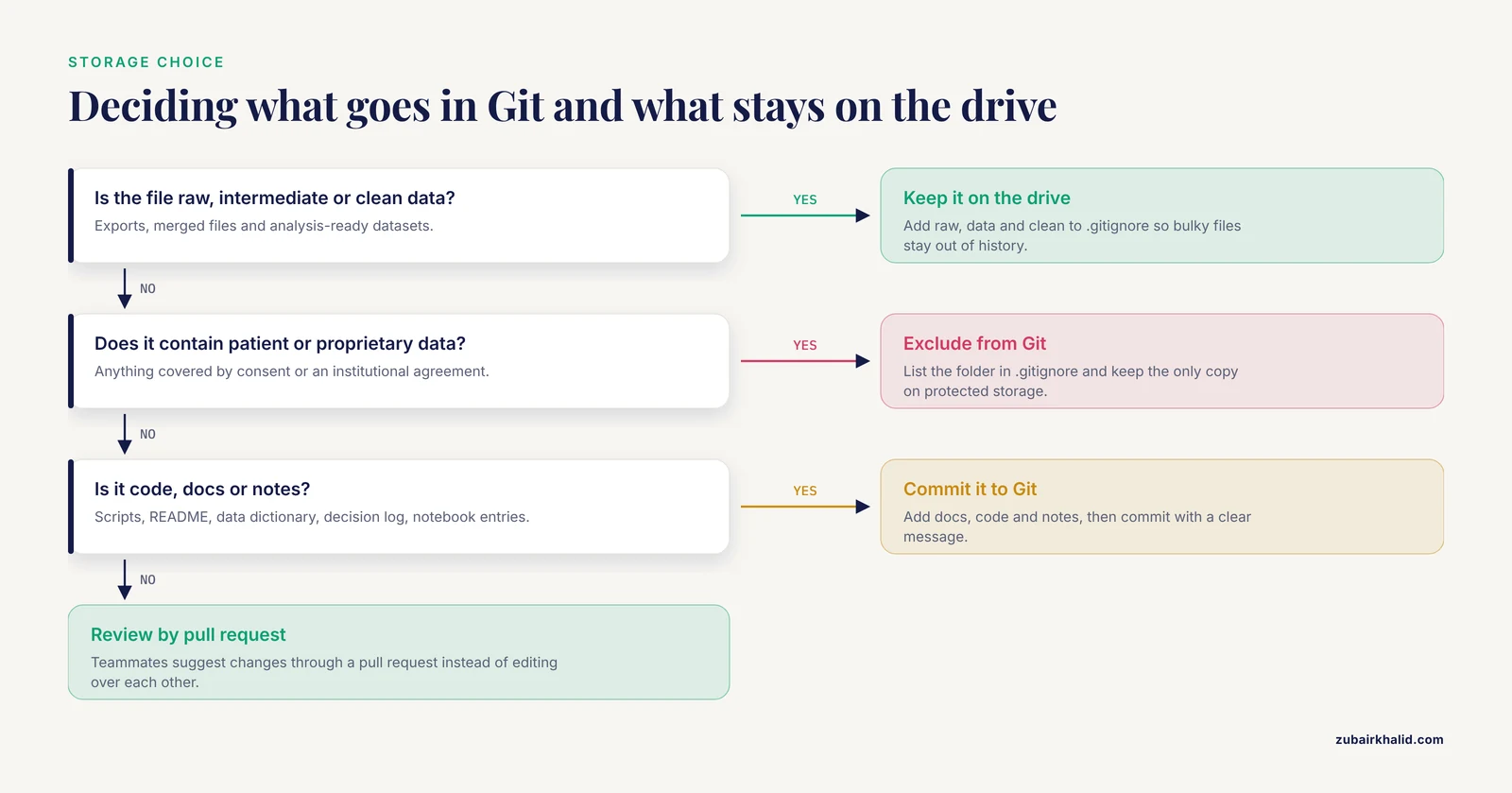
Git records who changed what and lets collaborators work in parallel. Initialize the repository for everything except the large data files:
cd myproject
git init
git add docs/ code/ notes/
git commit -m "Initial data dictionary and cleaning script"
git branch -M main
Expected output:
[main (root-commit) 3f2a1c9] Initial data dictionary and cleaning script
 4 files changed, 212 insertions(+)
Add a .gitignore file listing raw/, data/, clean/, and any folder containing patient or proprietary data, so sensitive or bulky files never enter the repository history. Push the repository to your institution's Git service and add each collaborator. When a teammate suggests changes, review them through a pull request instead of editing over their shoulder. This habit is the single largest practical upgrade most small labs can make.
Step 6: Define access, roles, and a data steward
Decide in writing who can edit raw files (nobody), who can merge changes, and who answers questions about a given variable. Assign one person as data steward. In interprofessional clinical work, clear role definition is associated with better task performance, and the same holds for data roles [11]. For cloud storage, use named shared folders with least-privilege permissions rather than a single shared login, and enable version history if the platform offers it.
If your project involves transferring data between services, plan the transfer deliberately. A suicide prediction study that collected participants' Google Search histories via Google Takeout documented recruitment and data-transfer challenges as part of its methods because remote data acquisition at scale rarely goes smoothly [12]. Test your transfer path with a small dummy file before the real data arrive.
Step 7: Set up research note taking and a literature notes system
Research note taking and file organization reinforce each other. Keep dated notebook entries in notes/, one file per experiment or meeting, named with the same convention as data files. Each entry should state what was done, what was decided, and what changed in the data or code, with links to the relevant script versions.
For literature, build a shared literature notes system rather than letting each collaborator keep private highlights. A practical structure is one note per paper containing the full citation, a two-sentence summary, methods used, key results with page numbers, and how the paper relates to your project questions. Store these in a plain text or Markdown format inside literature/ and index them with a reference manager that everyone on the team uses. Note taking is itself a recognized data source in some research traditions. A scoping review of autoethnography in medical education found that reflective writing was the predominant data source, appearing in 81% of the 53 included studies, and that collaborative autoethnography was the most common approach [13]. Qualitative teams similarly run collaborative inductive thematic analysis, where multiple researchers code the same material and reconcile their interpretations, which requires shared, well-organized source documents [14]. Your literature notes should be organized well enough to serve as analyzable material if the project ever calls for it.
Step 8: Verify, archive, and hand off
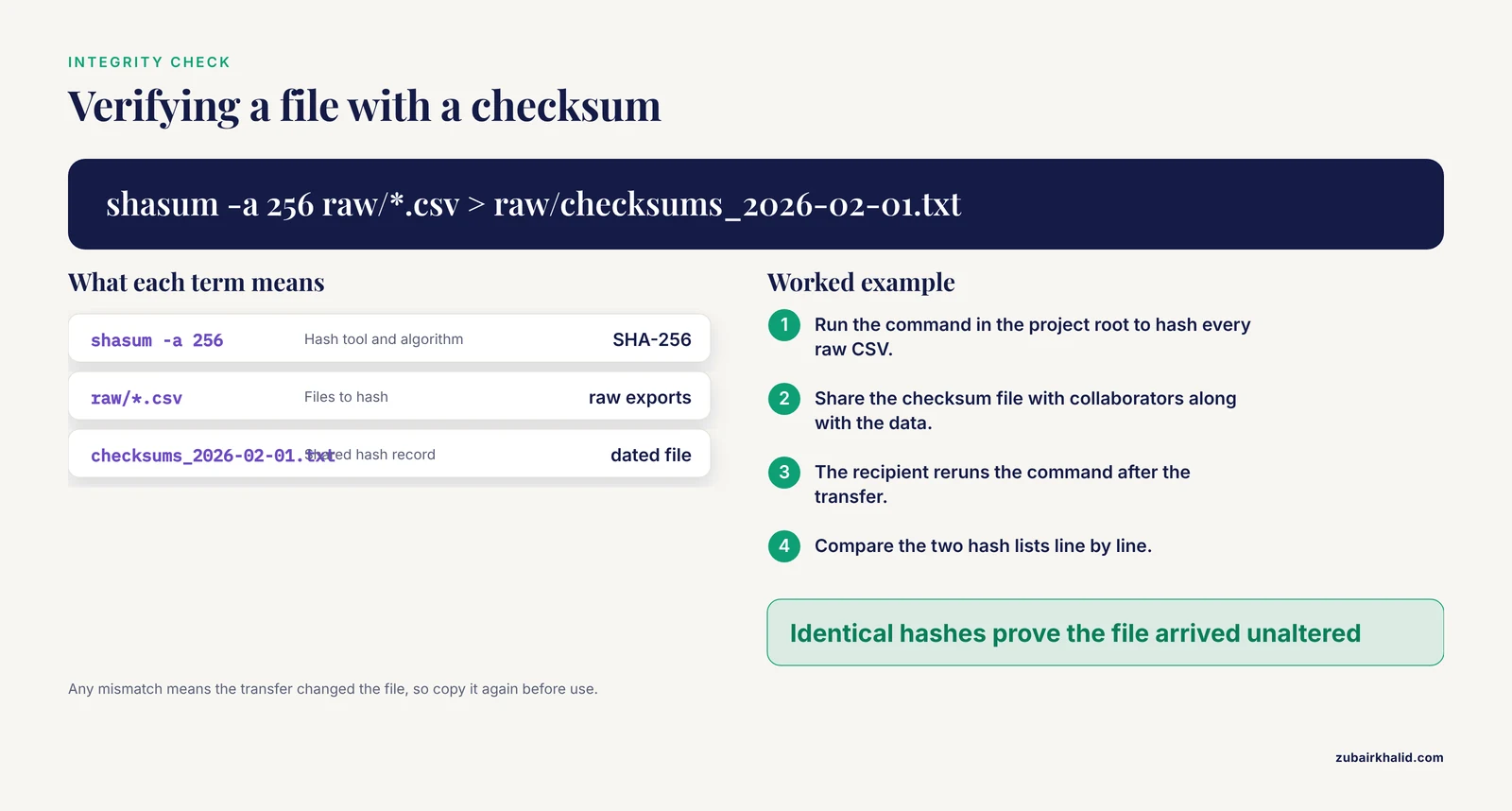
Before any release or handoff, run three checks.
First, verify file integrity with checksums:
shasum -a 256 raw/*.csv > raw/checksums_2026-02-01.txtShare the checksum file with collaborators. After any transfer, the recipient reruns the command and compares. Identical hashes prove the file arrived unaltered.
Second, test that a newcomer can follow your workflow. Ask them to regenerate clean/analysis_ready_v1.csv from raw/ using only the README and code. Anything they cannot reproduce is a documentation gap.
Third, package the project for archival in open, non-proprietary formats: CSV for tabular data, plain text or Markdown for documents, and a full data dictionary. Deposit the package in an institutional or disciplinary repository with a persistent identifier. Repositories designed for reuse, such as HuBMAP's portal with its metadata-driven search and standardized pipelines, show what well-prepared shared data make possible [2]. Expect the deposit to be usable by people who never met you.
Quick Reference Table
| Item | Recommendation | Why it matters |
|---|---|---|
| Raw data | Read-only, never edited | Preserves the original record |
| File names | ISO date, version, author, no spaces | Sortable, unambiguous, script-safe |
| Data dictionary | One row per variable, with units and codes | Prevents interpretation errors across sites |
| Transformations | Scripts only, version controlled | Every result is reproducible |
| Access | Named accounts, least privilege, one steward | Accountability and audit trail |
| Notes | Dated, linked to code versions | Reconstructs decisions months later |
| Exchange format | CSV or similar open format with UTF-8 encoding | Opens identically everywhere |
| Archive | Repository deposit with persistent identifier | Long-term reuse and citation [9] |
Common Errors, Exact Messages, and Fixes
fatal: not a git repository appears when you run a Git command outside the cloned or initialized folder. Fix: cd into the project root, or run git init if the repository does not exist yet.
error: failed to push some refs (non-fast-forward) means a collaborator pushed commits you do not have. Fix: run git pull, rebase, resolve any conflicts in the flagged files, then push again.
UnicodeDecodeError: 'utf-8' codec can't decode byte 0x.. in Python means the CSV was exported with a different encoding, commonly by older Windows tools. Fix: reopen with pd.read_csv(path, encoding="latin-1") or encoding="utf-8-sig", then standardize future exports to UTF-8.
Excel silently converts identifiers to dates or drops leading zeros. A gene symbol like SEPT1 or a sample ID like 0042 can be mangled the moment a collaborator opens a CSV in a spreadsheet editor. Fix: import with column types specified, or prefix identifiers with an apostrophe in shared templates, and state the rule in the data dictionary.
Permission denied on the shared drive means the collaborator lacks write access to the specific folder, often after a new subfolder was created by one person. Fix: the folder creator adjusts the share settings to include the whole team, and the team agrees that new folders inherit team permissions.
Two divergent "final" files. If analysis_final.xlsx and analysis_final2.xlsx both exist, neither is final. Fix: designate the version-controlled copy as the only authoritative one, move the stray copy to an archive/ folder, and record the decision in the log.
Common Mistakes and Limitations
- Treating the folder plan as optional until later. Structure adopted after data collection is far more expensive than structure adopted on day one. Institutional reviews of research data management consistently identify retrofit as a major source of loss and fragmentation [1].
- Storing the only copy on one laptop. Follow the standard practice of at least three copies on two different media with one copy off-site. Cloud sync is not a backup by itself, because deletions sync too.
- Assuming everyone interprets a column the same way. Undocumented judgment calls, such as how an ambiguous measurement was recorded, are the errors hardest to catch later. The experience of multicenter registries shows that uniform data definitions must be established up front, because differing local practices limit comparability even among expert groups [3].
- Mixing personal and project storage. Data in personal accounts are invisible to the team and often to the institution, creating both practical and compliance problems.
- Over-engineering a small project. A three-person pilot does not need a custom database. It needs the folder skeleton, the dictionary, and version control. Add infrastructure when the data demand it.
- Letting the literature notes system decay. Notes written during reading are only useful if they follow a consistent template. A shared template, checked at lab meetings, keeps the system alive.
- A limitation to state plainly: individual projects differ in regulatory requirements, data sensitivity, and institutional policy, and this guide cannot substitute for your institution's data governance office on questions of protected data, retention schedules, or agreements between institutions.
Frequently Asked Questions
What is collaborative research data organization?
It is the set of folder structures, naming rules, documentation, and access controls that lets multiple people work on the same dataset without confusion or data loss. The goal is that any team member can find, interpret, and reproduce the data and analyses at any time.
What folder structure should a research team use?
A structure that separates raw data, cleaned data, code, documentation, and notes works well for most projects. The key is that raw files stay untouched in their own folder and every derived file can be traced back to a script.
How do we name files so collaborators can find them?
Use ISO-format dates, project content descriptors, padded version numbers, and author initials, with no spaces in the name. Agree on the pattern in the README before the first file is saved.
Do we need Git if we already use a shared drive?
A shared drive stores files but does not record who changed what, allow parallel editing safely, or let you roll back a mistake cleanly. Use the drive for data files and Git for code, documents, and notes, which is the combination most teams find practical.
What is a data dictionary and why does it matter?
A data dictionary is a table describing every variable in a dataset: its meaning, units, allowed values, and how it was collected. It prevents the interpretation errors that surface when collaborators, or future you, read the file months later.
How should we handle literature notes so the whole team can use them?
Keep one standardized note per paper in a shared folder or reference manager, with a consistent template covering citation, summary, methods, and relevance to your project. Consistency of template matters more than the specific software.
When should we deposit data in a public repository?
Deposit when the project's results are published or the funder's policy requires it, provided privacy, consent, and any agreements allow release. Well-documented deposits in open formats get reused by other groups for years.
How do we prepare data files for a multi-center collaboration?
Agree on uniform variable definitions, units, and formats with every site before collection, mirror a shared folder skeleton at each site, and validate incoming files against the data dictionary. Standardization at the point of collection is what makes pooled analysis possible.
Sources
- From data neglect to data respect: A framework for institutionalising a sustainable research data management culture in Kenyan universities.
- HuBMAP Data Portal: a resource for multimodal spatial and single-cell data of healthy human tissues.
- Development of the Pediatric Exercise Data Analytics and Learning (PEDAL) Network: a novel registry dedicated to exercise testing in congenital and paediatric acquired heart disease.
- Regional and national variation in donor and recipient characteristics, transplant practice, and outcomes after liver transplantation (the IMPROVEMENT collaborative): a multicentre cohort study.
- Pregnancy and neonatal outcomes after prenatal exposure to dolutegravir: Data from a European cohort collaboration.
- Structural imbalances in open-access critical care research: a bibliometric analysis of abstracts from ICU database studies, 2018-2025.
- Exchange of High-Frequency Medical Monitoring Data Using Fast Healthcare Interoperability Resources for Interoperable Integration Into Clinical Practice and Research: Methodological Development Study.
- A Collaborative, Multi-Institutional Growth Standard for Dam-Reared Infant Rhesus and Pigtail Macaques (Macaca mulatta and Macaca nemestrina) in Research Settings.
- Computational Frameworks, System-Level Platforms, and Emerging Trends in DNA Data Storage.
- Cardiopulmonary Event Prevalence Before First Recorded COPD Diagnosis: A Retrospective Cohort Study Using the Clinical Practice Research Datalink.
- Association Between Interprofessional Collaborative Competencies and the Quality of Tracheostomy Care Among Intensive Care Unit Nurses: A Cross-Sectional Study.
- Study Design and Lessons Learned From Using Google Takeout Donations for Suicide Prevention Research: Prospective Cohort Study.
- A scoping review of autoethnographic approaches in medical education research.
- The Practice Gap in Managing Cognitive Impairment in Post-Intensive Care Syndrome: A Qualitative Study of Nurses' Perspectives.