Lab Notebook Setup for Collaborative Research
By Dr. Zubair Khalid, DVM, MS, PhD ·

By the end of this guide you will be able to set up a shared lab notebook that multiple people can write in, search, and trust. You will choose a platform using a structured electronic lab notebook comparison, build a lab notebook template that every team member fills in the same way, agree on naming rules that survive a full turnover of students and postdocs, and put review and offboarding steps in place so the record stays usable after people leave.
Here is what you need before you start:
- A decision from the principal investigator or team lead on where the notebook will live
- Access to the platform you plan to use, whether that is a paper notebook, a shared document system, or an electronic lab notebook (ELN), which is a software product designed to capture experimental data in a searchable, timestamped form
- A one-hour team meeting to agree on templates and naming rules
- A list of the data types your lab produces, because sensitive data such as human subject information needs different handling than open data [1]
Why Collaborative Notebook Setup Fails Without a Plan
Individual notebook habits work fine when one person runs one project. Collaboration breaks them. Two people describe the same protocol in different words, a reagent lot number lives in someone's email, and six months later nobody can reproduce a result. Editors at Cell Reports Methods describe exactly this failure mode. Labs inherit a notebook and a set of reagents, try to pick up where a project left off, and end up spending months reinventing the protocol because small but critical details were never recorded.
A collaborative lab notebook setup solves this by making three things shared rather than personal: the structure of each entry, the location of raw data, and the vocabulary used to describe methods. The goal is that any current or future member of the team can reconstruct an experiment without asking the person who did it. Method development itself is an achievement worth documenting carefully, not an afterthought to the result.
Collaboration also raises the stakes on access and security. A single-user notebook has one reader. A shared notebook has many, and some of what goes into it, such as unpublished results, human data, or proprietary reagent information, may need protection. Research into electronic research notebooks at a large US research university found that institutions need to assess risk for ELN products differently depending on whether researchers store open data or sensitive data that require standards [1]. Your setup should decide this on day one, not after someone pastes protected information into a tool that was never approved for it.
Choosing a Platform: An Electronic Lab Notebook Comparison
There is no single best notebook tool for every team. A study of researcher needs at a research-intensive university in the Southeast United States concluded that no single institutional ELN license satisfies all scientific disciplines, and that labs need a core set of tools plus tailored best practices for their specific workflows [1]. That finding matches what most multi-lab collaborations discover within weeks. The right question is not "which ELN is best" but "which option fits our data types, our budget process, and our people."
Use this comparison to narrow the field before you run a trial.
| Option | Best for | Strengths | Watch-outs |
|---|---|---|---|
| , - | , - | , - | , - |
| Paper notebook with scan-and-upload | Wet bench work with instruments that resist tablets | Universal, accepted for signatures, no vendor lock-in | Not searchable, copies drift out of date, one physical copy |
| Shared documents or wiki | Small teams, planning, meeting notes | Free or low cost, instant collaboration, easy linking | Weak timestamping and audit trails, easy to edit history accidentally |
| Institutional ELN | Labs under one university license | Templates, audit trails, export, institutional support | License may not fit every discipline in the collaboration [1] |
| Version-controlled repository (for example Git) | Computational projects, code, analysis pipelines | Full change history, works well with code | Steep learning curve, poor fit for freehand sketches |
| Specialized hosting platforms | Teams that also run shared instruments or online experiments | Handles scripts, participant or sample databases, and results in one place | Requires setup effort and a server-side administrator [2] |
Two practical rules make this comparison useful rather than theoretical.
First, run a trial before committing. A chapter on ELN adoption describes testing an electronic lab notebook and setting up a structured product trial as a standard part of the decision process [3]. A trial means a real project, real entries, and real users for a fixed window, not a vendor demo with sample data. Assign two or three people to write their actual work in the trial product for two to four weeks and report what broke.
Second, ask what happens when the trial ends. Export formats, what happens to entries if the license lapses, and whether data leaves in a usable form are adoption questions with long-term consequences. A notebook your lab cannot exit is a liability, because your data outlives any single product.
Collaborative Lab Notebook Setup Step by Step
This walkthrough assumes a wet lab or mixed wet-computational project with three to ten contributors. Adapt the details to your field. The steps stay the same.
Step 1: Name the record of truth
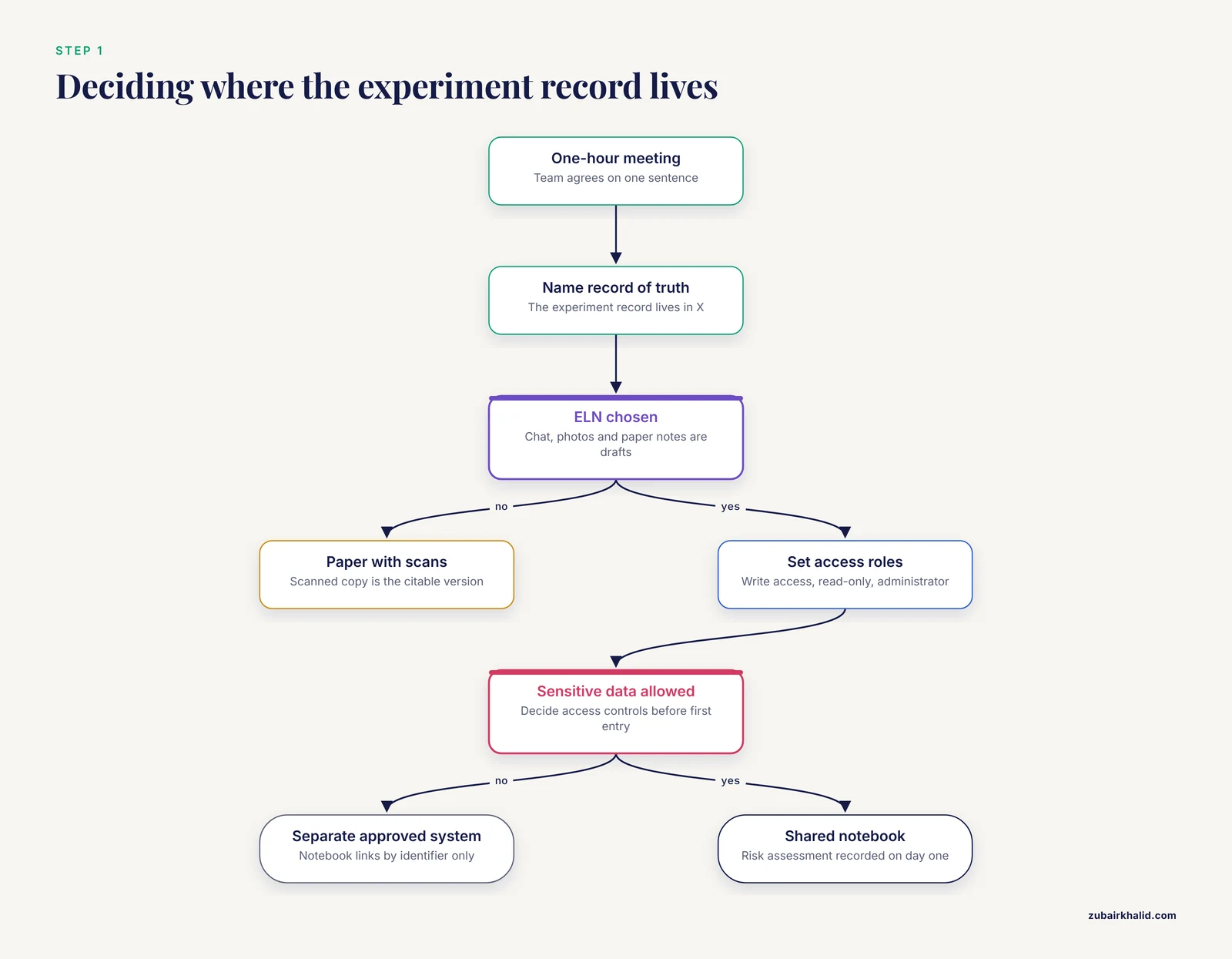
Hold a one-hour meeting and write down one sentence: "The experiment record lives in X." Everything else follows from that sentence. If the record of truth is an ELN, then chat messages, whiteboard photos, and personal paper notes are working drafts that must be transcribed. If the record of truth is paper with scans, then the scanned copy is the citable version. Ambiguity here is the root cause of most collaborative notebook failures, because people assume someone else captured the detail.
Decide in the same meeting:
- Who has write access and who has read-only access
- Who is the administrator who manages accounts and permissions
- Whether unpublished or sensitive material goes in the shared notebook at all, and if so, under what access controls, consistent with the need for risk assessment of ELN products handling sensitive data [1]
Step 2: Run your product trial and record the decision
If you are choosing among ELNs, set up the trial using the approach described in the ELN testing literature: configure the product, load a representative set of real entries, have several users work in it, and evaluate against written criteria [3]. Write your criteria down before the trial starts. A short scorecard works:
Trial scorecard (score each 1-5)
1. A new user could write a complete entry without training
2. Search found a specific result from three months ago in under a minute
3. Export gave us our data back in a format we can open without the vendor
4. Permissions let us restrict sensitive sections
5. Templates matched our experiment types
Record the decision itself, including the date, the participants, and the scores, as the first entry in the new notebook. That entry becomes the provenance record for the whole system.
Step 3: Create the folder and project structure
Consistent structure is what makes a shared notebook searchable. For a repository-style or file-based component of your setup, create the skeleton with a script so every project starts identically:
mkdir -p projects/zymo-2026/{notebook,raw,protocols,analysis}
find projects/zymo-2026 -type d
Expected output:
projects/zymo-2026
projects/zymo-2026/analysis
projects/zymo-2026/notebook
projects/zymo-2026/protocols
projects/zymo-2026/raw
Explain each folder to the team:
notebookholds dated entries written from the template in Step 4rawholds unmodified instrument output. Nothing in this folder is ever editedprotocolsholds versioned method documents that entries reference by version numberanalysisholds processed data and scripts, always derivable fromraw
The separation of raw from processed data is standard data-management practice, and the protocols folder earns its place because of a documented failure pattern. Labs that inherit notebooks and reagent sets often cannot pick up a project because the method details that mattered went unrecorded. A versioned protocol folder means the exact version used on a given date is always identifiable.
For teams that also share code or host experiments, dedicated platforms exist that integrate the experiment builder, participant database, and results in one deployable system, with a step-by-step guide for researchers setting them up [2]. If your collaboration spans behavioral or online experiments alongside bench work, treat that platform as a sibling of the notebook, with entries in the notebook linking to the hosted study.
Step 4: Adopt one lab notebook template for everyone
The template is the single highest-leverage part of a collaborative lab notebook setup. Write it once, enforce it always. Here is a template in Markdown that works in most ELNs and wikis:
# [YYYY-MM-DD] [Experiment ID] [Short title]

**Operator:** initials
**Project:** project code
**Related protocol:** protocols/xxx_v2.md (version number required)
**Objective:** one sentence, what question this experiment answers

## Design
Conditions, controls, sample sizes, randomization if any.

## Materials
Reagents with manufacturer, catalog number, and lot number.
Cell line or organism with source and passage or generation.

## Procedure
Numbered steps. Note deviations from the protocol inline as:
DEVIATION: [step number] [what changed and why]

## Data
Raw file names and their storage location in raw/.
Checksums for files that must not change.

## Observations
Anything noticed, including equipment behavior and timing.

## Results and next steps
One or two sentences. Negative results are results.

## Sign-off
Operator signature or timestamped ELN entry.
Reviewer (for example PI or senior lab member) signature and date.
Two fields in this template deserve emphasis because they are the ones most often skipped. Lot numbers for reagents matter because a manufacturing change in a critical reagent can produce unexpected issues that look like a mystery failure in your experiment. Recording the lot turns a six-month mystery into a ten-minute check. And deviations from the protocol must be written at the moment they happen, because a deviation recorded from memory a week later is a guess.
Step 5: Fix a naming convention and checksum workflow
File names are metadata. Agree on one pattern and encode it in a script or ELN template field:
YYYY-MM-DD_PROJECT_EXP###_INITIALS_description.ext
2026-11-11_ZYM26_EXP012_KT_plateA_od600.csv
The date is in ISO format (year, month, day) so files sort chronologically in any operating system. The experiment number matches the notebook entry. The initials identify the operator without exposing full names in shared file systems.
For files whose integrity matters, generate a checksum, which is a fixed-length fingerprint of a file's contents. If the file changes by even one character, the fingerprint changes:
sha256sum raw/2026-11-11_ZYM26_EXP012_KT_plateA_od600.csvExpected output (a 64-character hexadecimal string, followed by the file name):
9f86d081884c7d659a2feaa0c55ad015a3bf4f1b2b0b822cd15d6c15b0f00a08 raw/2026-11-11_ZYM26_EXP012_KT_plateA_od600.csvPaste the checksum string into the notebook entry for that experiment. Anyone can rerun the same command later and confirm the raw file has not changed since the entry was written. To verify a file against a recorded checksum, use the check flag:
sha256sum -c checksums_zym26_exp012.txtExpected output for an unchanged file:
raw/2026-11-11_ZYM26_EXP012_KT_plateA_od600.csv: OKStep 6: Define the writing workflow
Set these rules and put them in the notebook's own front page:
- Entries are written the same day as the experiment, not reconstructed later
- Every entry follows the template, with no exceptions for "quick checks"
- Raw data goes to
raw/or the ELN attachment area before the entry is finished - Corrections are made by adding a dated amendment, never by deleting or overwriting the original text
- A designated reviewer signs or countersigns entries on a fixed schedule, for example weekly
The amendment rule preserves the audit trail that makes a notebook credible, whether the platform is paper or electronic. The review rule matters because a notebook nobody reads is a diary, not a record. Review catches missing lot numbers, vague procedure steps, and lost deviations while the operator still remembers them.
Step 7: Onboard new members with a written procedure
Every new student, postdoc, or collaborator gets the same one-page onboarding checklist: account creation, template walkthrough, naming convention, the raw-versus-processed rule, and safety training. Safety training deserves its own session rather than a signature on a form. Research on laboratory safety instruction found that students gained significant safety knowledge across all tested instructional formats, including interactive virtual reality simulation, desktop simulation, and review of text material, with differences appearing mainly in affective outcomes such as confidence and attitudes [4]. The practical takeaway for a collaboration is that the format matters less than making sure training happens before the person handles the notebook's associated hazards, and that a record of who completed training lives alongside the notebook.
Teams that build collaborative projects from scratch, such as student engineering teams in synthetic biology, succeed partly because they standardize parts and techniques so members can assemble, share, and reuse work reliably. Your onboarding checklist plays the same role: it standardizes the parts of the notebook so a new member's entries look like everyone else's from their first week.
Step 8: Plan backups, export, and offboarding
For each platform decision, answer three questions in writing:
- Backup: where does a second copy live, who verifies it, and how often
- Export: how do we get all entries and attachments out in an open format, and has anyone actually tested that export
- Offboarding: when someone leaves, what happens to their entries, and who inherits their protocols
Test the export path once a year with a small project. An export that has never been tested is a hope, not a plan.
Collaborative Lab Notebook Setup Tips
These tips come from the gaps that appear repeatedly in multi-person labs.
Write for a reader who was not there. Assume the person reading the entry in two years is you, tired, on a new project, with no memory of why the control failed. Concrete beats terse. "Incubated 37 C, 5% CO2, 45 min" beats "standard conditions."
Link, do not duplicate. When a protocol is referenced in ten entries, it lives once in protocols/ with a version number, and entries cite the version. This mirrors the standardization logic that makes modular engineering approaches tractable, where shared, clearly defined parts make rebuilding and reuse fast.
Make the notebook the only place decisions live. Decisions made in chat or at the bench get a dated entry the same day. A sentence stating the decision, the alternatives considered, and who approved it is enough.
Record negative results and stopped experiments. An experiment that failed after four hours is information your teammates need so they do not repeat it. The pattern of experiments that work for months and then suddenly break is common enough in the methods literature that recording what changed, including reagent lots, is presented as a core practice for avoiding it.
Schedule a fifteen-minute weekly notebook review. The reviewer checks that templates were followed, raw files exist for each entry, and deviations were recorded. Rotate the reviewer role among senior members so review does not bottleneck on one person.
Keep one vocabulary list. Agree on how the team writes sample identifiers, strain names, and condition labels, and keep the list on the notebook's front page. Search fails when the same condition is written three different ways.
Match tooling to the project, not the lab. Because no single ELN solution satisfies every discipline, keep core practices universal and allow discipline-specific extensions, the approach recommended in research on institutional ELN adoption [1]. A lab mixing molecular biology and behavioral experiments can share the template and naming rules while each subgroup uses the attachment and analysis tools that fit its data.
Common Mistakes and Limitations
These are the mistakes that most often damage a collaborative notebook, with fixes.
No single record of truth. Symptom: the same result exists in a chat thread, a slide, and someone's paper notebook, with different numbers. Fix: the Step 1 sentence, enforced by the reviewer.
Reconstructing entries after the fact. Backfilled entries omit the details that mattered, especially deviations and timing. Fix: the same-day rule, plus an amendment mechanism for late corrections rather than silent edits.
Mixing raw and processed data. Once a raw file is edited, its provenance is gone. Fix: the raw/ and analysis/ split from Step 3, plus checksums for critical files.
Skipping the trial before an institutional commitment. Teams sometimes adopt an ELN based on a vendor demonstration. The ELN testing literature treats a hands-on product trial, with real users and real entries, as a standard stage of adoption [3]. Fix: run the Step 2 scorecard with at least two users on live work before any license decision.
Ignoring data sensitivity from the start. Human subject data, patient information, and some industrial data require standards and access controls that not every notebook product supports. Risk assessment for ELN products, distinguishing open data from sensitive data, is an identified institutional need [1]. Fix: decide in Step 1 what may enter the shared notebook and configure permissions before the first sensitive entry, not after.
Template drift. Six months in, people invent their own entry formats. Fix: the weekly review, and a rule that template changes require a dated amendment to the template itself so older entries remain interpretable.
No offboarding plan. A departing member leaves protocols in their head and files on their laptop. Fix: Step 8, with offboarding added to the departure checklist for every leaver, including interns.
Treating the notebook as bureaucracy. If entries are written for the reviewer instead of for the next experimenter, quality collapses. The framing that helps is the one the methods literature uses: careful method documentation is itself a contribution, and the details that go unnoticed are the ones that break reproduction.
A final limitation applies to every setup described here. Regulatory, funding, and institutional requirements for research records vary by field and institution, and this guide does not replace your institution's data-management plan or your funder's retention rules. Confirm signature, retention, and intellectual-property requirements with your technology transfer office or research office when your collaboration involves those obligations.
Frequently Asked Questions
What is a collaborative lab notebook setup?
It is a shared system for recording experiments, including a single agreed platform, one template all members follow, common naming rules, defined access permissions, and a review routine, so any team member can understand and reproduce another member's work.
Should our team use a paper notebook or an electronic lab notebook?
Use whichever option your team will actually maintain after scoring it against your data types and export needs. The comparison table earlier in this guide narrows the choices, and a hands-on trial with real entries is the standard way to decide before committing.
What should a lab notebook template include?
At minimum, date, experiment identifier, operator, objective, design, materials with reagent lot numbers, the procedure with deviations noted, raw data file names and locations, observations, results including negative results, and sign-off. The full Markdown template in Step 4 can be adapted to any platform.
How do we compare different electronic lab notebook products?
Score candidates against written criteria before the trial starts, including ease of first entry, search quality, export formats, permissions for sensitive sections, and template support, then have real users run real work through each product for two to four weeks [3]. Add institutional factors such as whether one license can serve every discipline in your collaboration, which research suggests it often cannot [1].
How often should notebook entries be reviewed?
A short weekly review by a designated senior member works for most teams. The reviewer confirms template compliance, that raw data files exist for each entry, and that deviations were captured, and rotates the role so review does not bottleneck on one person.
How do we handle sensitive data in a shared notebook?
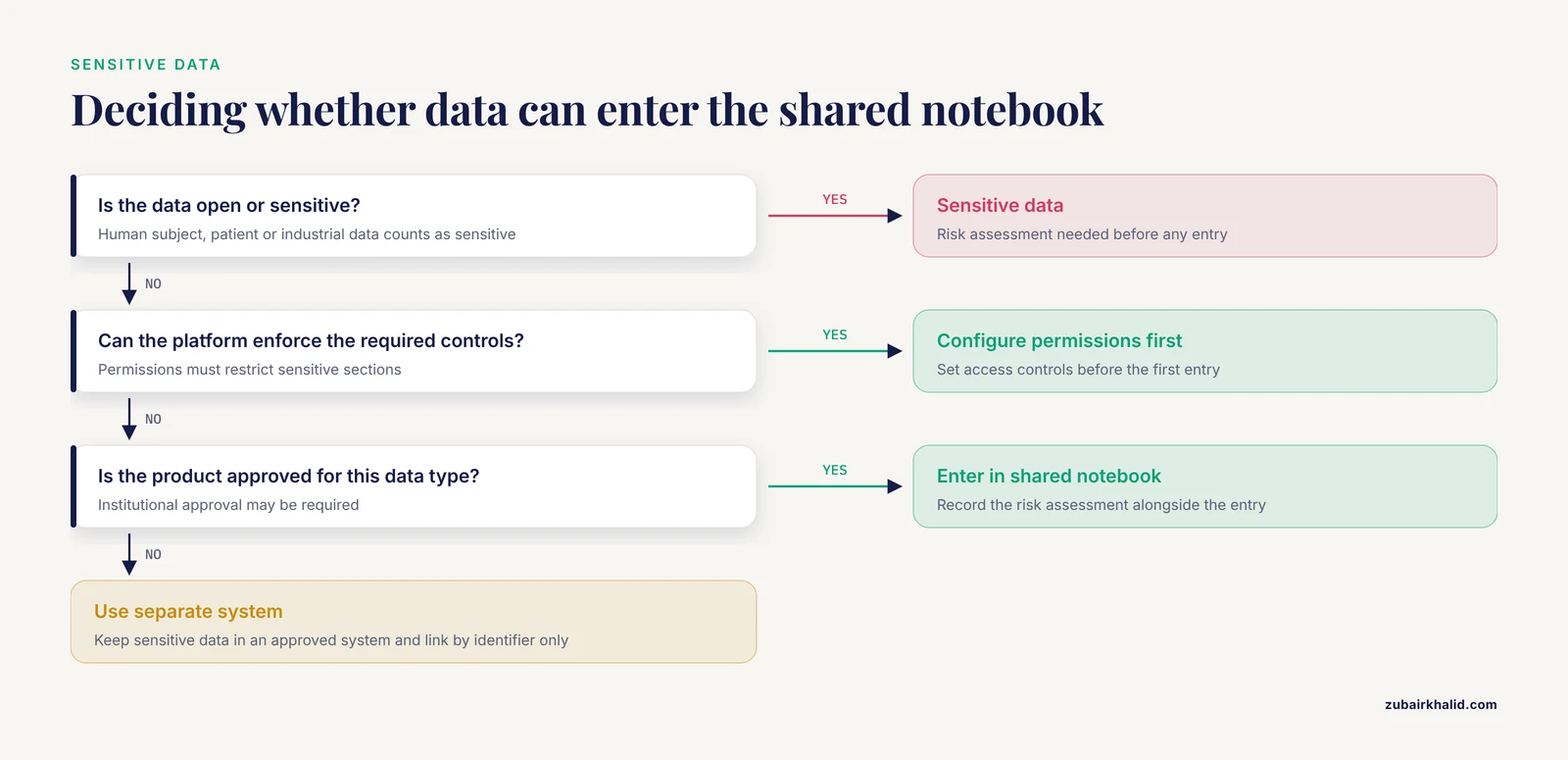
Decide before the first entry what may enter the shared notebook, configure access controls in the platform, and apply the risk assessment appropriate to whether the data is open or sensitive and subject to standards [1]. If the platform cannot enforce the required controls, sensitive data belongs in a separate approved system with the notebook linking to it by identifier only.
How do we onboard a new lab member to the notebook system?
Give every new member the same one-page checklist covering account setup, the template, naming rules, the raw-versus-processed rule, and a scheduled safety training session before they handle lab hazards, since structured safety instruction reliably increases safety knowledge across instructional formats [4]. Pair the checklist with their first two entries being reviewed before sign-off becomes their responsibility.
What happens to the notebook when a lab member leaves?
Run the offboarding step from their first day, not their last: confirm all entries are complete and signed, transfer protocol ownership, copy any local files into the shared structure with checksums, and record the departure and handover as a dated notebook entry so the chain of custody for their work is explicit.
Sources
- Exploring electronic lab notebooks (ELNs) at a R1 institution in the Southeast USA
- Open Lab: A web application for running and sharing online experiments
- Testing the Electronic Lab Notebook and Setting Up a Product Trial
- Science lab safety goes immersive: An ecological media-comparison study with gender analyses assessing iVR's learning effectiveness