Collaborative Lab Notebooks: Multi-User Options Compared
By Dr. Zubair Khalid, DVM, MS, PhD ·

The core difference between collaborative lab notebook options is who controls structure and access: dedicated electronic lab notebooks (ELNs) enforce permissions, audit trails, and experiment templates, while repurposed general tools like OneNote and Evernote give you flexible sharing with none of the built-in compliance machinery. The rule of thumb for choosing: pick a dedicated multi-user ELN if your lab needs traceable records for grants, patents, or regulated work, and pick a general note-taking tool if you need fast, cheap collaboration and can tolerate building the structure yourself.
This article compares the realistic options for a shared, multi-user lab record, explains the pros and cons of each, and shows how real labs have made the transition from paper.
Why Multi-User ELNs Replaced the Paper Notebook in Many Labs
An electronic lab notebook, or ELN, is a digital system for recording experimental procedures, observations, raw data, and analysis in a searchable, shareable format. The traditional paper lab notebook, or pLN, ties every record to one physical book, which makes collaboration awkward. Two people cannot write in the same notebook at once, data lives on paper that cannot be searched, and large datasets from modern instruments do not fit on a printed page.
The case for going digital is straightforward. Documentation of experiments is essential for best research practice and ensures scientific transparency and data integrity, and electronic tools now handle nearly all data acquisition, analysis, presentation, and archiving, so the paper notebook has become the last paper component of an otherwise digital experiment [1][2]. ELNs were introduced to make documentation more straightforward and to support quality and transparency as labs moved toward fully electronic workflows [2].
The collaborative benefits are concrete. When a bioprocess engineering teaching lab implemented LabArchives, a cloud-based ELN, instructors reported a streamlined workflow, quick data recording and archiving, enhanced data sharing and collaboration, superior data integrity, and the ability to monitor experiments in real time from remote locations. Students rated the ELN better than the paper notebook for compliance [3]. A translational science laboratory at New York University School of Medicine reached a similar conclusion after six months of running its entire routine record keeping on Evernote, finding that the advantages of an ELN outweighed its main limitation, the inability to write freehand directly into the notebook [4].
Adoption has been slower than the benefits suggest, and knowing why matters before you choose. A user study of ELN adoption identified three recurring barriers: the cost of available ELNs, their ease of use or lack of it, and accessibility problems across different devices and operating systems. The same study found that scientists willingly use generic notebooking software, spreadsheets, and general office tools for lab work, which tells you the gap is in fit rather than willingness [1]. Any collaborative lab notebook multi-user decision should be tested against those three barriers.
The Main Collaborative Lab Notebook Multi-User Options
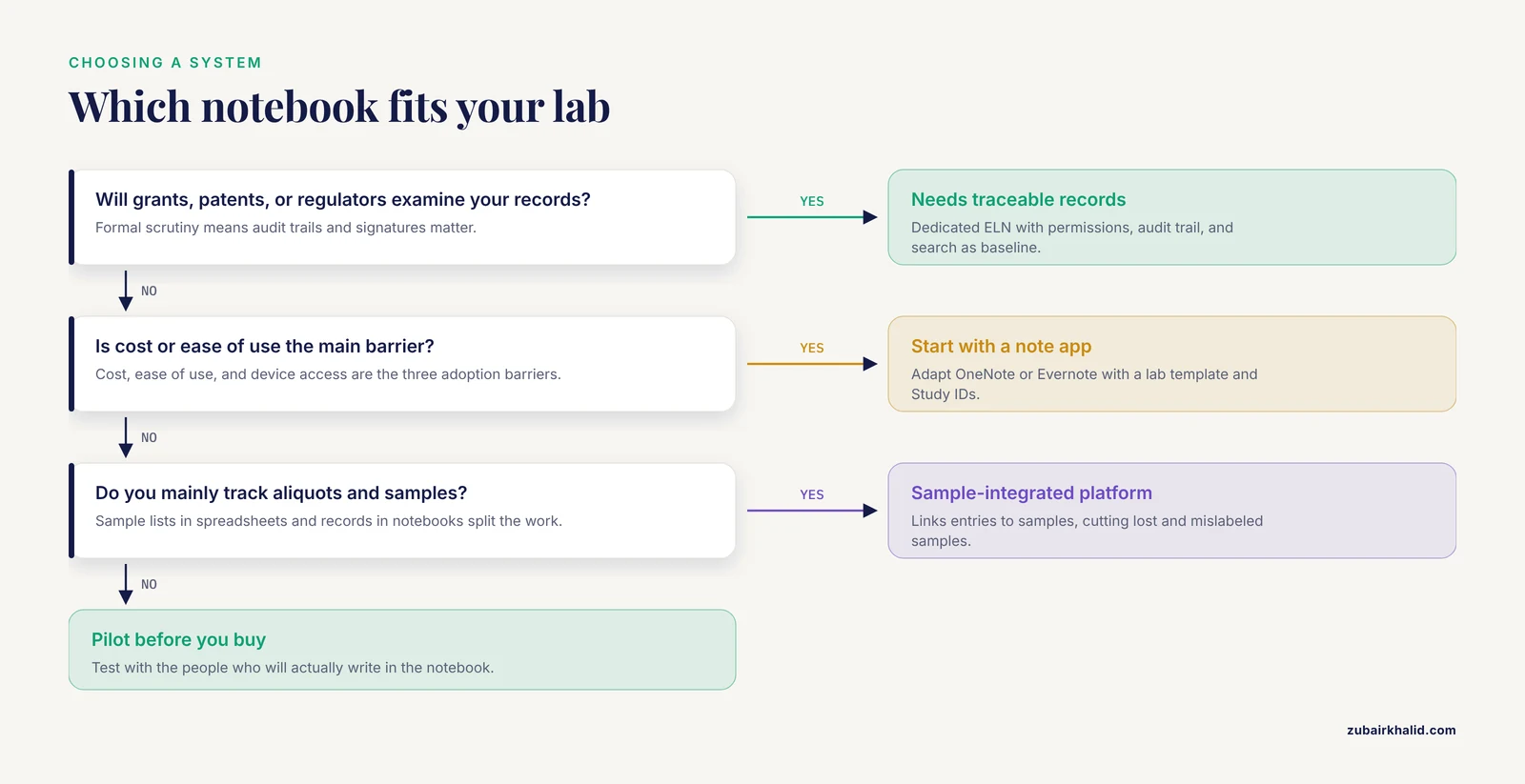
Survey-based reviews of the ELN market have classified dozens of products into categories such as quality assurance and quality control, biology, chemistry, research and development, and multidiscipline pools, precisely because no single notebook fits every lab [5]. Those categories map cleanly onto the five practical options below.
Dedicated Cloud-Based ELNs
These are platforms built from the ground up as lab notebooks with collaboration as a core feature. The earliest web-based example, eCAT, was designed as a highly scalable web-based collaboration tool with a permissions system, controlled sharing, an audit trail, electronic signature, and search, presented through an interface that looked like the electronic counterpart of a paper notebook. More than 100 individuals and groups participated in its beta testing, including groups at the FDA's Center for Biologics Evaluation and Research and several universities, and labs used it to compile images and spreadsheets, keep meeting minutes, and share records across the group [6].
LabArchives, a later cloud-based ELN, demonstrated the model at scale in an academic teaching setting, where it supported shared student notebooks, streamlined grading and feedback, and remote monitoring of experiments [3]. Dedicated ELNs in this family typically offer per-user accounts, notebook or page level sharing, and history tracking. They are the default answer when the question is the best collaborative lab notebook multi-user choice for a lab with formal data integrity requirements.
Commercial Discipline-Specific ELNs
Larger commercial platforms target specific disciplines, most commonly chemistry and biology, and often bundle structured data capture, reaction or protocol templates, and inventory features. A review of 35 ELNs available on the market grouped these products by intended audience and noted that the number and variety of solutions was growing quickly, making selection a cumbersome process for labs [5]. One example from the surveyed literature is PerkinElmer Elements, a scientifically designed ELN that competed directly with general tools in a biomedical institute's evaluation [7].
The trade-off is fit versus friction. Discipline-specific platforms capture structured data well but tend to be expensive, and cost was one of the three major barriers to ELN adoption identified in user studies [1].
General Note-Taking Applications Repurposed as ELNs
Microsoft OneNote and Evernote are the two best-documented examples. A biomedical research institute that tested five ELNs and ran two survey-based studies found that Microsoft OneNote offered numerous features associated with ELN best functionality, and both surveyed groups preferred OneNote over a scientifically designed ELN. The caveat was clear: OneNote remains a general note-taking application not designed for scientific purposes, so the institute published a quick guide for adapting it to an ELN workflow [7].
Evernote showed the same pattern in a translational science lab. Over six months of full use, the lab found that imported snapshots and drawing add-ons could compensate for the lack of freehand entry, and concluded that Evernote effectively replaced paper notebooks in an academic research setting while adding search and sharing advantages [4]. For multi-user work, both tools support shared notebooks, though permissions are coarser than in dedicated ELNs, and neither records a laboratory-grade audit trail.
Sample-Integrated Platforms and LIMS-Linked ELNs
Many biology labs manage samples and experiments as separate activities, keeping sample lists in spreadsheets and experiment records in notebooks. Integrating the two produces tangible benefits: fewer lost and mislabeled samples, clearer visualization of relationships between samples and experiments, reduced experimental error, more effective search, productivity gains, and more efficient use of freezers with lower storage costs [8]. The benefits of an ELN also increase when it is integrated with laboratory information management systems, chromatography data systems, analytical instruments, and scientific data management systems, although no well-established path for that integration has existed [9]. For labs whose central problem is tracking aliquots and linking them to experiments, an integrated platform or an ELN with built-in sample management can be the best collaborative lab notebook multi-user option even before collaboration features are considered.
Shared Documents, Spreadsheets, and Wikis
The simplest multi-user option is the one many labs already use: shared documents, spreadsheets, and generic office tools. Scientists adopt these readily because they are familiar, cheap, and accessible across devices [1]. The weaknesses mirror the strengths. There is no experiment-level structure, no permissions model designed for lab hierarchies, no audit trail, and no linkage between entries and samples or instruments. These tools work as a transitional collaborative notebook, but they are not a substitute for an ELN in any context where record integrity will be examined.
Side-by-Side Comparison
| Option | Documented examples | Sharing model | Strengths | Weaknesses | Best fit |
|---|---|---|---|---|---|
| Dedicated cloud ELN | LabArchives, eCAT (early web-based example) | Per-user accounts, shared notebooks, permissions | Audit trail, controlled sharing, search, remote access, proven in teaching and academic labs [3][6] | Cost, learning curve, adoption barriers [1] | Labs needing traceable, compliant multi-user records |
| Discipline-specific commercial ELN | PerkinElmer Elements | Structured, project-based access | Structured capture, templates for a specific science, evaluated head-to-head against general tools [5][7] | Expense and usability complaints are common adoption barriers [1] | Chemistry or biology labs with structured workflows |
| General note app as ELN | OneNote, Evernote | Shared notebooks with coarse permissions | Cheap or free, familiar, preferred by users in surveys, workable with adaptation [4][7] | No lab-grade audit trail, not designed for science, freehand limits [4][7] | Small academic labs prioritizing speed and cost |
| Sample-integrated platform or LIMS-linked ELN | ELNs integrated with LIMS and instruments | Role-based, links entries to samples | Fewer lost samples, clearer sample-experiment links, reduced error, better search, freezer efficiency [8] | Integration with other informatics tools historically lacked an established path [9] | Labs managing large sample collections |
| Shared docs, spreadsheets, wikis | Generic office and notebooking tools [1] | Open sharing within a drive or workspace | Free or cheap, zero training barrier, accessible across devices [1] | No structure, permissions, audit trail, or data linkage | Prototyping a workflow before committing to an ELN |
Collaborative Lab Notebook Multi-User Pros and Cons, Criterion by Criterion
The features that actually decide a choice fall into six categories. Evaluating candidates against each one, rather than against a sales pitch, is the fastest way to a decision.
Permissions and Access Control
A multi-user notebook must answer three questions: who can read an entry, who can edit it, and who can attest to it. Dedicated ELNs were designed around this. eCAT, the first online ELN, shipped with a permissions system, controlled sharing, an electronic signature, and an audit trail as baseline features, gathered through direct collaboration with lab scientists [6]. General note apps sit at the other end of the spectrum, where sharing a notebook typically grants broad access to everyone in the share. If your lab mix includes students, collaborators at other institutions, and a principal investigator who signs off on records, fine-grained permissions matter.
Audit Trails and Data Integrity
Data integrity means the record shows what was done, when, by whom, and that it was not altered invisibly afterward. Electronic documentation supports transparency and integrity in ways paper cannot, because entries can carry timestamps, author identities, and version history automatically [2]. Dedicated ELNs handle this natively. Repurposed note apps generally do not, which is the single biggest reason a lab that expects scrutiny of its records should choose a dedicated system. The payoff for getting this right extends beyond compliance: a standard practice of releasing lab notebooks as supplementary data alongside publications would help reduce biased and incomplete reporting, and new ELN systems offer an opportunity toward that level of transparency [10].
Templates and Structure
A template is a pre-formatted entry that every member of the lab fills in, which makes records comparable across people and experiments. Dedicated ELNs usually include template builders. General apps can be templated manually, and a published quick guide shows exactly how to adapt OneNote into a structured ELN workflow using notebooks, sections, and pages, a design that can be adjusted to other nonscientific ELNs as well [7]. Structure is also how labs keep records usable years later, which is why one guide to adopting an eLN recommends setting up unique Study IDs in labs to maintain and enhance best practices [2].
Search and Data Retrieval
Search is where electronic records leave paper behind entirely. The integrated sample-and-experiment model makes search dramatically more effective because an entry can be found by its linked sample, not just its text [8]. Dedicated ELNs include search as a baseline capability [6]. In shared spreadsheets, search degrades to filtering, and finding an experiment from two years ago depends entirely on how consistently people named their files.
Integration and Interoperability
Modern labs generate data across instruments, LIMS, and analysis software, and ELN benefits grow when the notebook connects to those systems [9]. Interoperability between ELNs themselves is a newer frontier. ELNdataBridge, a server-based solution released in 2025, uses Python APIs to synchronize data between disparate ELN platforms, letting researchers map and configure the transfer of values and entry types between systems. Its first demonstrator connected Chemotion ELN and Herbie, focused on chemistry and materials science, and the authors report that interoperable exchange of information between different ELNs had not previously been described [11]. For multi-user labs this matters in one specific situation: when two labs collaborating on a project use different ELNs and need to move structured data between them.
Cost, Ease of Use, and Accessibility
These are the three barriers that have kept ELNs from becoming a market with a single key player, according to user studies of adoption: cost, ease of use, and accessibility across devices and operating systems [1]. The practical reading is that the most feature-rich option is not always the one that gets used. A free general note app that every lab member opens daily beats a licensed ELN that half the lab avoids. One documented middle path is cloud-based ELN training in a lab course, which addresses the limited training and lack of ELN-knowledge workforce that have restricted adoption in academic settings [3].
Building a Lab Notebook Template for a Shared Notebook
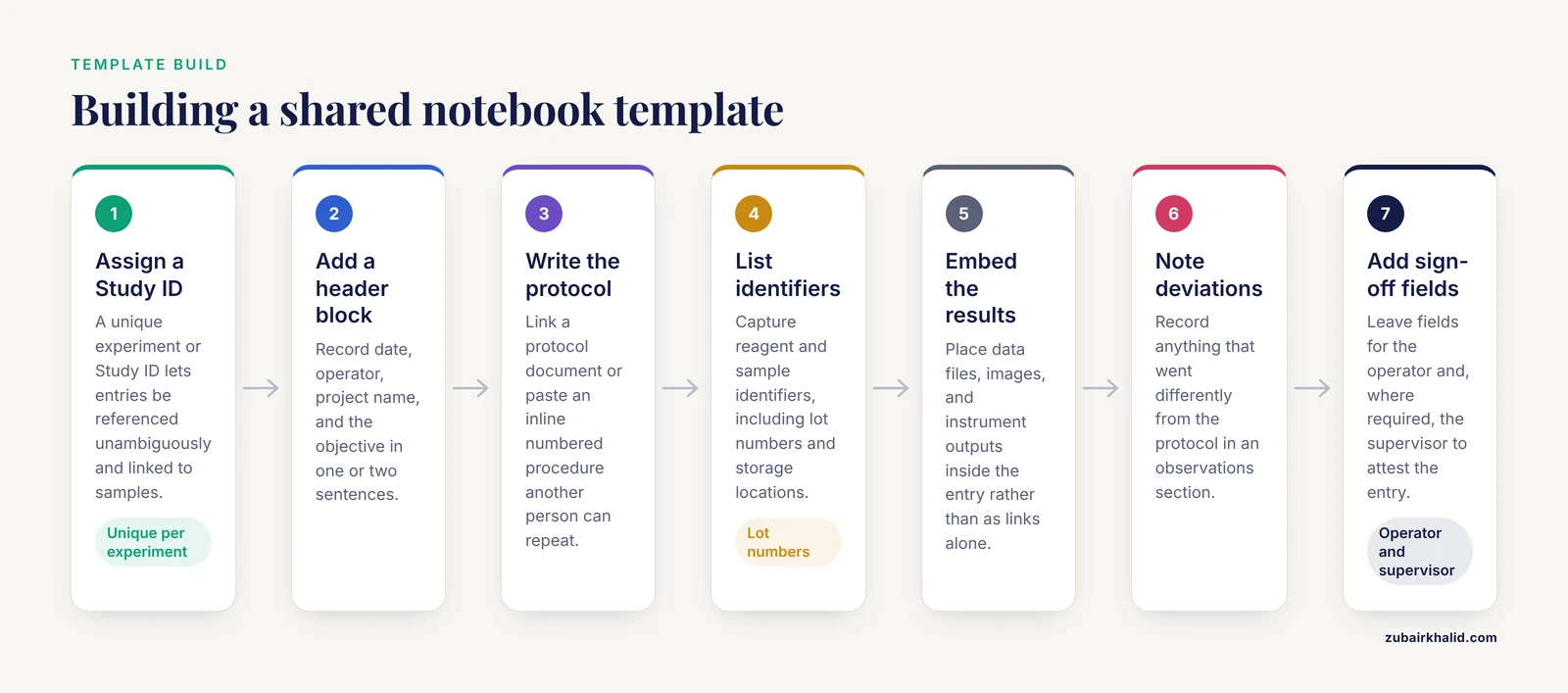
Whatever platform you choose, the template carries most of the usability. A workable multi-user template, based on published ELN guidance, includes the following elements.
- A unique experiment or Study ID, assigned by the lab, so entries can be referenced unambiguously in other documents and linked to samples [2].
- A header block with date, operator, project name, and the objective of the experiment in one or two sentences.
- A protocol section with either a linked protocol document or an inline numbered procedure, so another person can repeat the work.
- Fields for reagent and sample identifiers, including lot numbers and storage locations, which is where sample-integrated systems prevent lost and mislabeled samples [8].
- A results section with embedded data files, images, and instrument outputs rather than links alone, since embedded records survive file moves.
- An observations and deviations section, recording anything that went differently from the protocol.
- Sign-off fields for the operator and, where required, the supervisor, mirroring the attestation functions built into dedicated ELNs.
In OneNote, the published adaptation maps these onto notebooks for labs or projects, sections for experiment types, and pages for individual experiments, with the template pasted into each new page [7]. The same structure transfers to dedicated ELN template builders with little modification.
Worked Scenarios
Scenario 1: A Five-Person Academic Molecular Biology Lab
The lab is grant funded, collaborates with one external group, and currently keeps paper notebooks plus a shared spreadsheet of clones. Cost sensitivity is high, and the principal investigator wants records that could support a manuscript or a data-sharing request. Given the documented user preference for OneNote over a scientifically designed ELN in a similar biomedical setting, and the existence of a published adaptation guide [7], a structured OneNote shared notebook is a defensible low-cost start. The lab should accept the audit trail gap and compensate with disciplined use of the template, dated entries, and a lab-issued Study ID scheme. If a funder later requires demonstrable record integrity, migration to a dedicated ELN is the planned next step.
Scenario 2: A Core Facility or Bioprocess Lab With External Users
A teaching or service lab with rotating users, compliance expectations, and remote monitoring needs fits the documented LabArchives deployment: cloud-based ELN, streamlined workflow, real-time and remote monitoring, enhanced sharing, and student-rated improvements in compliance over paper [3]. The right collaborative lab notebook multi-user choice here is a dedicated cloud ELN with per-user accounts, because the compliance benefit was a direct finding of that implementation.
Scenario 3: Two Labs in Different Institutions Sharing Experimental Data
Two collaborating labs run different ELNs, one chemistry-focused and one materials-focused, mirroring the situation that motivated ELNdataBridge. Rather than duplicating entries by hand, the labs can use an interoperability layer that maps values and entry types between their systems through Python APIs [11]. Where that is not feasible, the fallback is agreeing on a shared export format and a fixed schedule for data exchange, recognizing that ELN-to-ELN exchange is a young capability with the first demonstrations appearing recently [11].
Common Mistakes and Limitations
- Buying for features instead of adoption. The three documented barriers to ELN adoption are cost, ease of use, and device accessibility [1]. A platform that fails any of the three will be abandoned regardless of its feature list, so pilot with the actual people who will write in the notebook.
- Assuming a general note app satisfies integrity requirements. OneNote and Evernote can replace paper records in academic settings [4][7], but neither was designed for scientific purposes [7], and neither provides the audit trail and electronic signature baseline of a dedicated ELN [6]. Labs with regulatory or patent exposure should not treat a shared note app as their system of record.
- Skipping the template. A shared notebook without a template produces entries no one else can interpret. The Study ID practice exists specifically to keep multi-user records unambiguous.
- Treating sample tracking and experiment records as separate projects. Splitting them across a spreadsheet and a notebook is the exact pattern that produces lost samples and broken links between samples and experiments [8].
- Planning no migration path. ELN adoption in a paper-based lab is usually disruptive [9], and switching ELNs later is nontrivial. The recent arrival of ELN-to-ELN data exchange tools [11] helps, but choosing a platform with export options from the start is cheaper than retrofitting.
- Expecting the notebook to fix reporting quality by itself. Shared electronic notebooks create the opportunity for transparency, for example by making notebook release alongside publication practical [10], but they do not enforce accurate reporting. That remains a lab culture issue.
- One practical limitation deserves plain statement. This article compares systems, not individual products' current pricing or feature versions, and any lab making a purchase decision should verify current vendor documentation directly.
Frequently Asked Questions
What is a collaborative lab notebook multi-user system?
It is a shared electronic record in which several lab members can create, view, and edit experiment documentation, with access controls deciding who can read or change each entry. Dedicated ELNs add audit trails and permissions on top of shared writing, while adapted general tools like OneNote provide the sharing with fewer safeguards [6][7].
What is the best collaborative lab notebook multi-user option for a small academic lab?
For a small lab on a tight budget with informal compliance needs, an adapted general note app is the best starting point, since surveyed users preferred OneNote over a purpose-built scientific ELN and a published adaptation guide exists [7]. For a lab expecting formal scrutiny of its records, a dedicated cloud ELN is the safer choice because it provides permissions, audit trails, and search as baseline features [3][6].
Can OneNote or Evernote really replace a paper lab notebook?
Yes in many academic settings. Evernote replaced paper notebooks entirely for six months in a translational science lab, with snapshots and drawing add-ons compensating for the lack of freehand entry [4], and OneNote matched ELN best functionalities in a biomedical institute's evaluation once adapted with a structured workflow [7]. Both remain general tools rather than scientific ELNs, so structure must be supplied by the lab.
Do multi-user ELNs satisfy data integrity requirements?
Dedicated ELNs are built to support data integrity through timestamps, authorship, audit trails, and electronic signatures [2][6], and students in an ELN-based lab course rated the ELN better than paper for compliance [3]. General note apps do not provide equivalent audit machinery, so their integrity support depends entirely on lab discipline.
How do labs exchange data between different ELNs?
Historically, by manual re-entry, which is why interoperability tools are new. ELNdataBridge, described in 2025, synchronizes data between disparate ELN platforms through Python APIs and was demonstrated by connecting Chemotion ELN and Herbie for chemistry and materials science data [11]. The longer-standing advice is that ELN value grows when the notebook integrates with LIMS and instruments, though effective integration paths have historically been poorly established [9].
What should a lab notebook template include?
At minimum, a unique experiment or Study ID, a header with date, operator, and objective, the protocol, sample and reagent identifiers, embedded results, a deviations section, and sign-off fields [2]. The ID scheme keeps multi-user entries unambiguous, and the remaining fields make each entry interpretable and repeatable by someone else.
Sources
- Electronic lab notebooks: can they replace paper?
- Electronic Lab Notebooks and Experimental Design Assistants.
- Implementation and use of cloud-based electronic lab notebook in a bioprocess engineering teaching laboratory.
- Using Evernote as an electronic lab notebook in a translational science laboratory.
- A review of electronic laboratory notebooks available in the market today.
- eCAT: Online electronic lab notebook for scientific research.
- A quick guide for using Microsoft OneNote as an electronic laboratory notebook.
- The benefits of integrated systems for managing both samples and experimental data: An opportunity for labs in universities and government research institutions to lead the way.
- Electronic laboratory notebooks progress and challenges in implementation.
- Scientific honesty and publicly shared lab notebooks: Sharing lab notebooks along with publication would increase transparency and help to improve honesty when reporting results.
- ELNdataBridge: facilitating data exchange and collaboration by linking Electronic Lab Notebooks via API.