The Role of Collaboration Tools in Reproducible Research
By Dr. Zubair Khalid, DVM, MS, PhD ·

Collaboration tools make research reproducible by recording who changed what, when, and why, so that any result can be traced back to the exact data, code, and decisions that produced it. Version control is the backbone of this system because it turns every edit into a permanent, searchable history instead of a pile of files called "final_v3_REALLY.docx". Without these tools, a result that looks solid today can become impossible to reconstruct six months later, even by the person who generated it.
This article explains what the phrase "collaboration tools, reproducible research, version control" actually means, how the underlying technology works, where it is used across scientific fields, and how you can start applying it in your own work.
What Does Collaboration Tools Reproducible Research Version Control Mean?
The phrase combines three ideas that work together.
Reproducible research means that a second person, or the original author on a later date, can obtain the same result from the same data using the same methods. Reproducibility is a prerequisite for verification, for building on published work, and for meeting the code and data availability statements that many journals now request.
Collaboration tools are the software platforms that let several people work on the same project without overwriting each other. Research collaboration tools include shared repositories, project frameworks, annotation platforms, and communication systems built around a common record of the work.
Version control is the technology that records every change to a set of files as a discrete, labeled snapshot. A version control system (VCS) stores each snapshot with the author, the timestamp, and a message describing the change. Git, first released in 2005, is the distributed VCS that now dominates both software development and computational research, and it is the system most training materials use as their example [1].
In plain terms: version control provides the memory, collaboration tools provide the shared workspace, and reproducibility is the outcome when both are used deliberately. When researchers describe a "collaboration tools reproducible research version control interpretation," they usually mean this chain of reasoning, that shared, version-tracked infrastructure is what converts a private lab notebook into a public, checkable record.
Why Research Becomes Irreproducible Without These Tools
Most irreproducibility is ordinary and preventable. A student leaves the lab and takes the only working analysis script. A dataset gets corrected after a paper is submitted, and nobody can say which correction produced the published figure. Two collaborators email slightly different versions of a manuscript, and hours are lost deciding which one is current.
These failure modes share a root cause. The project state lives in scattered copies rather than in a single tracked history. Version control addresses this directly. A study of distributed version control in research collaboration noted that the approach solves the recurring problems of merging concurrent edits, preserving the full history of changes, and letting geographically separated authors work on the same material without stepping on each other [2]. Later work pushed the idea further, proposing systems designed for total traceability of research collaboration, where every contribution is linked to the person, the time, and the purpose behind it [3].
The problem is not limited to any one discipline. A practical tutorial on real-world evidence studies in pharmacoepidemiology observed that the principles of version control and code sharing are far less established in that field than in computational biology or health informatics, even though transparency and reproducibility are prerequisites for studies meant to inform decisions [4]. The gap between what researchers do and what reproducibility requires is exactly where collaboration tools earn their place.
The Core Toolset, Explained
Git and the four mental models
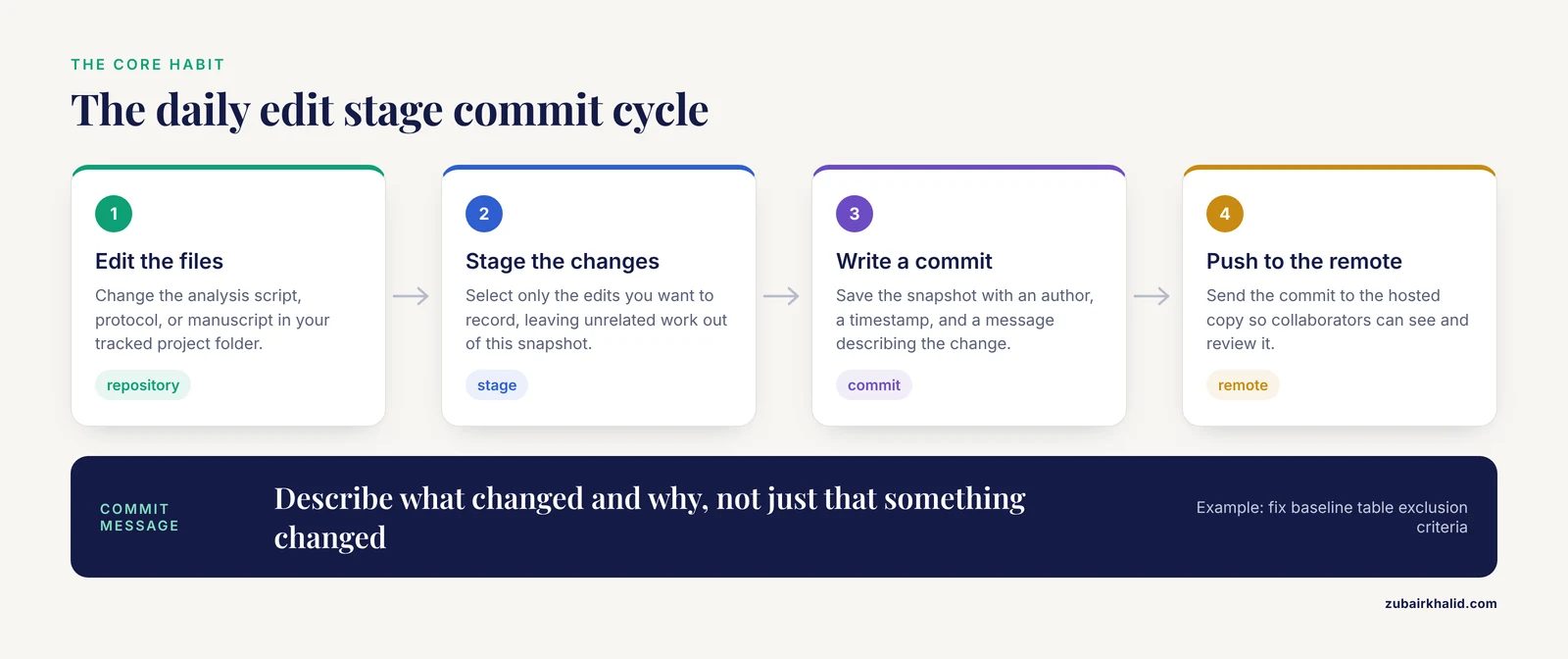
Git can look intimidating, but a widely used primer for surgical data science reduces it to four concepts: the repository, the commit, the branch, and the remote [1].
- A repository is the folder, plus its entire history, that Git tracks.
- A commit is one snapshot of the files, tagged with an author, a timestamp, and a message such as "fix baseline table exclusion criteria."
- A branch is a parallel line of development, used to try an analysis without disturbing the main version.
- A remote is a copy of the repository on a server such as GitHub or GitLab, which is what makes collaboration possible.
The daily habit is a simple cycle of edit, stage, commit. You change files, you select the changes you want to record, and you save them as a commit with a message. Over weeks, this builds an audit trail in which any figure, table, or result can be linked to the exact commit that produced it. The same primer demonstrates practical workflows for retrospective registry analysis, multi-institutional collaboration, and answering reviewer requests for reproducibility, including recovery scenarios for undoing mistakes [1].
Hosting platforms: GitHub, GitLab, and friends
A repository on your laptop has history but no collaboration. Hosting platforms add the remote layer where collaborators push their commits, propose changes, and discuss them. A pull request is a formal proposal to merge one branch into another, which lets a senior author review code before it touches the master version [1].
Hosting platforms also matter when the collaborators are students. A medical bioinformatics program deployed a self-hosted Git-based platform that combined repository management, access control, course materials, and assignment submission in one environment, and used it to carry a real bioinformatics software package from idea to release [5]. The platform doubled as both infrastructure and pedagogy, showing students how distributed teams actually coordinate.
Project frameworks that wrap version control in structure
Raw Git is powerful but terse. Several projects wrap it in friendlier interfaces.
The Open Science Framework (OSF) provides project components, data management plans, pre-registrations, preprints, and integrations with services such as Dropbox, GitHub, and Google Drive, all organized around a single project page [6]. Version control is one capability among many, which lowers the barrier for researchers who mainly want a structured, citable home for a project.
The workflowr R package integrates four elements: version control through Git, literate programming through R Markdown, automatic checks that catch broken code, and publication of results as a browsable website that collaborators can open from a plain URL [7]. A novice user who simply follows the workflow ends up with figures, source code, and a development history that anyone can inspect.
Containers and environment capture
Code that runs on one computer often fails on another because library versions differ. Containers solve this by packaging the code together with its complete software environment. The remaining difficulty is that building a container image must itself be documented carefully, and recent work uses generative AI agents to process a repository's textual information, produce the build instructions, and iterate with the user through an error-correcting dialogue until a working image results. The agent's output quality was comparable to that of a human programmer, which suggests environment setup is becoming something a non-expert can delegate.
Specialized collaboration platforms
Some scientific objects need more than generic file tracking. A few examples from across the sciences show the range:
- Image annotation. EXACT, the EXpert Algorithm Collaboration Tool, is an open-source platform for collaborative image annotation across domains, from multi-gigapixel medical whole slide images to whale sound spectrograms. Its built-in version control tracks changes to datasets so that deep learning results can be linked to a specific dataset version [9].
- Field sciences. The Project Panormos archaeological survey in western Turkey piloted a stack of ODK for structured field data collection, Git and GitLab CE for version control, and R for analysis, explicitly to bring transparency and reproducibility to destructive fieldwork [10].
- Robotics and sensing platforms. An autonomous vehicle group built a framework that launches its perception system and records data while simultaneously logging the exact state of the software, using only standard version control tools independent of the sensor suite, so that any dataset can be tied to the system state that generated it [11].
- Human-robot interaction. HRIStudio is a web-based platform for Wizard-of-Oz experiments that adds comprehensive data logging and playback, lowering the technical barriers that normally make such studies hard to reproduce [12].
- Sensitive health data. TRACE, a Trusted Research Access and Collaboration Environment, combines granular variable-level access control, auditable workflows, and provisioning into a sealed analysis environment so that institutions can share sensitive data while still supporting reproducibility at the level of data and analysis code [13].
Comparison of the Main Tool Categories
| Tool category | Representative examples | What it tracks | Typical users |
|---|---|---|---|
| Version control system | Git [1] | Every change to every file, with author and timestamp | Anyone writing code, text, or analysis |
| Hosting and review platform | GitHub, GitLab, self-hosted Git servers [1][5] | Remote copies, proposed changes, discussions, access control | Collaborating teams and classrooms |
| Project and workflow frameworks | OSF [6], workflowr [7] | Project structure, preregistration, code, results, documentation | Research groups, individual scientists |
| Environment tools | Containers with AI-assisted builds [8] | The exact software environment around the code | Computational and wet-lab-adjacent teams |
| Domain platforms | EXACT [9], HRIStudio [12], datathon toolkits [14] | Domain-specific objects such as annotations, experiment runs, shared analyses | Imaging, robotics, clinical data science |
| Trusted data environments | TRACE [13] | Data access, audit trails, sealed analysis | Institutions handling sensitive records |
What Version Control Looks Like in a Real Project
Consider a simple pharmacology study, following the workflow described in the real-world evidence tutorial [4]. The team creates one repository holding the study protocol, the analysis code written in R, and the documentation. Each analysis step becomes a commit. When a collaborator proposes changing the statistical model, she creates a branch, makes the edit, and opens a pull request. The team reviews the proposed change, discusses it in the platform's comment thread, and merges it. The repository now maintains a complete audit trail of every study document and every analysis decision, which is precisely what the tutorial identifies as the payoff of adopting Git in such workflows [4].
The same pattern generalizes. In surgical research, the four mental models of repository, commit, branch, and remote support workflows for multi-institutional collaboration and for responding when a journal asks for code availability [1]. In archaeology, the survey team used Git and a self-hosted GitLab instance so that the data-collection process itself, not only the final dataset, remained transparent [10]. In behavioral science, a tutorial positions Git as the tool for curating research assets so that the materials behind published findings stay organized and accessible [15].
Datathons illustrate the collaborative speed these tools enable. At an international critical care datathon, multidisciplinary teams of clinicians, statisticians, and data scientists were given a suite of open-source tools that cut environment setup from hours or days down to a few minutes, letting them spend the event actually analyzing data together [14]. The same tools continued to serve the teams after the event ended, which is the mark of infrastructure designed for lasting collaboration rather than a single workshop.
Collaboration Tools Beyond Software: Documents, Models, and Ontologies
A common misconception is that version control belongs only to programmers. The evidence says otherwise.
Construction project management, a field about as far from computational biology as one can get, produced a framework built on a request-review-merge loop, a trunk-branch-freeze versioning protocol, and lifecycle traceability tags. In evaluation, the approach improved version traceability to 94.3 percent, cut collaboration response time to 3.8 hours, and reached 96.5 percent information flow integrity, outperforming traditional file-sharing methods [16]. The lesson transfers directly to any laboratory or research office managing documents that many hands touch.
Ontology development, which sits at the heart of biomedical data standards, faces the same challenge of many editors changing a shared, formal artifact. OntoEditor addresses it with real-time collaboration built on distributed version control, letting ontology engineers work concurrently without losing the change history [17]. Even modeling research has explored version control for models as the bridge between academic prototypes and industrial use [18]. There is even work on version control as a method for fostering collaboration among children in spatial decision tasks, which shows how deep the principle runs: any group editing shared material benefits from tracked history [19].
The New Frontier: AI Systems as Collaborators That Must Be Versioned
Two recent developments extend collaboration tools into territory that barely existed a few years ago.
First, generative AI can now act as a collaborator on the infrastructure itself. As described above, an AI agent can read a code repository, draft container build instructions, and iterate with a user until the environment reproduces.
Second, when AI is part of the research method, the AI system itself becomes an experimental variable that must be reported. A systematic audit examined AI model and version reporting across 439 primary studies on human-AI team collaboration. Among the 42 empirically active studies in the full-text tier, 76.2 percent identified the AI system by name, only 21.4 percent provided a version-specific identifier, and 9.5 percent disclosed no model information at all. The audit also found a clear temporal pattern, with version reporting becoming far more common in studies published from 2025 onward. The rationale is straightforward. Different versions of a nominally identical model can behave differently, so an AI-assisted analysis is only reproducible if the exact model version is recorded alongside the code and data. Treat the AI assistant the way you would treat a reagent: record the name, the version, and the lot.
How to Start: A Practical Sequence
If you are a student or an early-career researcher, the following sequence reflects the practices recommended across the training literature.
- Install Git and learn the four concepts. Repository, commit, branch, remote. The daily edit-stage-commit cycle is the core habit [1].
- Create a remote repository on a hosting platform and push your project there. This single step converts private work into shareable, reviewable work [1].
- Protect sensitive files. Identifiable patient data must never enter a version-controlled repository. Use a .gitignore file to keep such files out of commits from the start [1].
- Use branches for anything experimental. Try the new analysis on a branch, keep the main branch working, and merge through a pull request after review [1].
- Add structure. Wrap the repository in a framework such as OSF for preregistration and data management, or workflowr if you work in R and want an automatically published results website [6][7].
- Record your environment. Write the container recipe, or use an AI assistant to help generate one, so the software versions travel with the code.
- Version everything that varies. Datasets [11], annotations [9], documents, ontologies [17], and AI model identifiers all belong in the tracked record.
Common Mistakes and Limitations
- Committing too rarely. A commit every two weeks is a diary entry, not an audit trail. Small, frequent commits with descriptive messages are what make history useful when a reviewer asks how a result was produced.
- Vague commit messages. "Updates" tells a future reader nothing. "Exclude sites with fewer than 10 survey units, per reviewer comment 3" tells a future reader everything.
- Putting sensitive data in a repository. Once a file with identifiable patient information is committed and pushed, removing it is difficult, because the history retains it. The standard defense is a .gitignore file configured before the first commit [1].
- Confusing sharing with reproducibility. Posting code on a public site is a start, but without recorded versions, environments, and data provenance, a visitor may still be unable to run it. Containers and dataset versioning close this gap [11].
- Ignoring the software environment. Code without its library versions is only half a method. Reproducibility requires the environment, not just the script.
- Treating AI tools as exempt from reporting. An AI-assisted analysis without a named, versioned model is not fully described, and the audit evidence shows most studies before 2025 fell short of this standard.
- Overestimating the learning curve. The most common reason researchers avoid version control is the belief that it requires programming expertise. Training-oriented deployments, including a self-hosted Git platform used to teach bioinformatics and AI in medical sciences, show that the core workflow is learnable in an structured course setting [5], and tools like workflowr deliberately expose simple interfaces over powerful internals [7].
- Assuming one tool covers everything. Git tracks files. It does not, by itself, manage access permissions for health data, provide preregistration, or capture instrument calibrators. Mature projects combine several layers, as the TRACE environment does for sensitive data [13].
What Is Still Uncertain
Adoption remains uneven across disciplines, and the reasons are partly cultural. Fields such as computational biology adopted version control early, while areas such as real-world evidence research are still building the norms [4]. The audit of AI reporting suggests that reporting norms can shift quickly once expectations change, since version identifiers became markedly more common from 2025 onward, but whether that trend holds across all study designs is not yet known.
There are also open questions about how much structure is optimal. Heavyweight frameworks with request-review-merge loops and freeze protocols improved traceability in construction information management [16], but the overhead such protocols impose on a two-person academic project has not been quantified. And the role of generative AI in building reproducible environments is promising but young, with quality demonstrated as comparable to human programmers in one study rather than established as superior or universally reliable [8].
Frequently Asked Questions
What does "collaboration tools reproducible research version control" mean?
It describes the linked set of practices where shared software tools, especially version control systems, let research teams work together in a way that leaves a complete, checkable record. Version control stores every change with its author and timestamp, collaboration platforms let many people work on the same tracked files, and reproducibility is the result when anyone can retrace and rerun the work.
Do I need to be a programmer to use version control?
No. The core Git workflow of edit, stage, and commit is a filing habit, not a programming skill. Tutorials written for surgeons, behavioral scientists, and epidemiology students all teach the same four concepts of repository, commit, branch, and remote without assuming prior software training [1][15][4].
What is the difference between Git and GitHub?
Git is the version control software that runs on your computer and records snapshots of your files. GitHub is a hosting service where a copy of a Git repository lives online so collaborators can push their work, propose changes through pull requests, and discuss them. GitLab and self-hosted servers serve the same purpose.
Can version control be used with patient or sensitive data?
The code and documents can be version controlled, but identifiable patient data must never be committed to a repository. The recommended safeguard is a .gitignore file configured before the first commit, and for studies involving regulated health data, dedicated trusted research environments with variable-level access control and sealed analysis spaces exist for exactly this purpose [1][13].
What happens if my collaborator and I edit the same file?
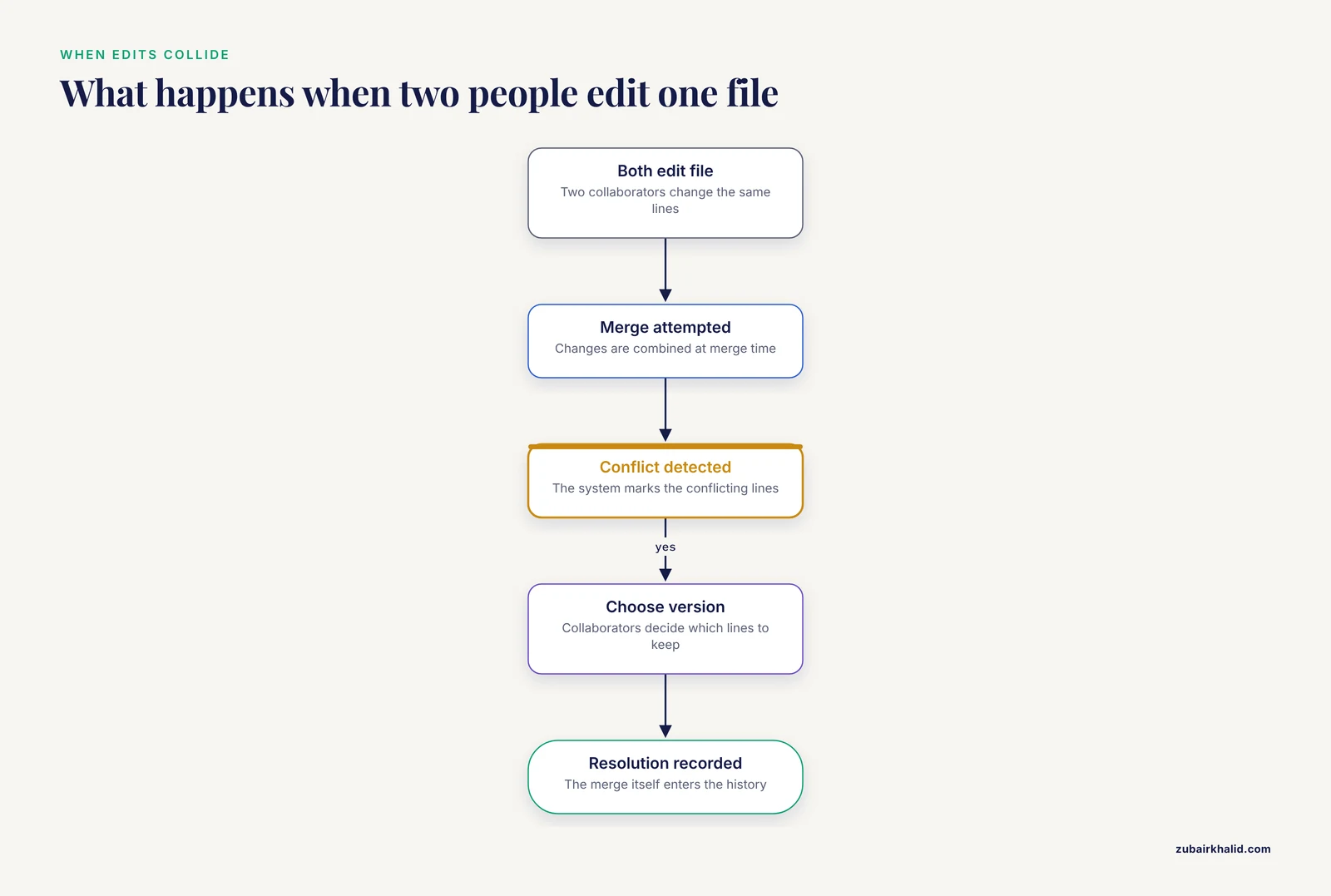
The version control system detects the conflict when the changes are merged and marks the conflicting lines. The collaborators then choose which version to keep, and the resolution itself becomes part of the recorded history. This merge process is one of the central advantages that distributed version control offers over emailing files back and forth [2].
Is version control useful for things other than code?
Yes. Documented uses include construction project documents, research ontologies, archaeological field records, annotated image datasets, and manuscripts. Any shared artifact that changes over time benefits from tracked history, and domain-specific platforms have been built for each of these cases [9].
How do AI tools fit into reproducible research?
In two ways. AI assistants can help build the reproducible infrastructure itself, for example by generating container build instructions from a code repository and fixing errors interactively [8]. And when AI is part of the research method, the model name and version identifier should be reported like any other reagent, because different versions of the same model can produce different results.
How do I start using version control in my own project?
Create a Git repository for your project, add a .gitignore for any sensitive files, connect it to a hosting platform, and commit small changes often with descriptive messages. Once that habit is established, add a project framework such as OSF or workflowr for structure and sharing, and record your software environment so others can rerun your analysis [1][6][7].
Sources
- Version Control for Surgical Data Science: A Primer on Git and GitHub.
- Version Control Systems to Facilitate Research Collaboration in Economics
- Towards a Total Traceability of Research Collaboration: a New Distributed Research Oriented Version Control System
- The FAIRification of research in real-world evidence: A practical introduction to reproducible analytic workflows using Git and R.
- Implementing a Version Control Platform as an Interactive Educational Framework for Bioinformatics and Artificial Intelligence in Medicine
- Ensuring Open Research Collaboration with the Open Science Framework: The Experience of the SPSTL SB RAS
- Creating and sharing reproducible research code the workflowr way.
- Generative AI for Reproducible Research in Control, Automation and Robotics
- EXACT: a collaboration toolset for algorithm-aided annotation of images with annotation version control
- Reproducibility in the Field: Transparency, Version Control and Collaboration on the Project Panormos Survey
- Toward Reproducible Version-Controlled Perception Platforms: Embracing Simplicity in Autonomous Vehicle Dataset Acquisition
- Collaborative and Reproducible HRI Research Through a Web-Based Wizard-Of-Oz Platform
- FAIR by design (TRACE): A Trusted Research Access & Collaboration Environment.
- Datathons and Software to Promote Reproducible Research.
- Curating Research Assets in Behavioral Sciences : A Tutorial on the Git Version Control System
- Construction project information system management framework strategy based on version control and collaboration
- OntoEditor: Real-Time Collaboration via Distributed Version Control for Ontology Development
- Version Control for Models: From Research to Industry and Back Again
- A Version Control System as a Tool and Methodology to Foster Children's Collaboration in Spatial Configuration Decision Tasks