Code Availability Statements: What to Include and How to Write Them
By Dr. Zubair Khalid, DVM, MS, PhD ·

By the end of this article you will be able to write a code availability statement that survives peer review, archive your analysis code so it receives a persistent digital object identifier (DOI, a permanent citable link), and avoid the mistakes that most often cause editors or reviewers to send a manuscript back. You will need three things on hand before you start: your analysis code in a version-controlled repository, a free account on a code hosting service such as GitHub or GitLab, and a free account on a general-purpose archival repository such as Zenodo or your institution's repository.
What a Code Availability Statement Is
A code availability statement is a short section in a research article that tells readers exactly where the code behind the paper's results can be found, under what conditions it can be accessed, and what software environment is needed to run it. It usually appears near the end of the manuscript, often directly after the data availability statement and before the acknowledgments or references.
Code availability statements differ from a mention of software in the methods section. The methods section says what you did. The code availability statement says where a reader can obtain the precise, executable version of what you did. That distinction matters because prose methods always leave gaps. A reader can know that you used a psychophysical staircase procedure and still be unable to reconstruct your exact implementation, parameter values, randomization scheme, or plotting code.
Many journals now ask for code availability statements as a matter of policy, and the practice has become standard in computational biology, neuroscience, psychology, bioinformatics, and machine learning. Even where a journal does not require one, including a clear statement signals that your work supports reproducible research, which means research that others can re-run with the same inputs and obtain the same outputs.
Why Code Availability Matters for Reproducible Research
Reproducibility depends on the exact details of analysis, and those details often change results in ways no one anticipates. A clear illustration comes from psychophysics. When researchers compared vibration perception threshold measurements collected with the Staircase method against measurements collected with the von Békésy method in 30 healthy subjects at vibration frequencies of 250, 375, and 500 Hz, they found significant differences between the two methods, with the Staircase procedure producing lower thresholds [1]. They also found differences between fingers that appeared under one method but not the other [1]. Nothing in that study was done wrong. The point is that two defensible, standard methods produced different results, which means anyone comparing the findings to other studies needs to know precisely which implementation was used. A code availability statement is the mechanism that makes that level of precision possible.
Reporting checklists push research in the same direction. In an international project to build a child-centred research checklist, a structured process combining a literature review, expert questionnaires, and a three-round Delphi consensus study (a method that iteratively collects and refills expert judgment until it converges) produced a 10-item checklist intended to improve the design and reporting of research studies [2]. The lesson generalizes well beyond pediatric research. Structured, itemized checklists raise the quality of reporting because they turn vague expectations into concrete requirements. A good code availability statement is one item on any modern reproducibility checklist, and this article gives you the sub-items it must contain.
What to Include in a Code Availability Statement
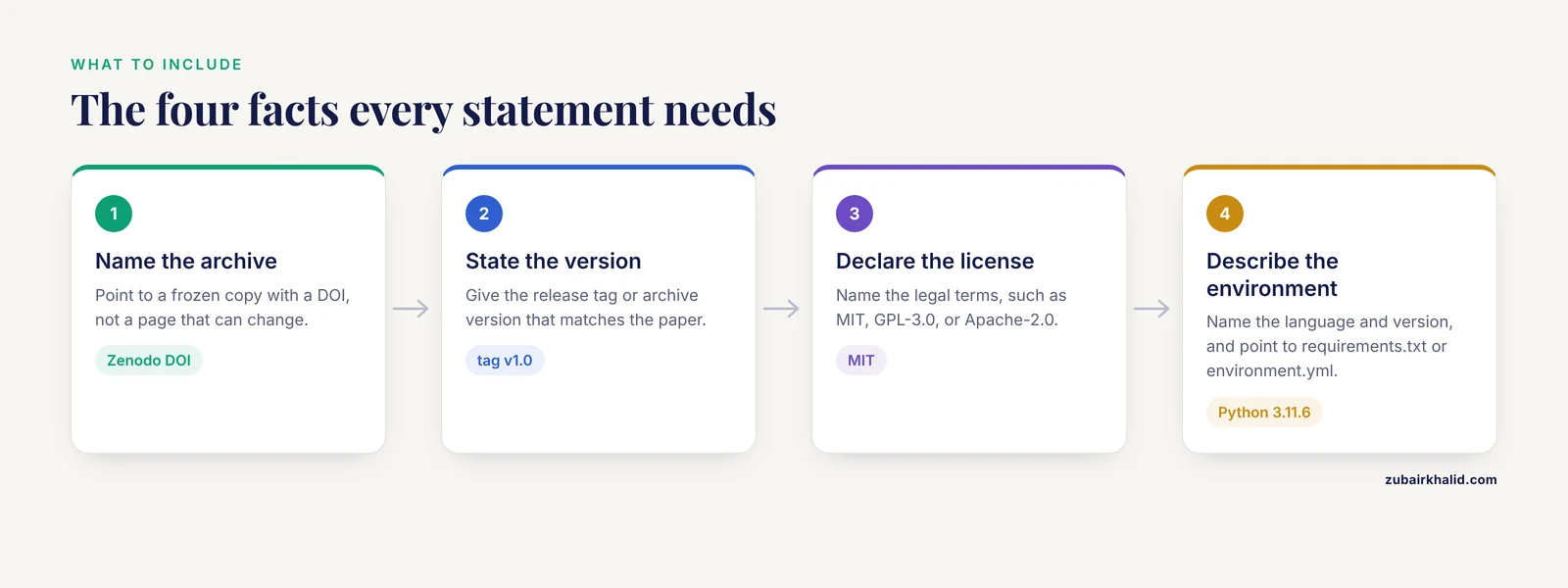
Every strong statement contains the same core elements. Review each item before you submit.
- A clear statement of availability. One sentence saying whether the code is publicly available, restricted, or unavailable, with a reason for any restriction.
- A persistent identifier. A DOI or accession link that points to an archived, frozen copy of the code, not to a page that can change or disappear.
- The exact version. A release tag, commit hash, or archive version, so readers know which snapshot corresponds to the published paper.
- The license. The legal terms under which others may reuse the code, such as MIT, GPL-3.0, or Apache-2.0.
- The computing environment. The programming language and version, key package versions, and operating system where relevant, usually through a dependency file such as requirements.txt or environment.yml.
- A link to a development repository (optional but helpful). A live repository where readers can follow updates, file issues, and see the development history.
- Access conditions for restricted code. If the code cannot be shared, state why, describe what can be shared, and explain how a reasonable request can be made.
If any of these elements is missing, a reviewer will often ask for it, so adding them up front saves a revision cycle.
Code Availability Statement Example
Here is a complete, filled-in statement for a typical openly shared analysis project. You can adapt it directly.
Code availability. All analysis code is openly available. The exact code used to generate all figures and statistical results in this article was archived on Zenodo at the time of submission and is available at https://doi.org/10.5281/zenodo.XXXXXXX under an MIT license (Zenodo record version 1.0, corresponding to repository tag v1.0). Analyses were run in Python 3.11.6. All package dependencies and their versions are listed in requirements.txt in the archived record. The live development repository, including any post-publication updates, is available at https://github.com/yourusername/project-name. Raw data are available separately as described in the Data Availability statement.
For projects with restrictions, a shorter honest statement works better than silence.
Code availability. The custom acquisition software contains proprietary licensed components and cannot be redistributed in full. The statistical analysis scripts, which do not depend on proprietary components, are archived on Zenodo (https://doi.org/zenodo.XXXXXXX, license GPL-3.0). Requests for the acquisition software will be considered by the corresponding author and are subject to the terms of the original software license.
For a minimal study with a small single-script analysis, a compact version is acceptable.
Code availability. The R script used for all statistical analyses and figure generation (R version 4.3.1) is available in the archived repository at https://doi.org/10.5281/zenodo.XXXXXXX under the MIT license.
Notice what all three share. Each one names a persistent archive, states a version, declares a license, and either describes the environment or points to a file that does. Those four facts are the non-negotiable core of code availability statements.
Code Availability Statement Example, Step by Step
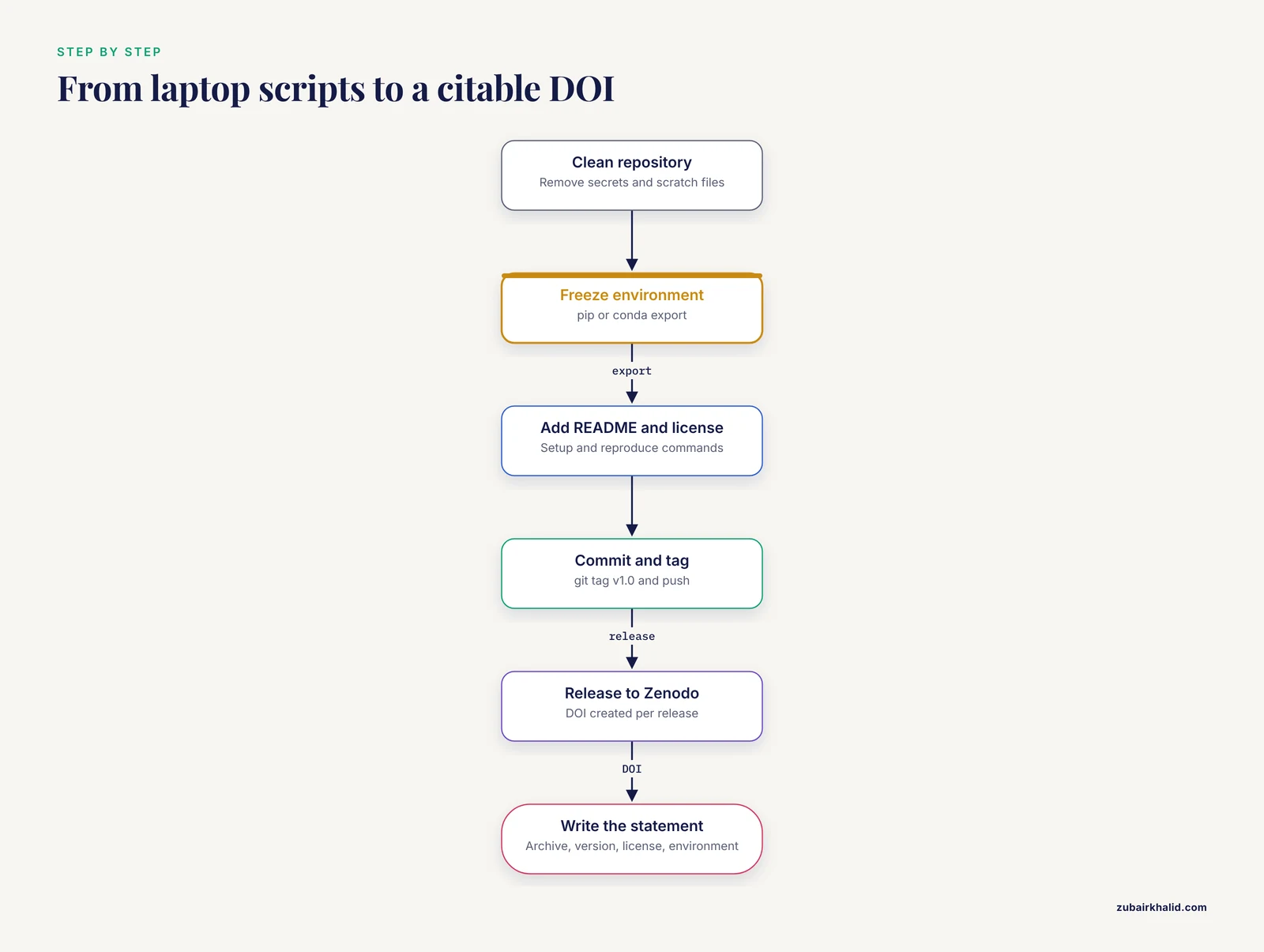
This walkthrough takes a project from a folder of scripts on your laptop to a citable archived DOI and a finished statement. The commands use Git and Python on a Unix-style terminal. Equivalent commands work in the Windows PowerShell with minor path changes.
Step 1. Clean and organize the repository
Clone or enter your project folder and make sure it contains only what a reader needs.
git clone https://github.com/yourusername/vpt-analysis.git
cd vpt-analysis
ls
Expected output:
data/           docs/           README.md       analysis/
environment.yml figures/        src/            tests/
Remove or ignore anything that cannot be shared, such as participant identifiers, large raw files that belong in a data repository, and scratch files. Add a .gitignore file so secrets, credentials, and temporary outputs never enter the history.
Step 2. Record the software environment
If you use pip and Python, freeze the exact package versions:
pip freeze > requirements.txt
head -n 5 requirements.txt
Expected output:
numpy==1.26.4
pandas==2.2.2
matplotlib==3.8.4
scipy==1.13.1
statsmodels==0.14.2
If you use conda, export the full environment instead:
conda env export --no-builds > environment.ymlThe -no-builds flag removes platform-specific build strings so the file can be recreated on Mac, Windows, and Linux alike. This file is what lets a reader reconstruct your environment instead of guessing package versions.
Step 3. Add a README and a license
The README should contain, at minimum, one paragraph describing what the code does, the command to install dependencies, and the command to reproduce the main result:
cat > README.md << 'EOF'
# VPT Analysis

Code for "Vibration perception threshold assessments: Comparing the
Staircase and von Bekesy methods." Produces all figures and
statistical tables from the raw threshold data.

## Setup
conda env create -f environment.yml
conda activate vpt

## Reproduce
python src/run_all_analyses.py
EOF
Then add a license. GitHub can generate one through the web interface, or you can add the standard MIT license text manually to a file named LICENSE. Without a license, visitors have no legal right to reuse your code, which defeats the purpose of sharing it.
Step 4. Commit, tag, and push
git add .
git commit -m "Release analysis code v1.0"
git tag v1.0
git push origin main
git push origin v1.0
Expected output:
main -> main
new tag  v1.0 -> v1.0
The tag v1.0 freezes this exact state of the code. Every future edit to the live repository leaves the tagged snapshot untouched, and that snapshot is what you archive in the next step.
Step 5. Archive the repository and get a DOI
Connect your GitHub account to Zenodo through its web interface, which is a one-time authorization. Then create a GitHub release from your tag. Zenodo automatically creates a versioned archive with a DOI for each release.
Release created: v1.0
Zenodo DOI: 10.5281/zenodo.XXXXXXX
The DOI is permanent. Even if you delete the GitHub repository years later, the archived copy and its DOI remain. This is the link you put in the code availability statement, not the mutable GitHub URL.
Step 6. Write the statement
Using the elements from the previous section, write two to five sentences that name the archive, the version, the license, and the environment. The filled example earlier in this article is a model. Keep it factual and short. Reviewers do not want prose about your coding philosophy. They want the four facts.
Choosing Where to Host the Code
Different services serve different purposes, and the strongest statements use two of them together.
| Option | Persistent identifier | Strength | Limitation |
|---|---|---|---|
| GitHub or GitLab | No, URLs are mutable | Collaboration, issue tracking, version history | Can be edited or deleted at any time |
| Zenodo | Versioned DOI per release | Permanent archiving, citable snapshots, accepts large files | Not designed for ongoing development |
| OSF | DOI and project links | Combines code, data, and documents in one project | Less integrated with Git workflows |
| Institutional repository | Usually a handle or DOI | Funder and institutional compliance | Interface and policies vary by institution |
The standard pattern is to develop on GitHub or GitLab and archive tagged releases on Zenodo or an equivalent service. The statement then cites the DOI and mentions the live repository as a convenience.
Code Availability Statement Example Tips
A few habits separate strong statements from weak ones.
- Cite the archive, not the paper. The statement should point to the code itself, and the code repository should cite the paper. The two directions are separate.
- State the version number explicitly. Writing "version 1.0" or the tag name removes ambiguity if the repository grows after publication.
- Mention what runs the pipeline end to end. If a single command regenerates every figure and table, say so. That single sentence does more for reproducible research than a paragraph of description.
- Include random seeds for stochastic analyses. If your analysis involves simulation, resampling, or machine learning, state where the seed is set so outputs are bit-for-bit repeatable.
- Test the archive before you cite it. Open a private browser window, follow your own DOI, download the archive, and run the code on a clean machine or container. If you cannot reproduce your own results from the statement, neither can a reviewer.
- Keep the statement in the manuscript, not only on the repository. Editors and reviewers check the manuscript first.
These tips compound. Each one takes minutes to apply, and together they turn a bare link into a genuinely reusable scientific artifact.
A Reproducibility Checklist for Your Next Submission
Structured checklists measurably improve research reporting, and the Delphi-based checklist development process described in the pediatric research literature shows how expert consensus converges on concrete, actionable items [2]. You can apply the same principle to your own code. Before every submission, run through this list.
- The code runs from a clean environment using only the dependency file provided.
- A single documented command regenerates the main results and figures.
- Random seeds are fixed and recorded for any stochastic step.
- No personal data, credentials, or restricted files are present in the repository history.
- A license file is present and named in the statement.
- A tagged release corresponds exactly to the version used for the manuscript.
- That release is archived with a DOI, and the DOI resolves correctly.
- The code availability statement names the archive, version, license, and environment.
- The README explains in one paragraph what the code does and how to run it.
- A collaborator who has never seen the project can follow the README without emailing you.
Items 1 through 10 take roughly an hour on a well-kept project and can save weeks of reviewer correspondence. The value of checklists of this kind is not theoretical. The multi-round expert consensus process behind the child-centred research checklist demonstrates that itemized requirements are how research communities translate good intentions into consistent practice [2].
Common Mistakes and Limitations
The most frequent failures fall into a small number of categories, and each has a direct fix.
- Linking only to a live repository. GitHub links can change, be renamed, or vanish. Always pair the live link with a DOI-backed archive.
- Writing "available from the corresponding author on reasonable request." This phrase is increasingly treated by journals and reviewers as a barrier rather than an availability statement. It hides the effort required from the requester and cannot be verified. Use it only when a genuine legal or ethical restriction exists, and state the reason.
- Missing or vague version information. "The code is on GitHub" tells a reader nothing about which commit produced Figure 3. Name the tag or DOI version.
- No license. Code without a license is legally unusable by others. Add one before archiving.
- Environment drift. Code that runs only on the author's laptop because package versions were never recorded is the single most common reproducibility failure. The dependency file from Step 2 prevents it.
- Sharing code that depends on unavailable data. If the analysis reads a dataset that cannot be shared, provide a small synthetic dataset with the same structure so the pipeline still demonstrates end to end.
- Archiving after acceptance rather than at submission. Reviewers may want to inspect the code during review. Archive at submission time.
A limitation to keep in mind is scope. A code availability statement makes code findable and runnable. It does not by itself guarantee that results replicate across independent implementations, as the vibration threshold comparison shows, since even standard methods can diverge [1]. Reproducibility of your pipeline and replicability of your scientific conclusion are related but distinct goals, and the statement serves the first of them.
Frequently Asked Questions
Where does the code availability statement go in a manuscript?
It goes near the end of the main text, usually immediately after the data availability statement and before the acknowledgments. Some journals specify the location in their author guidelines, so check them before submission.
Can I just link to my GitHub repository instead of archiving the code?
A GitHub link alone is not enough, because the repository content can change or disappear. Link to a frozen, DOI-backed archive such as a Zenodo release, and add the live repository as a secondary convenience link.
What should I write if my code cannot be shared publicly?
State honestly what cannot be shared and why, describe any portion that can be shared, and explain the process for requesting access. A specific, reasoned restriction is accepted by many journals, while a vague "on request" line often draws criticism.
Do I need to make code available for standard software packages I only used?
No. You do not need to redistribute established third-party tools. You do need to record their names and versions, and you must share any custom scripts, wrappers, or modifications you wrote yourself.
Which license should I choose for my research code?
Permissive licenses such as MIT or Apache-2.0 maximize reuse, while copyleft licenses such as GPL-3.0 require derivatives to remain open. Pick the one that matches your intent, name it in the statement, and stay consistent across releases.
Does the code availability statement cover data as well?
No. Data are covered by a separate data availability statement, even though both often point to the same repository. Keep them separate because they can have different restrictions and different archives.
How much environment detail should the statement include?
Name the language and version in the statement itself and put full detail in a dependency file, such as requirements.txt or environment.yml, included in the archive. The statement should let a reader confirm at a glance that the environment is documented.
Is a code availability statement required by all journals?
No, requirements vary by journal and field. Many journals in computational and life sciences now require or strongly encourage them, and funders increasingly expect archived code for supported projects, so including one is a sound default even where it is optional.