Cloud-Based LIMS vs. On-Premise LIMS: Which Is Right for You?
By Dr. Zubair Khalid, DVM, MS, PhD ·

A cloud-based LIMS runs on servers owned and operated by the software vendor, and you reach it through a web browser, while an on-premise LIMS is installed on servers your own organization buys, houses, and maintains. The rule of thumb is simple. If your lab is small or growing, has no dedicated IT department, and needs to collaborate across sites, cloud wins. If your lab operates under strict data-control mandates, has deep internal IT capacity, and needs heavy customization of validated systems, on-premise still earns its keep.
This research software comparison walks through what each deployment model actually is, how they differ on the criteria that decide real purchasing decisions, and which situations favor which option. The goal is to help you pick the best software for researchers in your specific lab, not the best software in the abstract.
What a LIMS Actually Does
A Laboratory Information Management System, or LIMS, is software that tracks samples, workflows, instruments, and results across the life of an experiment or a clinical batch. In practice, a LIMS assigns a unique identifier to every sample when it enters the lab, records where it came from, logs every step performed on it, captures quality-control results, and links the sample to its final data. When an auditor asks how a result was produced three years ago, the LIMS is the system that answers.
The same core job applies whether the lab processes biobank specimens, runs a clinical diagnostics pipeline, or manages a theranostics production workflow. The scale varies, but the need for traceable, auditable sample lineage is universal.
The deployment question, cloud lims vs on-premise, is not about what the software does. Two products can have identical features. The deployment model determines who owns the hardware, who patches the software, how you pay, how fast you can change, and how you prove compliance to regulators. Those are the differences that matter.
On-Premise LIMS Explained on Its Own Terms
An on-premise LIMS is licensed software installed on servers inside your organization's own data center or server room. Your institution owns the license, often through a large upfront purchase, and typically pays an annual maintenance fee for updates and support.
Your IT staff, or a contracted integrator, handles everything else. They install the software, configure the database, set up backups, apply security patches, and manage upgrades. Historically, this was the only option, and it remains the default in many large hospital systems, pharmaceutical companies, and government laboratories that built their infrastructure decades ago.
The strengths of this model flow directly from ownership. Your data never leaves your physical control. You can customize the system as deeply as your vendor and IT team allow, because you control the entire stack. A lab with unusual workflows, legacy instrument integrations, or institution-specific data models can bend an on-premise system to fit in ways hosted products often cannot match.
The costs are equally direct. Traditional LIMS platforms acquired this way are cost-intensive, and once installed they often lack the flexibility to accommodate changes in data sources and workflows [1]. Adding a new module, integrating a new instrument, or scaling storage usually means procurement cycles, capital requests, and IT project plans measured in months. Every upgrade is a project your team runs.
Cloud-Based LIMS Explained on Its Own Terms
A cloud-based LIMS runs on infrastructure owned by the vendor or a cloud provider. You log in through a browser. There is no server to buy, no database to install, and no patch schedule to manage. The vendor handles hosting, backups, security updates, and version upgrades, usually as part of a subscription.
The economic model is fundamentally different. Instead of a large capital purchase, you pay a recurring fee, often priced per user or per sample volume. This pay-as-you-go structure is what allows small and medium-sized labs to automate their operations without IT personnel, a shift documented in the biobanking literature, where cloud technology emerged as an alternative that opens enterprise-grade data management to labs that could never fund a traditional LIMS [1].
Modern cloud platforms also tend to move faster functionally. A recent example is a cloud-ready, web-based platform that unifies LIMS and quality management system functions in a single system, embedding a large language model-assisted module that generates structured standard operating procedures, identifies required consumables and instruments, and proposes executable workflows from a single service-name input [2]. That kind of capability arrives as a vendor-side update. In an on-premise world, the equivalent would be a multi-year internal development project.
The trade-offs are the mirror image of the strengths. You depend on the vendor for uptime, security posture, and product direction. Your data sits on infrastructure you do not physically control. And a weak internet connection becomes an operational risk, because the lab cannot work if it cannot reach the system.
Side-by-Side Comparison
| Criterion | Cloud-Based LIMS | On-Premise LIMS |
|---|---|---|
| Hardware | None. Vendor hosts and maintains servers | Lab or institution buys, houses, and maintains servers |
| Cost model | Recurring subscription, pay-as-you-go | Large upfront license plus annual maintenance |
| IT staff needed | Minimal to none [1] | Dedicated database, network, and systems administration |
| Time to launch | Weeks to a few months | Often six months to several years with validation |
| Scalability | Rapid, dynamic allocation of services [1] | Requires hardware procurement and capacity planning |
| Data control | Data resides with vendor or cloud provider | Data stays inside your physical perimeter |
| Customization | Bounded by vendor configuration options | Deep customization possible across the full stack |
| Upgrades | Vendor-managed, continuous | Lab-managed projects, often infrequent |
| Collaboration | Shared environment across groups and sites [1] | Requires deliberate networking and integration work |
| Internet dependency | High. No connection, no system | Low. Local system keeps running if the network fails |
| Compliance support | Vendor certifications, shared responsibility | Full internal control of the validated state |
The Differences That Actually Decide the Choice
Cost structure and who can afford in
The headline cost difference is not the total amount over ten years. It is the shape of the spending. On-premise systems concentrate cost at the beginning, in licenses, servers, and implementation consulting, then add steady maintenance spend. Cloud systems spread cost evenly across the subscription term.
For small and medium-sized labs, this shape matters more than the size. A biobank evaluating traditional LIMS found them cost-intensive and inflexible, while cloud alternatives offered cost-effective automation on a pay-as-you-go basis [1]. If your budget is a flat annual grant, a subscription that matches that rhythm is easier to sustain than a capital request. If your institution has capital budgeting machinery already, the upfront model holds no terror.
One caution applies to both. The subscription looks cheap in year one and adds up over a decade. Ask vendors for a five-year total cost projection including per-user growth, storage growth, and support tiers, and compare it against the on-premise quote including internal staff time, which buyers routinely forget to count.
Regulatory compliance and validation
Regulated labs, those operating under Good Laboratory Practice, Good Manufacturing Practice, or clinical accreditation, must prove that their software does what it claims to do, that records cannot be silently altered, and that changes are controlled. In the United States, the relevant framework for electronic records is FDA 21 CFR Part 11, and testing laboratories often also align to ISO/IEC 17025.
Both deployment models can support this, but the work is distributed differently. A published pilot of a cloud-ready LIMS and QMS platform mapped its controls explicitly to 21 CFR Part 11 and ISO/IEC 17025 under a risk-based Computer Software Assurance framework [2]. Computer Software Assurance, or CSA, is the FDA-endorsed approach of assuring software rigor in proportion to the risk it carries, which lets teams focus validation effort on patient- or product-safety-critical functions rather than documenting every screen.
In a cloud deployment, part of the compliance burden shifts to the vendor, who maintains the infrastructure and often provides pre-built audit trails, electronic signature features, and validation documentation you can inherit. In an on-premise deployment, your team owns every layer, which means more work but also total visibility into the validated state. Neither model is inherently more compliant. The honest difference is whose name appears on each control.
Security, in both directions
Security is the criterion where intuition most often points the wrong way. Many buyers assume that data on their own server is automatically safer. The biobanking assessment reached the opposite practical conclusion, noting that cloud-based solutions offer heightened security as one of their advantages [1]. The reason is unglamorous. A specialist cloud vendor patches vulnerabilities continuously, staffs a security team, and passes third-party audits, while a typical academic lab server is patched when someone gets around to it.
That said, on-premise security can be excellent when an institution invests in it, and some data classes are legally or contractually barred from leaving the premises regardless of how good the vendor is. The real question is not whether the cloud is secure in the abstract. It is whether your specific organization can achieve and sustain a security posture better than a vendor whose entire business depends on it.
Scalability and changing workflows
Research changes. A project that started with hundreds of samples becomes a program with hundreds of thousands. A new instrument arrives with a new data format. This is where the difference between cloud LIMS and on-premise becomes sharpest.
Traditional LIMS often lack the flexibility to accommodate changes in data sources and workflows [1], and on-premise scaling means buying hardware before you need it or discovering you do not have it when you do. Cloud platforms provide rapid scalability and dynamic allocation of services, so capacity grows with the sample count and shrinks when a project ends [1]. For labs whose funding and workload are inherently unpredictable, this elasticity is often the deciding argument.
Collaboration across groups and sites
Modern science is distributed. A core facility serves dozens of principal investigators. A consortium spans universities. A biobank feeds samples to external collaborators. Cloud LIMS platforms facilitate collaboration between different research groups through a shared environment [1], because every authorized party reaches the same system through the same browser.
On-premise systems can achieve the same result through VPNs, federated identities, and data-sharing agreements, but each connection is an integration project. If your primary value proposition is serving external users, the cloud model removes most of that friction by default.
Control, customization, and exit risk
The strongest remaining case for on-premise is control. If your lab has spent fifteen years tailoring a system to a highly specialized workflow, that configuration is institutional knowledge encoded in software. Moving it into any hosted product, cloud or otherwise, means either giving up the customization or rebuilding it. Cloud vendors also carry business risk of their own. If your provider discontinues your product, is acquired, or raises prices sharply, your leverage comes from data portability and contract terms, not from owning the system. Read the data-export clause before you sign anything.
When to Use Cloud LIMS
The clearest signals for cloud deployment look like this.
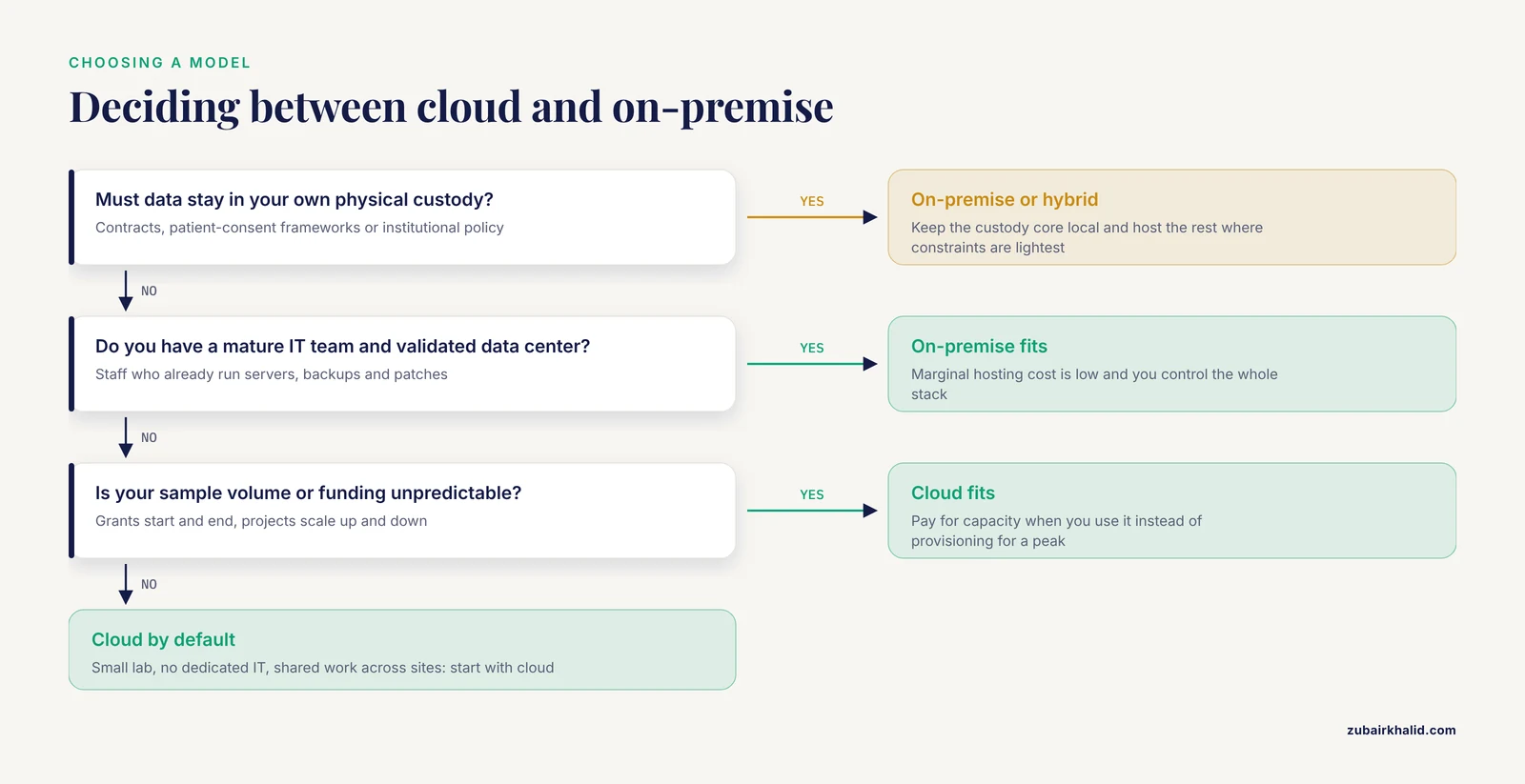
- You are a small or mid-sized lab without dedicated IT. This is the textbook case. Cloud technology exists precisely so that labs can automate operations cost-effectively even without IT personnel [1]. If nobody on your team wants to own a database server, do not buy a database server.
- Your sample volume or funding is unpredictable. Grants start and end. Cloud elasticity means you pay for capacity when you use it, rather than provisioning for a peak you might not reach.
- Collaboration is central to your mission. Core facilities, multi-site consortia, and biobanks serving external researchers benefit directly from the shared-environment model [1].
- You need to be running in weeks, not years. If a project deadline or a funding milestone depends on having a working system this quarter, deployment speed alone can decide the question.
- You are regulated but resource-limited. Compliance-ready cloud platforms with mapped controls for 21 CFR Part 11 and ISO/IEC 17025 exist [2], and inheriting vendor validation documentation is usually faster and cheaper than building it yourself.
When On-Premise Makes Sense
- Data governance rules keep the data in-house. Some contracts, patient-consent frameworks, and institutional policies require physical custody of data. When that is non-negotiable, the decision makes itself.
- You have a mature IT organization. If your institution already runs validated data centers with 24-hour operations staff, the marginal cost of hosting one more application is low, and your control over the environment is total.
- Your workflows demand deep customization. Labs with decades of institutional configuration, unusual instrument integrations, or proprietary data models often find that the on-premise stack is the only place that customization survives intact.
- Your environment cannot tolerate internet dependency. Certain manufacturing floors, high-containment facilities, and field sites run in conditions where connectivity is genuinely unreliable. A local system keeps working when the wide-area network does not.
A middle path also exists. Some labs run the regulated, sample-custody core of their LIMS on-premise while using cloud tools for collaboration, analytics, or quality documentation. This hybrid pattern adds integration work but lets each function sit where its constraints are lightest.
A Note on the Converging Middle
The line between the two models is blurring in practice. The published cloud-ready platform described above is web-based, and a lab could in principle deploy such a web-based system on infrastructure the institution controls [2]. Meanwhile, cloud vendors increasingly offer single-tenant or dedicated-hosting arrangements that mimic on-premise data isolation. When you evaluate vendors, ask about deployment options rather than assuming a product is locked into one model. The question "cloud lims or on-premise" is increasingly answered product by product, not category by category.
Common Mistakes and Limitations
Mistake 1. Comparing sticker prices instead of total cost of ownership. On-premise quotes routinely exclude internal IT labor, server replacement cycles, and the cost of validation rework at each upgrade. Cloud quotes routinely exclude per-user growth and storage tiers. Build the five-year comparison on both sides before deciding.
Mistake 2. Assuming on-premise is automatically more compliant. Compliance comes from controls, validation, and documentation, not from the physical location of a server. A well-run cloud platform with explicit 21 CFR Part 11 and ISO/IEC 17025 control mapping can be more audit-ready than a neglected local installation [2].
Mistake 3. Assuming the cloud is automatically more secure. A vendor with strong security is safer than your server room, but a vendor with weak vetting is not. Due diligence on certifications, breach history, and data-handling terms applies in both directions.
Mistake 4. Ignoring the internet dependency until it hurts. Pilot your workflow during a network outage simulation before committing. If a single dropped connection halts sample processing in your facility, design for offline capture or reconsider the deployment model.
Mistake 5. Locking in data before reading the exit terms. Whatever you choose, insist on documented, complete data export in a non-proprietary format. Your samples outlive any software product.
Mistake 6. Treating validation as a one-time event. Under a risk-based Computer Software Assurance approach, assurance is continuous and proportionate to risk [2]. Budget for revalidation after major upgrades under either model.
A final limitation applies to the numbers in this article. Published deployment data, such as the pilot reporting a 23-day mean turnaround, 1,456 quality-control checkpoints, and 43 deviation-handling episodes across 187 laboratory requests, describes one platform at one center and cannot be generalized as a benchmark for your lab [2]. Vendor claims and published pilots are starting points for your own requirements process, not substitutes for it.
Frequently Asked Questions
What is the main difference between cloud LIMS and on-premise LIMS?
The main difference is who hosts and maintains the system. Cloud LIMS runs on vendor-managed servers accessed through a browser, while on-premise LIMS runs on servers your organization owns and operates. Functionality can be identical, but hosting determines cost structure, staffing needs, upgrade cadence, and data custody.
When to use cloud LIMS instead of an on-premise system?
Use cloud LIMS when your lab is small or growing, lacks dedicated IT staff, faces unpredictable sample volumes, or needs to collaborate across groups and sites. Cloud platforms let such labs automate cost-effectively without IT personnel, scale rapidly, and share environments on a pay-as-you-go basis [1].
Is cloud LIMS secure enough for regulated laboratory work?
Yes, when the vendor supports it explicitly. Published cloud-ready platforms have been designed and mapped to FDA 21 CFR Part 11 and ISO/IEC 17025 requirements under a risk-based Computer Software Assurance framework [2]. Security diligence still falls on you, so verify certifications, audit trails, and data-handling terms before signing.
Does cloud LIMS cost less than on-premise LIMS?
It depends on the time window. Cloud shifts spending from a large upfront license and hardware purchase to a recurring subscription, which lowers the barrier for small and medium-sized labs [1]. Over a long horizon, compare a five-year total cost projection from each vendor, including internal staff time for the on-premise option.
Can we switch from on-premise to cloud LIMS later?
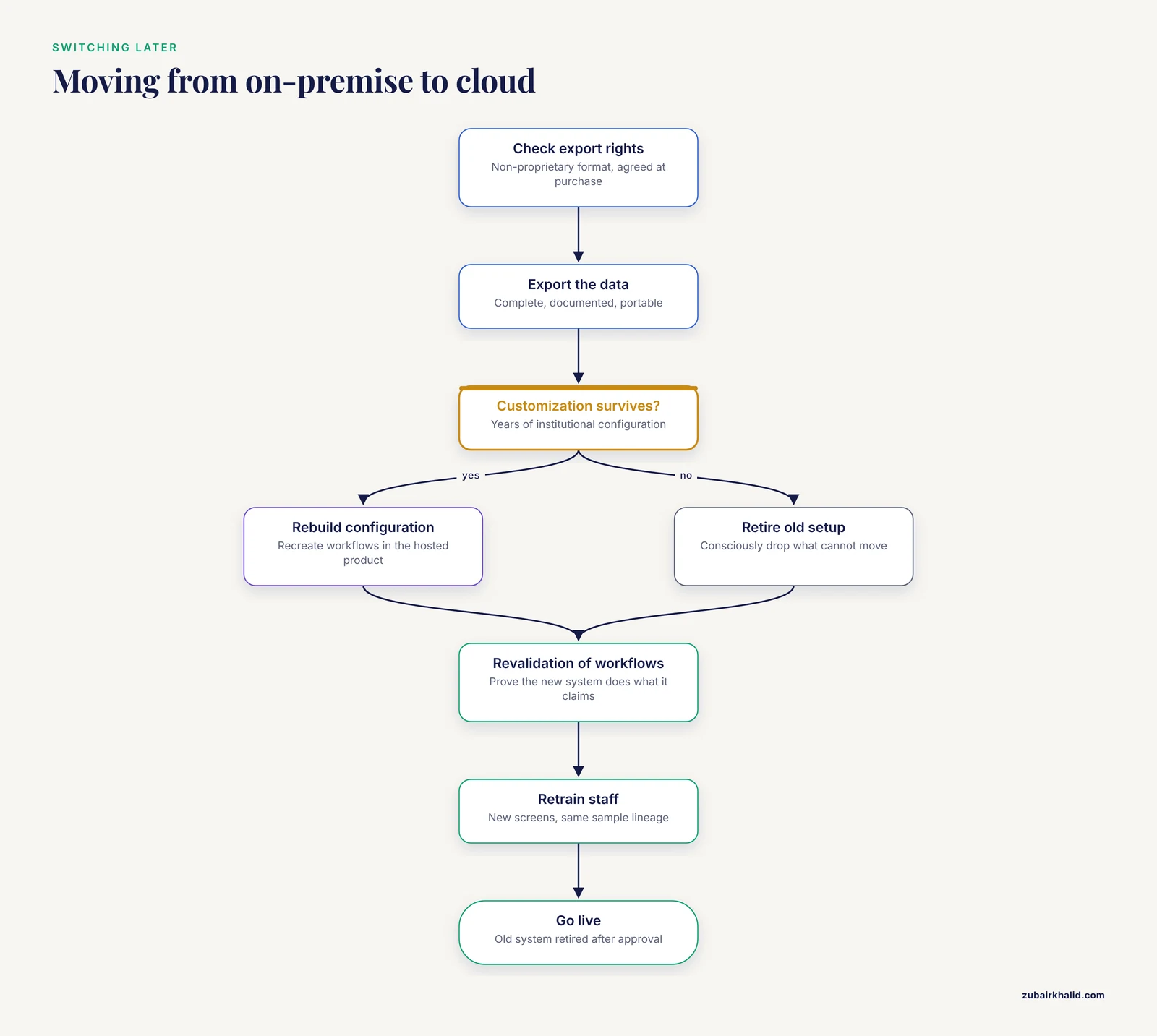
Yes, and many labs do, but plan the migration deliberately. The main work is data export in a non-proprietary format, revalidation of workflows, and retraining. Labs sometimes delay because their on-premise system carries years of deep customization that must be rebuilt or consciously retired. Negotiate export rights at purchase, whichever model you choose.
Can a small academic lab afford a LIMS at all?
A small lab can often afford a cloud LIMS subscription where it could never afford a traditional on-premise implementation. The biobanking literature documents this shift, with cloud technology opening cost-effective automation to small and medium-sized facilities that previously found traditional LIMS cost-intensive [1]. Start by inventorying your sample types, user count, and compliance obligations, then request cloud quotes against that scope.
Further Reading
- Real-World Applicability of Multiple International Terminology Systems in Oncology: Mapping Study of Clinical Terms for Cancer Diagnosis and Treatment.
- Comparison of Clinical and Ultrasonographic Severity Assessment in Hidradenitis Suppurativa: Prognostic Implications.