How to Use Google Calendar to Plan Your Biology Semester
By Dr. Zubair Khalid, DVM, MS, PhD ·

By the end of this guide you will have a working biology semester planner built in Google Calendar, with separate layers for classes, labs, deadlines, study blocks, and reading sessions. You will know how to plan backward from exams, how to schedule spaced study sessions for dense material like metabolic pathways, and how to automate repetitive blocks so you never rebuild them by hand. You will also know the errors you are most likely to hit and how to fix each one.
What you need before starting:
- A free Google account and access to calendar.google.com or the Google Calendar mobile app
- Your course syllabi, including exam dates, lab report due dates, and office hours
- Your class and lab schedule, with room numbers
- About 45 minutes for the initial setup
Why Biology Needs a Calendar More Than Most Majors
A biology semester has a structure that a simple to do list handles badly. Lecture courses such as cell biology or genetics deliver new material every week, so knowledge decays quickly if you review it rarely. Lab courses impose hard deliverables, including prelab assignments, notebook checks, and reports with fixed formats. Many programs also expect you to read primary research papers, which take far longer per page than a textbook chapter.
A paper published in International Journal of Molecular Sciences gives a concrete example of what a modern research paper looks like. A network meta-analysis of frontline treatments for chronic lymphocytic leukemia screened nine randomized clinical trials covering 5288 patients, compared 11 treatments across multiple subgroups, and reported ranking scores for each regimen [1]. A student assigned to read and critique that paper needs several focused hours, not a spare evening. If you do not schedule that time, it does not happen. That is the core argument for a calendar based planner.
Google Calendar is a good fit because it handles three things biology semesters demand: recurring weekly events like labs, deadline driven events like exams, and repeatable study blocks tied to specific topics. The rest of this guide walks through the setup step by step.
Step 1: Create Separate Calendars for Each Layer of Your Semester
Google Calendar lets you create multiple calendars inside one account. Each calendar gets its own color, its own visibility toggle, and its own notification settings. This is the foundation of a usable planner, because you can hide the noise and see one layer at a time.
Create your calendars
Work through this numbered list on the desktop web version, which has the most complete settings.
- Open calendar.google.com in a browser.
- In the left sidebar, find the "Other calendars" section and click the plus icon, then choose "Create new calendar".
- In the dialog, type a name and click "Create calendar". Repeat for each calendar in the list below.
- After each calendar is created, hover over its name in the sidebar, click the three dot menu, and assign a color.
Create these five calendars:
| Calendar name | Suggested color | What belongs in it | Default reminder |
|---|---|---|---|
| Classes | Blue | Lecture meeting times, discussion sections, office hours | None |
| Labs | Green | Lab meetings, prelab deadlines, notebook checks, report due dates | 1 day before |
| Deadlines | Red | Exams, quizzes, project due dates, registration dates | 1 week and 1 day before |
| Study blocks | Yellow | Planned solo study sessions with a specific topic in the title | 10 minutes before |
| Personal | Gray | Sleep anchors, meals, work shifts, gym, anything that blocks study time | None |
Why the layering matters
When the semester gets heavy, click the checkbox next to "Deadlines" so only that calendar shows. You now have an instant answer to the question "what is actually due this week." Toggle on "Labs" the night before a lab to see prelab requirements. Toggle on "Study blocks" each morning to see your plan for the day. A single undifferentiated calendar cannot do this.
Step 2: Add Your Recurring Commitments First
Recurring events form the skeleton of the planner. Add them before anything else, because they define the time you have left for everything else.
Enter a lecture series
- Click any date in the first week of classes, then click "Create".
- Title it exactly as you want to see it every week, for example "BIO 201 Lecture, Science Hall 210".
- Set the start and end times to match your schedule.
- Click the repeat dropdown and choose "Weekly" on the correct weekdays, then set "Ends" to the last day of instruction for the semester.
- Add the room number and your instructor's office hours in the description field.
- Click "Save".
Enter labs and sections the same way
Repeat the process for every lab meeting, discussion section, and recitation. For labs, add a second event on the same day that starts 30 minutes before the lab and title it "Prelab prep". This one small event prevents the most common lab course failure mode, which is walking in without having read the protocol.
Set notifications per calendar, not per event
Open each calendar's settings through the sidebar three dot menu and set default notifications there. Sensible defaults look like this:
- Classes: no notification, because the event itself is the reminder and you are already on campus
- Labs: notification 1 day before, so prelab work gets done
- Deadlines: notifications 1 week and 1 day before
- Study blocks: notification 10 minutes before
On your phone, open the Google Calendar app, tap the menu icon, choose "Settings", tap "General", and turn on event notifications. The first time the web version tries to alert you, Chrome will show a prompt reading "calendar.google.com wants to show notifications". Click "Allow" or desktop reminders will not appear.
Step 3: Add Deadlines and Plan Backward From Them
Fixed dates go in next. Transcribe every exam, quiz, report due date, and project milestone from your syllabi into the "Deadlines" calendar. Then convert each deadline into a plan using backward scheduling, which means starting from the deadline and subtracting the time each preparation phase needs.
A worked backward planning calculation
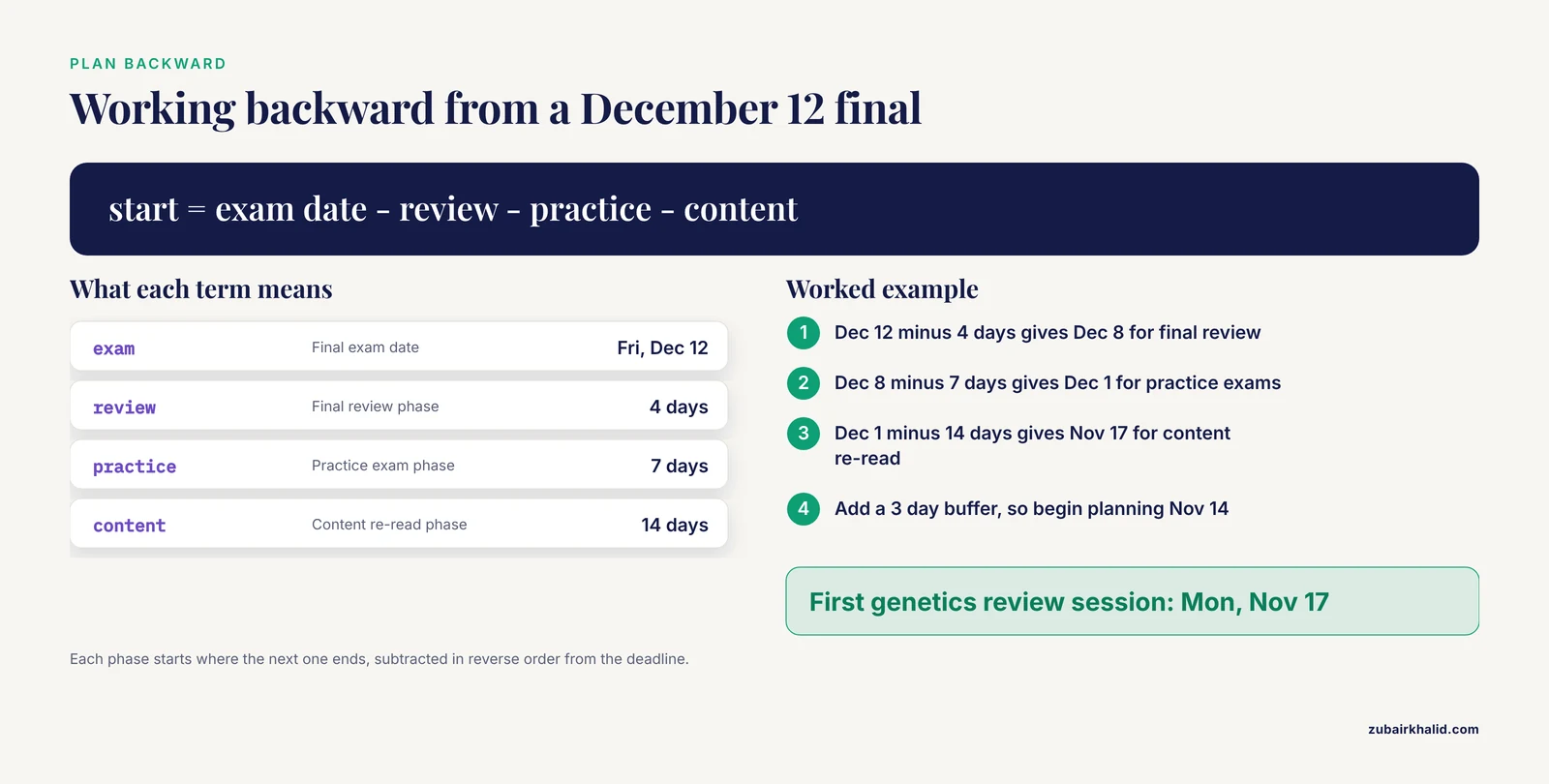
Suppose your genetics final is on Friday, December 12, and you want three preparation phases: a full content pass, a practice question phase, and a short final review. Using phase lengths that fit a typical 14 week course, the arithmetic works like this:
Final exam date:                 Fri, Dec 12

Phase 3, final review:   4 days  -> runs Dec 8  to Dec 11
Phase 2, practice exams: 7 days  -> runs Dec 1  to Dec 7
Phase 1, content re-read: 14 days -> runs Nov 17 to Nov 30
Buffer for other finals:  3 days  -> begin planning on Nov 14

First genetics review session:  Mon, Nov 17
The rule to remember is that you subtract phase durations in reverse order from the deadline. Each phase starts where the next one ends. Put a single all day event titled "Begin genetics content re-read" on November 17 in the Deadlines calendar, then create the individual study sessions as described in the next step.
Do this calculation for every major deadline. A one hour session with a calculator at the start of the semester removes all end of semester panic about what to do first.
Step 4: Time Block Your Study Sessions Around Proven Study Methods
This is where the planner connects to how to study biology rather than just when. Biology rewards two learning behaviors above almost everything else, and both are standard findings in learning science that appear in every introductory guide to effective study: active recall, which means retrieving an answer from memory instead of rereading notes, and spaced repetition, which means reviewing a topic several times with growing gaps between reviews.
Your calendar is the delivery system for both. A study block without a named topic becomes vague reading time. A study block titled "Recall drill, citric acid cycle" becomes a 45 minute session where you write the pathway from memory, check it, and note what you missed.
Schedule first exposure, then spaced reviews
For each lecture topic, place one block within 24 hours of the lecture and two review blocks later. A spacing pattern that works well for a semester course looks like this:
| Session | Timing | What you do |
|---|---|---|
| First pass | Same day or next morning | Rewrite the key figures from memory, list every term you cannot define |
| First review | 3 days later | Active recall drill only, no rereading first |
| Second review | 10 days later | Recall drill plus practice questions from the textbook or problem sets |
| Third review | During the exam phase you planned in Step 3 | Mixed practice across all topics |
Biology study methods like drawing pathways, labeling structures from memory, and explaining a mechanism out loud all slot into these blocks. Interleaving, which means mixing problem types from different chapters in one session, belongs in the second and third reviews, not the first pass.
Keep blocks short and specific
A 45 to 50 minute block with a single named topic in the title outperforms a three hour block titled "study biology". If a course is difficult, schedule two shorter blocks on different days rather than one long block, because the spacing itself is what strengthens memory.
Step 5: Schedule Time to Read Primary Literature
Biology courses at the intermediate and advanced level increasingly assign original papers. These need calendar time scaled to their density, and this is where many students lose a full weekend they did not plan to lose.
Use a real paper to calibrate. The leukemia network meta-analysis cited earlier [1] is the kind of assignment an upper level course might give. It contains nine clinical trials, subgroup analyses by genetic risk status, response rate tables, and a ranking method called SUCRA, which scores each treatment on a cumulative curve. A three pass reading plan handles a paper of this type:
- Pass one, 30 minutes. Read the abstract, the last paragraph of the introduction, every figure caption, and the conclusion. Write one sentence stating what question the paper answers.
- Pass two, 90 minutes. Read the methods and results in order. For a meta-analysis, that means noting how many trials were included, what outcomes were measured, and how the ranking was computed.
- Pass three, 60 minutes. Read the discussion critically and write down two limitations the authors acknowledge and one they do not.
Put all three passes in your Study blocks calendar as separate events, ideally on separate days. Reading a dense paper in three scheduled passes produces better comprehension than a single unfocused session, and it keeps the time cost visible and finite.
Step 6: Plan Semester Long Projects With a Protocol Mindset
If your semester includes an independent research project, a capstone, or a long group assignment, structure it on the calendar the way researchers structure studies. Two published protocols show the pattern clearly.
A pilot study in Social Psychiatry and Psychiatric Epidemiology evaluated a mental health awareness intervention for Black faith communities in the UK using a mixed methods pre and post design built on the Medical Research Council framework for complex interventions, and reported feasibility and acceptability as its main pilot outcomes [2]. The instructive point for a student planner is the structure: the team defined the design, named its outcome measures, and assessed feasibility before claiming impact.
A 2025 study protocol in Integr Cancer Therapies describes a randomized trial of an herbal medicine combined with pembrolizumab versus pembrolizumab alone in stage IV non-small cell lung cancer, with 70 participants, a named primary outcome of progression-free survival, predefined secondary outcomes, and a stated plan for monitoring adverse events [3].
On your calendar, copy that discipline in miniature:
- Define the deliverable and its due date in the Deadlines calendar.
- Break the work into phases with names, for example background reading, materials and methods, data collection, analysis, writing, revision.
- Assign each phase a weekly recurring block in the Study blocks calendar. A project that needs 40 hours across 10 weeks needs four one hour blocks per week, and the calendar makes that arithmetic visible in week two instead of week nine.
- Add a milestone event at the end of each phase so a slipping phase is visible within days, not at the deadline.
Step 7: Automate Repetitive Blocks With Google Apps Script
If you dislike clicking through the interface, Google Apps Script can create entire series of study blocks programmatically. Apps Script is free, included with your Google account, and connects directly to Calendar.
Open script.google.com, click "New project", delete the sample code, and paste this:
function addRecallDrills() {
  var cal = CalendarApp.getCalendarById("[email protected]")
  var topics = ["Cell structure", "Membranes and transport", "Enzymes and kinetics", "Glycolysis", "Citric acid cycle"]
  for (var i = 0; i < topics.length; i++) {
    var start = new Date(2026, 8, 7 + i, 19, 0, 0)
    var end = new Date(2026, 8, 7 + i, 19, 45, 0)
    cal.createEvent("Recall drill: " + topics[i], start, end)
  }
  Logger.log("Added " + topics.length + " events")
}
To find your study calendar ID, open Google Calendar settings, click the calendar name in the sidebar, and copy the value labeled "Calendar ID". Then click "Run", approve the permission prompt on first use, and check the execution log.
Expected output in the log:
Added 5 eventsFive 45 minute evening blocks now appear on consecutive days starting September 7, 2026, one per topic. Note that the month argument in the script is zero indexed, so 8 means September, not August. This trips up nearly everyone the first time.
You can also import events in bulk using an iCalendar file, which is the standard format Google Calendar accepts under "Settings", then "Import and export":
BEGIN:VCALENDAR
BEGIN:VEVENT
DTSTART:20260907T190000
DTEND:20260907T194500
SUMMARY:Recall drill: Cell structure
END:VEVENT
END:VCALENDAR
Save the text with a .ics extension, then upload it through the import settings. Calendar confirms how many events were imported.
How to Verify Your Planner Is Correct
Check the setup in under five minutes before classes start:
- Toggle test. Click each calendar checkbox in the sidebar and confirm only the intended layer appears and disappears.
- Conflict scan. Switch to Week view and look for overlapping blocks. Two study blocks at the same hour means one will silently vanish.
- Notification test. Create a one minute test event two minutes in the future with a 1 minute reminder and confirm the alert arrives on both desktop and phone.
- Sum check. Count your weekly study hours. If they exceed roughly 25 hours on top of class and lab time, the plan will collapse in week four, and it is better to cut it now than in October.
- Syllabus cross check. Open each syllabus side by side with the Deadlines calendar and confirm every date matches, including dates the instructor moved after the first lecture.
Common Mistakes and Limitations
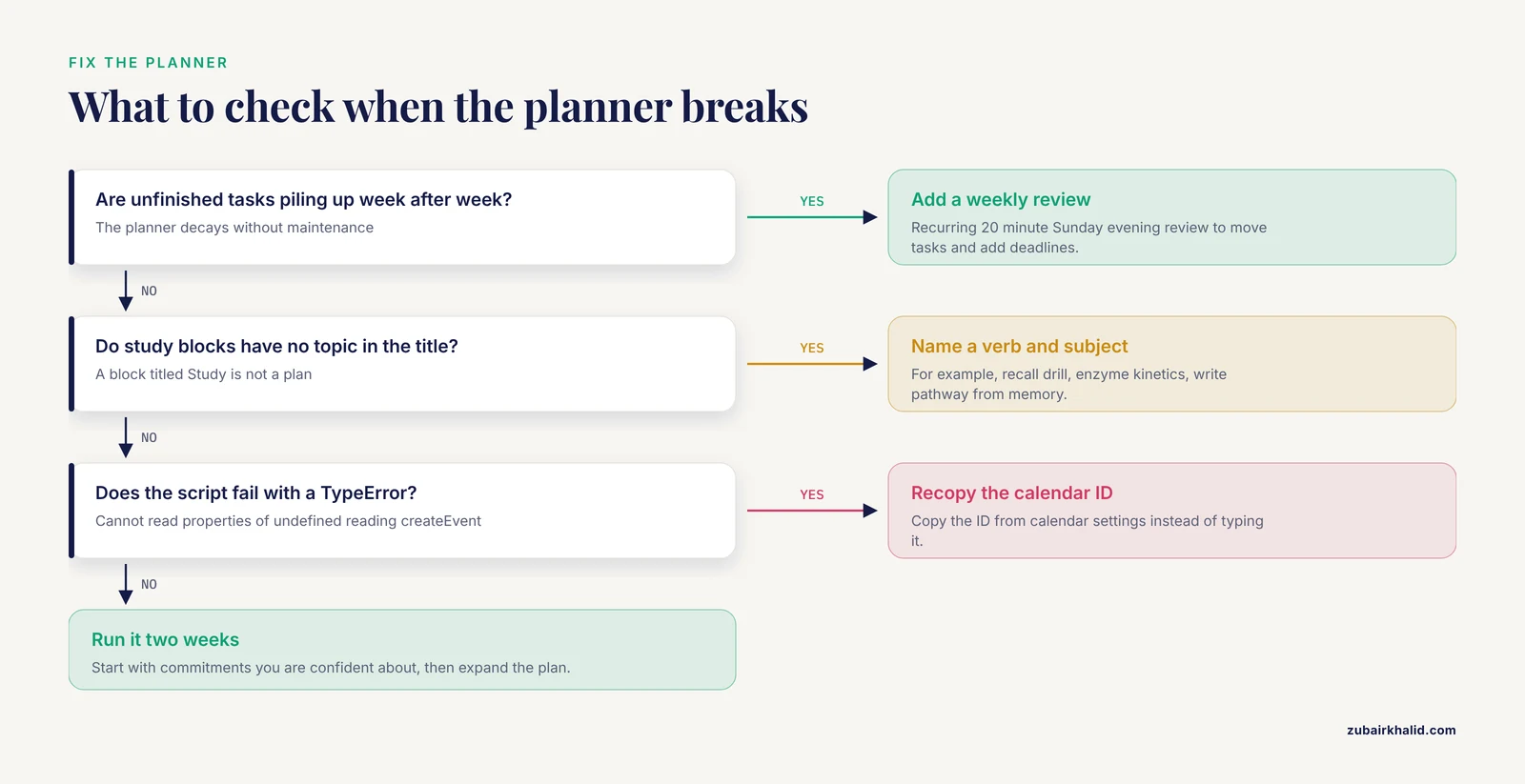
- Building the planner once and never maintaining it. A calendar is a weekly instrument. Put a recurring 20 minute "Weekly review" event on Sunday evening where you move unfinished tasks, add new deadlines from emails, and lay out the coming week. Without this, the planner decays by week three.
- Scheduling study blocks with no topic in the title. "Study" is not a plan. "Recall drill, enzyme kinetics, write pathway from memory" is. Every block needs a verb and a subject.
- Ignoring your energy pattern. Placing recall drills at 10 PM when you fade after 9 PM guarantees skipped sessions. Put demanding blocks in your alert hours and use late slots for lighter tasks like flashcard review or formatting a references list.
- Double importing an ics file. Importing the same file twice creates duplicate events, and Google Calendar does not merge them automatically. If this happens, open the day view, select each duplicate, and delete it, or delete the affected events in list view in one pass.
- Wrong calendar ID in a script. A mistyped ID produces an error like
TypeError: Cannot read properties of undefined (reading 'createEvent')when Apps Script runs. Copy the ID directly from the calendar settings page instead of typing it. - Malformed import files. If your ics file is missing a line or has wrong line endings, Calendar rejects it with the message "Failed to import events". Recheck that every line shown above is present and that the file is saved as plain text with the .ics extension.
- Color coding so elaborate it becomes noise. More than about six calendars and the layering trick stops being useful. Five calendars is the practical sweet spot for a semester.
- Overstuffing the plan at the start. A first week plan with 30 study hours is aspirational fiction. Start with the commitments you are confident about, run the system for two weeks, then expand.
- A calendar cannot replace a doctor or an advisor. For individual academic, medical, or mental health decisions, consult the appropriate professional. The planner organizes your time, it does not make personal decisions for you.
Frequently Asked Questions
How far in advance should I build my biology semester planner?
Build the skeleton as soon as syllabi are available, ideally before the first week of classes. Recurring events and known deadlines take about 45 minutes, and study blocks can be added in the first two weekends once you know the pace of each course.
How many calendars should I create in Google Calendar?
Five works well for most students: classes, labs, deadlines, study blocks, and personal. Fewer layers cost you the toggle and filter benefits, and more layers make the sidebar hard to scan.
Can I share my calendar with a lab partner or study group?
Yes. Hover over the calendar in the sidebar, open the three dot menu, choose "Settings and sharing", and enter their email under "Share with specific people". Grant "See all event details" for planning purposes and reserve "Make changes" for people you trust with your whole schedule.
How do I schedule time to read a research paper for a biology class?
Create three separate events: a 30 minute skim for structure, a 90 minute methods and results read, and a 60 minute critical discussion read. Spread them across two or three days rather than one sitting.
What reminders should I set for lab reports?
Set a one week notification for the drafting start and a one day notification for the final deadline on the Deadlines calendar. Add a separate "Prelab prep" event 30 minutes before each lab meeting.
Does time blocking actually help with how to study biology?
Yes, because biology depends on repeated retrieval and spaced review, and those behaviors require protected, named time. A calendar block titled with a specific recall task converts a vague intention into a scheduled action you can complete and check off.
What is the best way to plan around a final exam?
Plan backward from the exam date. Subtract the time needed for a final review phase, a practice phase, and a content re-read phase, and place the start of the earliest phase on the calendar as an all day marker, then fill the individual sessions in.
How do I keep the planner alive after the first few weeks?
Hold a recurring 20 minute weekly review on Sunday evening. Move anything unfinished, add deadlines that arrived by email, and lay out the next week's study blocks. This single habit is the difference between a planner that lasts 15 weeks and one that lasts two.
Sources
- Molecular-Biology-Driven Frontline Treatment for Chronic Lymphocytic Leukemia: A Network Meta-Analysis of Randomized Clinical Trials.
- Pilot study of a manualised mental health awareness and stigma reduction intervention for Black faith communities in the UK: ON TRAC project.
- Efficacy and Safety of Herbal Medicine Bojungikki-Tang in Combination with Pembrolizumab versus Pembrolizumab Monotherapy for Stage IV Non-Small Cell Lung Cancer: Study Protocol for a Randomized, Open-Label, Double-Arm, Multicenter Trial.