How to Use Binder to Share Your Reproducible Analysis
By Dr. Zubair Khalid, DVM, MS, PhD ·

By the end of this article you will be able to turn a Jupyter or R notebook analysis into a link that anyone can click to run your exact code in your exact software environment, with nothing installed on their machine. You will need a GitHub account, a repository containing your analysis, and a basic comfort with the command line. If you write your analysis in Python or R and you have ever had a collaborator say "it does not run on my laptop," Binder solves that problem.
Binder, hosted publicly at mybinder.org, takes a GitHub repository, reads its environment configuration files, builds a Docker image from those files, and hands the reader a live, interactive Jupyter session in the browser. The service is free, requires no account from your readers, and has become one of the standard entry points into reproducible research.
Why Binder Matters for Reproducible Research
Reproducible research means that another person can rerun your analysis from your data and code and reach the same results. In practice, most published computational work falls short of this, and the gap usually has nothing to do with missing code. Researchers describe this gap as "reproducibility debt," the accumulated weight of missing documentation, testing, and engineering practice that makes results fragile even when code and data are available [1].
The single largest contributor to that debt is the software environment. An analysis that runs today can fail a year later because a package released a new version, changed a function signature, or dropped support for an old interpreter. Studies of legacy R pipelines show that reproducibility is undermined not by missing data or code but by the gradual decay of software environments, through package obsolescence and version conflicts [2]. A benchmark of real-world faults in AI software systems reproduced 652 of 770 reported bugs (84.7 percent) only because the researchers carefully recorded the execution conditions for each failure, which illustrates how much of reproducibility is environment discipline rather than code quality [3].
Binder addresses the environment problem directly. Instead of asking readers to reconstruct your setup from a README, it builds a container from the dependency files you commit alongside your code. Containers package an application together with all of its dependencies so that it runs inside a controlled environment with consistent behavior across machines. This is the same principle that makes containerization attractive for scientific computing more broadly, where the ability to quickly create reproducible environments tailored to an individual experiment has become essential [4].
How Binder Works Under the Hood
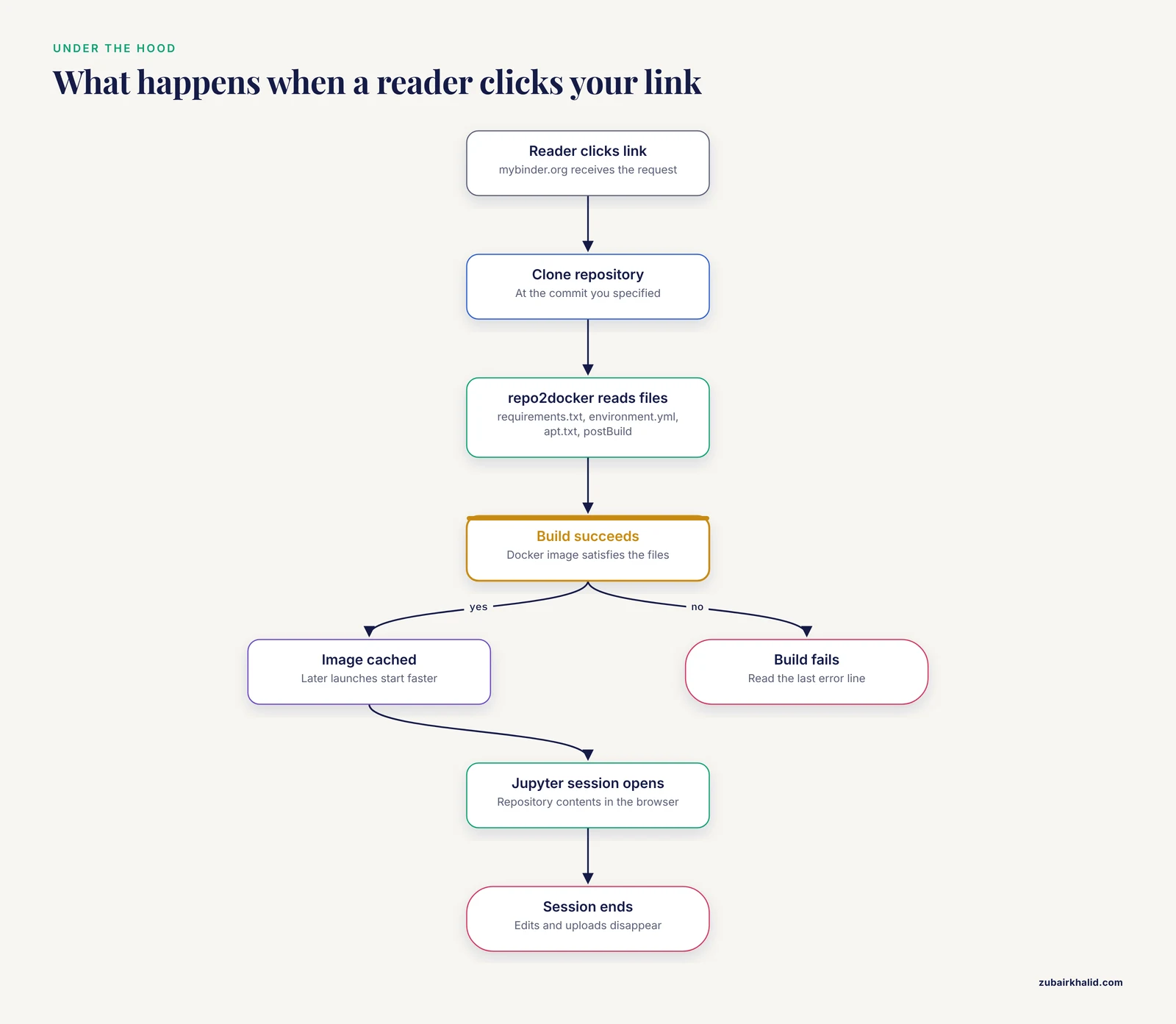
When a reader clicks your Binder link, three things happen:
- mybinder.org clones your GitHub repository at the commit you specified.
- A build service called repo2docker inspects the repository for configuration files (requirements.txt, environment.yml, apt.txt, a Dockerfile, or others) and constructs a Docker image that satisfies them. Docker images give you an executable bundle of your application and its dependencies, and builds that are uniquely identified can serve as reliable units of computation.
- The reader's browser connects to a fresh container running that image, with a Jupyter interface ready at your repository's contents.
Two properties of this design shape everything you do next. First, the image is built from your configuration files, not from a snapshot of your laptop, so whatever you write in those files is exactly what your readers get. Second, each reader session is isolated and ephemeral. Anything a reader does in the session, including edits and uploaded files, disappears when the session ends, and your repository on GitHub is never modified by Binder traffic.
What You Need Before You Start
- A public GitHub repository containing your analysis (notebooks, scripts, and data references).
- A Python or R environment on your own machine where the analysis currently works.
- The exact package versions currently installed. For Python, run
pip freezeorconda list. For R, runpackageVersion("dplyr")for each package you use. - A web browser. Your readers need nothing else.
Private repositories cannot be built by mybinder.org, so the analysis code itself must be public. You can keep large data files outside the repository and fetch them at runtime, which we cover in the tips section.
Binder Reproducible Research Step by Step
This walkthrough builds a shareable Binder for a small Python analysis. The same structure applies to R with the substitutions shown in Step 3.
Step 1: Structure Your Repository
Create a repository with this layout:
my-analysis/
├── analysis.ipynb
├── data/
│   └── measurements.csv
├── requirements.txt
├── apt.txt
└── README.md
Keep the notebook at the repository root or in a clearly named subfolder. Write the README so it states what the analysis does, what the key outputs should look like, and roughly how long the notebook takes to execute. Repo2docker picks up configuration files anywhere in the repository, but the simplest and least error-prone arrangement is to keep them at the root.
Step 2: Pin Your Python Dependencies
The most common failure mode in Binder publishing is an unpinned environment. Research on automatically generated code shows that declared dependencies are routinely inconsistent with what actually runs, and that the largest divergence occurs between the packages a project declares and the packages actually installed at runtime [5]. Reproducible environments therefore require exact versions, not names alone.
Generate a pinned file from your working environment:
pip freeze > requirements.txtThen edit the result so it contains only the packages your analysis genuinely needs, each pinned to an exact version:
pandas==2.2.2
matplotlib==3.8.4
scikit-learn==1.5.1
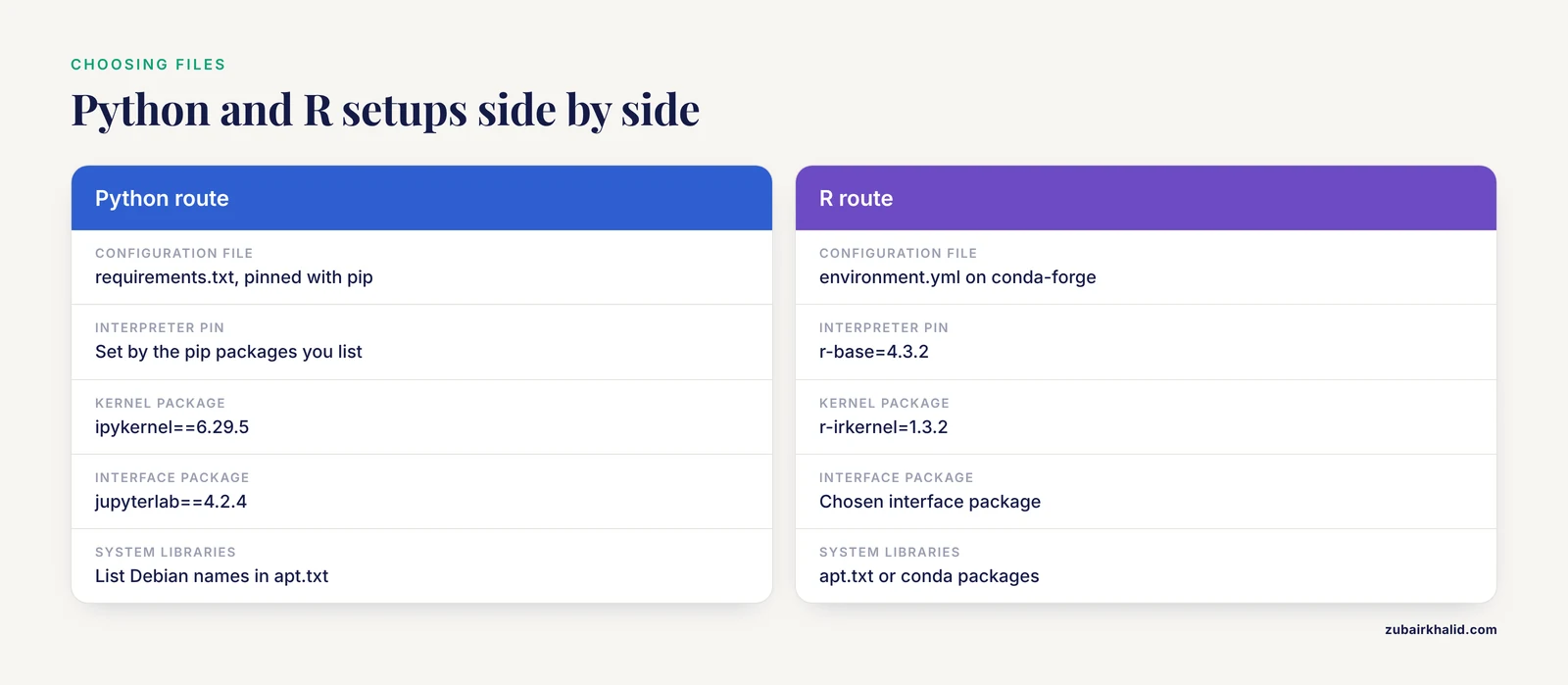
ipykernel==6.29.5
jupyterlab==4.2.4
Three details deserve attention:
- Always include
ipykernel. It provides the Python kernel that your notebook declares, and leaving it out is a frequent cause of "kernel not found" errors inside Binder. - Include
jupyterlab(ornotebookorjupyterhub, depending on the interface you want readers to see). Repo2docker uses whichever interface package you specify. - Pin with
==, not>=. A minimum-version declaration lets the build float forward to future releases, which reintroduces the environment decay problem that Binder exists to solve. Environment descriptions that rely on names and version labels alone do not capture the full complexity of the dependency graph, which is why exact, resolvable pins are the practical standard [6].
Step 3: Pin an R Environment (Alternative)
For R analyses, replace requirements.txt with an environment.yml file that names an R runtime and R packages:
name: analysis-env
channels:
  - conda-forge
dependencies:
  - r-base=4.3.2
  - r-tidyverse=2.0.0
  - r-ggplot2=3.5.1
  - r-irkernel=1.3.2
The r-irkernel entry plays the same role as ipykernel in Python, providing the kernel your notebook connects to. Legacy R projects can be harder to reconstruct because packages may have been removed from CRAN entirely, and successful recovery work in that area has relied on querying archival snapshots of package repositories to resolve complete dependency graphs at a specific historical timestamp [2]. If your analysis depends on an old or archived R package, prefer a conda-forge pin or install from a fixed GitHub commit hash in a postBuild step rather than from the package's moving main branch.
Step 4: Handle System Libraries and Post-Build Steps
Some packages need operating-system libraries that pip and conda cannot install. List them in apt.txt, one Debian package name per line:
libgl1
libglib2.0-0
r-base-dev
Use the postBuild file for commands that must run after all packages are installed, such as installing an R package from GitHub at a pinned commit or pre-executing notebooks:
#!/bin/bash
Rscript -e "remotes::install_github('tidyverse/[email protected]')"
Anything in postBuild runs at image build time, which means readers wait once at launch rather than repeatedly inside their sessions. Keep this file fast. A build that takes many minutes is more likely to time out on the public service.
If you eventually need control beyond what these files provide, repo2docker also accepts a full Dockerfile in the repository root. Use this only when necessary, because a hand-written Dockerfile gives you responsibility for every layer of the stack. Containers help with deployment, but they do not by themselves guarantee reproducibility, since the base image you start from can drift over time unless you pin it by digest.
Step 5: Push to GitHub and Launch
Commit and push everything:
git add requirements.txt apt.txt postBuild README.md analysis.ipynb
git commit -m "Add Binder configuration"
git push origin main
Now construct your Binder URL. The format is:
https://mybinder.org/v2/gh/USERNAME/REPOSITORY/COMMITReplace USERNAME and REPOSITORY with your GitHub details. For COMMIT you can use a branch name such as main, but a specific commit SHA is better for a published analysis, because it freezes the exact state of the code. For example:
https://mybinder.org/v2/gh/jdoe/my-analysis/a1b2c3dPaste the URL into your browser. You will see a build progress page showing repo2docker fetching, building, and launching. A first build of a modest environment typically takes several minutes. Expected behavior: the progress page resolves into a JupyterLab view showing your repository contents, and opening analysis.ipynb gives you a notebook connected to a kernel that has your pinned packages.
The most common launch failure is an HTTP 404 error immediately at the start. That means mybinder.org could not fetch the repository, which almost always comes from a typo in the URL, a private repository, or a branch name that does not exist. Check the repository URL in your browser first, then re-check the commit reference.
Step 6: Add the Binder Badge
Put a launch button in your README so readers never have to type a URL:
[](https://mybinder.org/v2/gh/jdoe/my-analysis/HEAD)Use HEAD in the badge so that readers always launch the newest commit on your default branch. For the version you cite in a paper, use the pinned SHA link from Step 5 instead, and keep both available. This mirrors the practice of maintaining a living analysis alongside an archived, citable version.
Step 7: Verify the Build
Verification is not optional. A link that has never been tested end to end is the reproducibility equivalent of an uncalibrated instrument.
- Open your Binder link in a private browser window.
- Once JupyterLab loads, open a terminal and confirm the environment:
python -c "import pandas; print(pandas.__version__)"Expected output:
2.2.2- Run your notebook from top to bottom using "Restart Kernel and Run All Cells." Confirm that every cell executes without error and that figures and numbers match what you produced locally.
- Close the session and click the link a second time. Because builds are cached, the second launch should start far faster, usually within seconds to a minute.
Configuration Files at a Glance
| File | Purpose | Example content |
|---|---|---|
| requirements.txt | Pins Python packages with pip | pandas==2.2.2 |
| environment.yml | Defines a full conda environment, including the interpreter | r-base=4.3.2 under conda-forge |
| apt.txt | Installs Debian system libraries | libgl1 |
| postBuild | Runs shell commands after installation, at build time | Rscript install commands |
| Dockerfile | Full manual control of the image | FROM jupyter/base-notebook |
| start | Custom script run when a reader session begins | prepare-data.sh |
Prefer the first four files for ordinary analyses. Reach for a Dockerfile only when a dependency cannot be expressed declaratively, and when you do, pin the base image tag precisely.
A Reproducibility Checklist
Run through this list before you share your link. It compresses the guidance above into a form you can keep next to your repository.
- Every direct dependency appears in a configuration file, pinned to an exact version.
- The kernel package (ipykernel or r-irkernel) is included, so the notebook finds its kernel.
- The interface package (jupyterlab or notebook) is included, so readers see a usable UI.
- System libraries are declared in apt.txt or handled by conda.
- All build-time work lives in postBuild, and postBuild completes quickly.
- The notebook runs top to bottom from a fresh kernel with no manual reordering of cells.
- Data either ships in the repository or is fetched programmatically from a stable, citable source at runtime.
- No credentials, API keys, or private data are committed anywhere in the repository.
- The README states expected runtime, expected outputs, and the meaning of key results.
- You have launched your own link at least twice and executed the notebook inside Binder.
This checklist operationalizes the provenance principle in computational research, which holds that the quality of a study improves when researchers explicitly create a clear, traceable record of the execution environment rather than relying on personal setup habits [7]. Treat each item as a requirement rather than an aspiration, because the items you skip are precisely the ones that fail for your readers.
Binder Reproducible Research Tips
Pin the commit you cite. Branch links change as you work. When you publish, create a dedicated link with a commit SHA and never force-push over that commit.
Keep postBuild lean. Every command in postBuild adds time to the first build for every reader. Heavy work belongs in pinned packages or a Dockerfile, not in repeated downloads at build time.
Fetch large data at runtime. Repository size slows cloning and can exceed GitHub limits. Store data in an archive such as Zenodo, record its DOI in your README, and download it in the first notebook cell or in a start script. This keeps code versioned and data citable, and it matches the pattern used by provenance-aware research workspaces, which combine versioned environments with data pulled from external providers on demand [8].
Pre-execute notebooks when practical. A notebook saved with outputs lets readers see results even before they finish running the analysis themselves, and a build-time execution step verifies that your environment actually reproduces the outputs.
Test against a clean environment locally. Run pip install -r requirements.txt inside a fresh virtual environment on your machine before pushing. If it fails locally, it will fail in Binder, and you will find out in seconds instead of after a five-minute cloud build.
Learn from failures rather than hiding them. Documented reproduction evidence, meaning the recorded execution conditions and the outcome of each reproduction attempt, is what allows others to debug and trust a computational result [3]. If a cell only works on your machine, that fact belongs in your README, not in a footnote you hope nobody reads.
Common Mistakes and Limitations
Unpinned or floating dependencies. Writing pandas instead of pandas==2.2.2 is the most common and most damaging mistake. Every rebuild can pull different package versions, so two readers clicking the same link weeks apart can get different results. Research on environment specification shows that declared and runtime dependencies diverge systematically even in carefully produced software, so precision here is not optional [5].
Relying on containerization alone. Containers provide portability, but portability is not reproducibility. A containerized MPI application, for instance, still requires an external system that provides the correct interfaces for parallel execution. Likewise, because container images hide their internals behind an opaque layer, an image that runs today may embed latent problems that surface only when a base image or host changes [9]. Binder's declarative files are an improvement over an opaque image precisely because they state what the environment should contain.
Assuming long-term executability. mybinder.org is a shared, best-effort service. Sessions are ephemeral, resources are limited compared with a personal machine, and the service makes no longevity commitment. Preserving prebuilt execution environments is not sufficient for long-term reproducibility, because the ability to replicate results requires preserving the full path from source to execution [10]. For archival permanence, pair your Binder link with a permanently versioned repository release and, where your field supports it, a fully specified environment built by a source-based package manager. Tools built for that purpose, such as Guix, allow scientists to share an environment so peers can reproduce it from source, and they address the fact that names plus version labels are an incomplete description of a computational environment [6]. Declarative package managers such as Nix follow the same philosophy, resolving the dependency leakage and composition problems that plague manually assembled stacks.
Shipping a notebook with hidden state. A notebook that depends on variables defined before a restart, or on files created by earlier manual runs, will not survive "Restart and Run All." Binder readers have no access to your prior sessions, so hidden state fails immediately and visibly.
Committing credentials or oversized data. Secrets in a public repository are a security incident, and repository bloat slows every build. Keep both out of the repository by design, not by caution.
Ignoring the build log. When a build fails, the on-screen log names the exact package and command that broke. Skimming past it to "try again" wastes time. Read the last error line, fix the pin or the apt package name, and push.
Treating R as Python. R packages installed through pip will not work. R dependencies belong in environment.yml as conda packages or in postBuild as R-level installs from pinned sources. Reverse dependencies of historical R environments can be reconstructed from archival snapshots when a package has vanished from CRAN [2], but prevention through pinning is far cheaper than archaeology.
Overloading the public service. mybinder.org is intended for demos, teaching, and lightweight interactive use, not for long training runs or heavy parallel computation. For demanding workloads, the same repository configuration works with self-hosted BinderHub deployments, which provision dedicated interactive working sessions with their own resource management and provenance tracking [8].
Frequently Asked Questions
Do my readers need to install anything to use my Binder link?
No. A reader clicks your link in any modern browser and receives a running Jupyter session with your environment already built. The build happens on mybinder.org, not on the reader's machine.
Is Binder free?
Yes. mybinder.org is a free public service supported by the community and its sponsors. There is no charge to you or your readers, though the service imposes resource and session-time limits appropriate to its demo-and-teaching purpose.
Can I use Binder with a private GitHub repository?
No. mybinder.org can only fetch and build public repositories. If your code cannot be public, run a self-hosted BinderHub on your own infrastructure, which uses the same repo2docker configuration files.
How long does the first Binder build take?
A small environment with a handful of pinned packages usually builds in a few minutes, while environments with many conda packages or extensive postBuild work take longer. After the first successful build, the image is cached and subsequent launches are much faster.
What is the difference between requirements.txt and environment.yml for Binder?
requirements.txt pins Python packages installed through pip, while environment.yml defines a complete conda environment including the interpreter itself. Use environment.yml when you need a specific Python version or packages available only through conda, such as R, and use requirements.txt for simpler pure-Python projects.
Can Binder run R notebooks?
Yes. Provide an environment.yml that includes r-base and r-irkernel from the conda-forge channel, and your R notebooks will open with an R kernel. System-level R libraries can be added through apt.txt or postBuild.
What happens when a reader changes something in the session?
Changes exist only inside that reader's ephemeral session and vanish when the session ends. Your GitHub repository is never modified. Readers who want to keep their work can download notebooks and files from the session before it closes.
How do I make my analysis reproducible for years, not just today?
Combine your Binder link with a versioned repository release or archival DOI, use a commit SHA in the citable link, and document the full environment declaratively. Long-term reproducibility requires preserving the ability to rebuild from source, because prebuilt environments alone do not guarantee that future systems can replicate your results [10].
Sources
- Managing Reproducibility Debt in Scientific Software: A Practical Framework
- Temporal Dependency Archaeology: Reconstructing Historical R Environments for Reproducible Text Analysis Pipelines
- AIFaultBench: A Reproducible Benchmark of Real-World Faults in AI Software Systems
- VCC: A framework for building containerized reproducible cluster software environments
- Code That Works, Environments That Don't: Measuring Environment Reproducibility in AI-Generated Software
- Toward practical transparent verifiable and long-term reproducible research using Guix
- Managing Software Provenance to Enhance Reproducibility in Computational Research
- SWIRRL. Managing Provenance-aware and Reproducible Workspaces
- Managing Vulnerabilities in Containerized and Kubernetes Environments
- Supporting Long-term Reproducible Software Execution