Best Zotero Plugins Compared
By Dr. Zubair Khalid, DVM, MS, PhD ·

The difference between a stock Zotero install and a well-tuned one is the difference between a pile of PDFs and a working research engine. The rule of thumb for choosing among the best Zotero plugins is to master the two official add-ons first, the Zotero Connector and the word processor plugin, then add Better BibTeX if you write in LaTeX, Better Notes if you read and annotate heavily, and AI assistants only after you understand where your data travels. Zotero itself is free, open-source reference management software, a program that stores, organizes, and cites the sources you read. Plugins are small add-on packages that extend what it can do, and the ecosystem behind them has grown large enough that choosing badly wastes an evening while choosing well saves months.
What a Zotero Plugin Is and How Installation Works
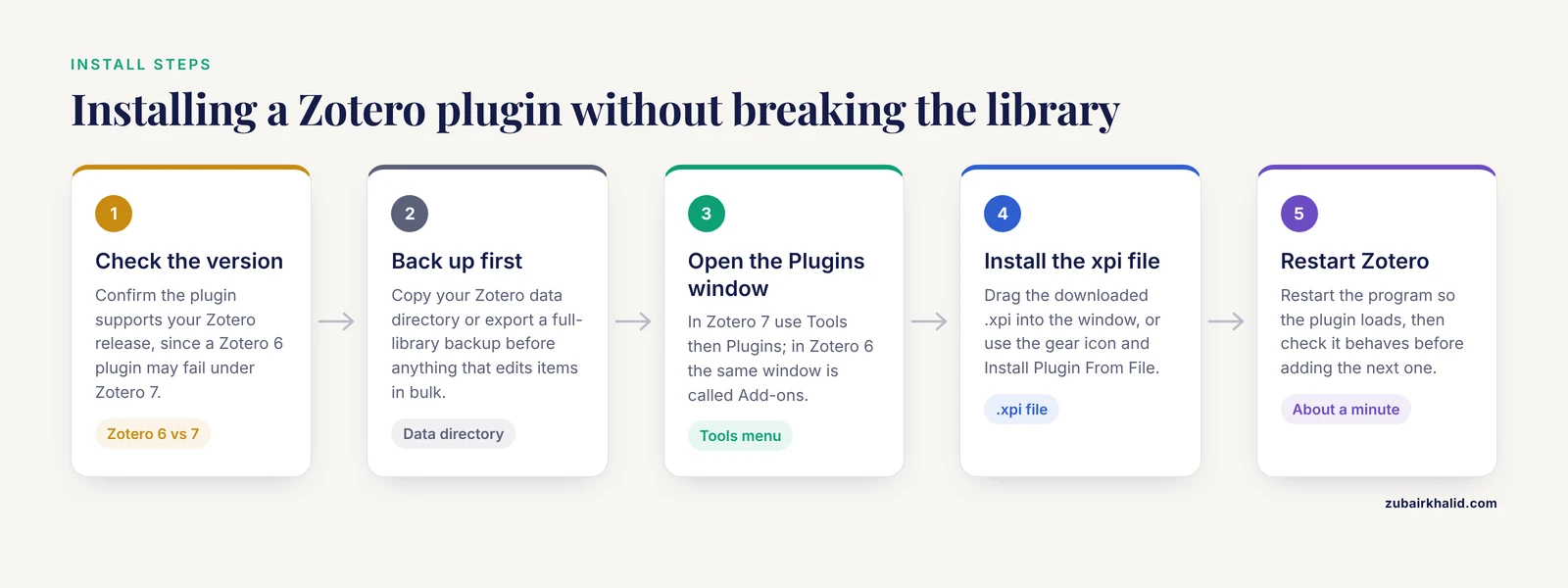
A plugin, often called an add-on, is a small software package that adds features to a host program. Zotero inherited its extension system from the Firefox browser, so plugins arrive as .xpi files, a packaged archive format Zotero loads directly. Two official add-ons come from the Zotero team itself. The Zotero Connector is a browser extension that saves sources into your library. The word processor plugins connect Zotero to Microsoft Word, LibreOffice, and Google Docs. Everything else described here comes from volunteer community developers who publish their work through the Zotero forums and public code repositories.
Installation takes about a minute. In Zotero 7, open the Tools menu and choose Plugins. In Zotero 6, the same window is called Add-ons. Drag the downloaded .xpi file into that window, or click the gear icon and choose Install Plugin From File, then restart Zotero. The single practical pitfall is version matching. A plugin built for Zotero 6 can misbehave or refuse to load under Zotero 7, because the major release changed how extensions hook into the program, so check the supported version on the plugin page before installing.
University library guides have treated this sequence as basic setup for more than a decade. Step-by-step guides pair the download of Zotero with its word processor plugins [1], list plugins as a distinct numbered stage of onboarding [2], and reserve separate pages for plugins and mobile access [3]. A how-to guide makes the pairing explicit in its own title, covering Zotero and related plugins together [4], and guides aimed at Word and OpenOffice users do the same for the writing side [5]. One more habit worth building early is auditing built-in features before installing anything, because recent Zotero releases have absorbed jobs that used to require plugins, such as flagging retracted papers.
The Best Zotero Plugins, Side by Side
The table gathers the plugins that matter most for life-science work. Sections after the table explain each option in depth, and the worked scenarios later show how the choices play out in practice.
| Plugin | Type | What it adds | Best for | Main drawback |
|---|---|---|---|---|
| , - | , - | , - | , - | , - |
| Zotero Connector | Official browser extension | Saves papers, preprints, and webpages into your library with one click and attaches open-access PDFs when they exist | Everyone | Behavior differs slightly between Chrome, Firefox, Edge, and Safari |
| Word processor plugins | Official add-ons | Insert citations and build formatted bibliographies inside Word, LibreOffice, or Google Docs | Everyone who writes manuscripts | Mid-document style changes require a refresh that can stall on very large files |
| Better BibTeX | Community | Stable citation keys, BibTeX and BibLaTeX export, and auto-export that keeps a .bib file synchronized with your library | LaTeX, Overleaf, Pandoc, and R Markdown writers | Adds configuration decisions and background export work |
| Better Notes | Community | A note workspace with templates, markdown export, and links between notes | Heavy readers building a personal knowledge base | Overkill for people who write two-line summaries |
| Zotero PDF Translate | Community | Translates selected PDF text, annotations, and abstracts through an external service | Readers working across languages | Quality depends entirely on the translation service you connect |
| AI assistant plugins (Zotero GPT and similar) | Community | Chat-style summarizing and questioning of papers inside Zotero | Journal clubs and rapid screening | Requires an API key and sends your text to an external model |
| Zotero Scholar Citations | Community | Pulls Google Scholar citation counts into item fields | Quick impact checks during screening | Breaks whenever Google Scholar throttles automated queries |
| Zotero DOI Manager | Community | Validates DOIs, fetches shortDOIs, and tidies identifier fields | Shared group libraries and data curation | Little value once your metadata is already clean |
| Retract | Community | Flags retracted publications using Retraction Watch data | Clinical and life-science writing | Recent Zotero releases already warn about retractions natively |
| ZotMoT | Community | Rules-based renaming and filing of attachments | Large linked-file libraries | Carries forward the unmaintained ZotFile concept, so expect setup discipline |
| KNIMEZoBot | External workflow | Natural-language question answering over your Zotero library through KNIME and OpenAI | No-code literature review automation | Runs outside Zotero and requires API keys |
Two rows deserve a footnote. KNIMEZoBot is not a Zotero plugin in the .xpi sense. It is an external workflow that reads your Zotero library, and it appears here because it solves the same problems people otherwise bring to AI plugins. The Retract row overlaps with native Zotero behavior, which newer releases handle automatically, so that plugin matters mainly on older installations.
The Official Core: Connector and Word Processor Plugins
The Zotero Connector sits in your browser and watches the pages you read. When you land on a journal article, a preprint server, a database record, or a plain webpage, one click saves a clean item with title, authors, journal, year, DOI, and other metadata, and attaches the open-access PDF when one is legally available. The Connector recognizes identifiers such as ISBNs and PMIDs on catalog pages and respects institutional proxy settings, so off-campus saving lands in the right subscription context. For most researchers this plugin does more daily work than everything else combined, because capture is the step where reference libraries usually decay.
The word processor plugins are where Zotero earns its keep in a manuscript. Inside Word or LibreOffice, a Zotero tab offers document preferences where you pick a citation style, an add-citation dialog with searchable lookup, and an add-bibliography command that builds the reference list from whatever you cited. Switch the style from a numbered format to author-date and one refresh reformats the entire document. A parallel plugin inside Google Docs does the same job in the browser. Zotero supports thousands of citation styles through its style repository, which covers the vast majority of journals you will submit to.
Friction for new users is measurable. A qualitative study of forty language-education students found that Zotero made reference management easier, gave them a working digital library, and sped up citation, while the recurring obstacles were unfamiliarity with the program, the installation process, file synchronization, and adding citations in Microsoft Word [6]. The same study counted computer skills and the noncommercial nature of Zotero among the factors that helped, and the fixes that worked were mundane, printed guides, video tutorials, citation-style cheat sheets, and a support group chat. The lesson for plugin choices is direct. Get the official core running smoothly before stacking community plugins on top of it.
One limitation no plugin fixes is complete automatic PDF retrieval. In a head-to-head test built on one thousand records from four evidence synthesis projects and a university's subscription portfolio, Zotero 6 retrieved 52 percent of available full texts against 47 percent for EndNote 20, ran 2 minutes 15 seconds faster, and matched EndNote's 99 percent accuracy for retrieved files [7]. Neither program found everything, each retrieved unique items the other missed, version differences appeared between the two for the same record, and Zotero's retrieval counts were less consistent across repeated runs. Treat automatic retrieval as a strong first pass, then verify that each PDF you actually cite is the version of record.
Better BibTeX for LaTeX and Overleaf Writers
LaTeX is the typesetting system that dominates mathematics, physics, and large parts of computational biology, and it reads bibliography data from BibTeX files. Better BibTeX is the community plugin that makes Zotero a first-class citizen of that world. Its signature feature is the stable citation key, a short identifier such as darwin1859 that you type into your manuscript. The plugin generates keys from patterns you define, keeps them stable even when the underlying metadata changes, and warns you about collisions.
Auto-export is the second reason people install it. The plugin watches your library and rewrites an exported .bib file whenever anything changes, which means an Overleaf project pointed at that file always compiles against your current references. Exports cover BibTeX, BibLaTeX, and CSL JSON, and can include notes and attachments. The pros and cons are worth stating plainly. On the plus side you get deterministic keys, hands-free synchronization with Overleaf, and dependable handling of complex item types in reproducible-analysis pipelines built on Pandoc or R Markdown. On the minus side, configuration choices multiply, auto-export on a very large library consumes noticeable resources, adopting the plugin after years of writing means migrating existing keys, and every added component is one more thing that can break during a software upgrade. If you write exclusively in Word, skip it entirely.
Better Notes and PDF Translate for Reading Workflows
Better Notes turns Zotero's note system into a connected workspace. You build structured paper summaries from templates, link notes to each other, export to markdown, and assemble review outlines from pieces you wrote while reading. Researchers running literature-heavy projects, a thesis chapter or the narrative of a systematic review, tend to get the most out of it. People who write two-line summaries per paper will find it heavy.
Zotero PDF Translate solves a narrower problem well. Select text inside an attached PDF, press a shortcut, and a translation appears in the sidebar, with the same treatment available for abstracts and for annotations you highlight. The plugin routes requests through external translation services that you configure, so quality and privacy depend on the service you pick. For anyone reading literature from Chinese, Japanese, Korean, German, or French journals alongside the English core, it removes the constant copy-paste detour through a separate browser tab.
Beyond these two, the ecosystem includes utility plugins that reward browsing once your workflow stabilizes. Actions and Tags triggers multi-step operations from shortcuts or saved searches, Linter cleans inconsistent metadata fields, and dashboard plugins chart your reading and tagging activity. None of these are essential, and adding them before the core habits stick is a classic procrastination trap.
AI Assistant Plugins and the Security Questions They Raise
A family of community plugins, known by names such as Zotero GPT, adds a chat panel inside Zotero. You ask questions about the open PDF or about your whole library, and a large language model answers, summarizes, or extracts methods sections. These plugins require an API key, a secret token that identifies your account to the model provider and bills usage to it. Understand what that means physically. Your paper text, and sometimes your library metadata, travels to an external service every time you ask a question.
That trade deserves scrutiny rather than reflex. Researchers studying large language model plugin ecosystems built a systematic evaluation framework and showed that third-party apps on such platforms cannot be implicitly trusted, that natural-language interfaces invite imprecise interpretations, and that concrete instances of these failure classes exist in real marketplaces, which led to recommendations for systematic security evaluation. Those findings describe ChatGPT plugins specifically, and the logic carries over to any Zotero plugin that pipes your library content to an external model. A researcher's library holds unpublished manuscripts, grant drafts, and confidential peer-review material, none of which belong in an unvetted pipeline.
A practical checklist follows from that. Read the plugin's documentation to learn exactly what it transmits. Prefer plugins that can run against a model you host or an endpoint you control. Create a dedicated API key with a spending cap instead of reusing a primary account key. Keep embargoed manuscripts out of any assistant you have not vetted. None of this argues against the category, because the payoff for journal clubs and rapid screening is real, it simply prices the risk correctly.
Education scholarship is already treating these tools as mainstream. A review of digital technologies for building research competencies lists Zotero AI plugins alongside interactive platforms such as Mentimeter, Kialo Edu, and Sciwheel as instruments for fostering scientific inquiry, source management, and evidence-based analysis in prospective teachers [8].
For a middle path between caution and convenience, KNIMEZoBot is instructive. It is a published workflow that connects Zotero, OpenAI, and the KNIME visual programming platform, where you assemble data processes as diagrams of nodes instead of code. The system uses retrieval-augmented generation, meaning it first retrieves relevant passages from your own papers and then asks the model to synthesize an answer grounded in those passages. You install a locally stored copy of the workflow, supply your own API keys, configure settings through a graphical interface, and ask natural-language questions through a chatbot, with no coding required. Because the workflow file lives on your machine and its steps are visible, the data flow is inspectable in a way an opaque plugin is not.
Metadata Quality Plugins: Scholar Citations, DOI Manager, and Retract
Every downstream artifact inherits your metadata. A misspelled author name or a malformed DOI propagates into your bibliography, your collaborator's library, and your manuscript's reference list. Three small plugins attack this problem from different angles.
Zotero Scholar Citations fetches Google Scholar citation counts into item fields, which helps when you are triaging how much attention a paper received or deciding what to read next. The plugin works by querying Google Scholar outside its intended interfaces, so it breaks periodically when Scholar throttles automated requests, and counts should be treated as approximate signals rather than measurements. Zotero DOI Manager validates DOIs, the persistent identifier strings such as 10.1000/xyz123 that resolve to a publisher landing page, and can generate shortDOI forms while cleaning inconsistent identifier fields across a library.
Retract flags retracted publications using data from Retraction Watch, the project that tracks retractions across the scholarly record. In clinical and life-science writing this matters more than almost any other metadata issue, because retracted papers keep circulating and citing one in a manuscript or a grant application is a genuine credibility wound. Recent Zotero releases now surface retraction warnings natively, so the standalone plugin is mainly relevant for older installations. A 2025 comprehensive review of Zotero and its plugins in the pharmaceutical sciences frames this whole ecosystem around research quality and scientific writing, which matches how biomedical writers actually deploy these tools [9].
Zotero Among Reference Management Software
Any citation manager comparison has to start with structural facts. Zotero is free and open source, runs on Windows, macOS, and Linux, stores your library in an open database you can back up and migrate, and syncs metadata without charge alongside a modest attachment-storage quota. EndNote is commercial software with deep database-search integration and a long track record in medical publishing. Mendeley is free with an Elsevier account and bundles annotation tools. All three insert citations into Word and produce journal-compliant bibliographies, so the decision rarely hinges on raw feature counts.
Head-to-head evidence is scarce, which makes the full-text retrieval study described above unusually useful. The two programs traded wins there, which is the honest summary of most citation manager comparisons, and the practical takeaway is that switching costs usually matter more than marginal feature differences [7]. Adoption research adds a softer criterion. The noncommercial status of Zotero appeared among the factors supporting its use in a study of student writing practices [6], and free tools lower the barrier for students whose institutions provide nothing else.
Teaching and Mentoring with a Tuned Zotero
Plugins matter most when someone is learning the workflow, and the education literature describes the pattern well. A microbiology educator paired Zotero with a template worksheet to manage and evaluate the literature review process in independent study courses, honors contracts, and undergraduate research mentoring, reporting that the combination saved time, introduced students to a multipurpose tool, and left a set of reusable resources for future teaching [10]. Group libraries make the mentoring visible, because a mentor can watch sources accumulate and comment on annotation quality instead of chasing email attachments.
Structured training closes the skill gap quickly. A community-service program for a small cohort of six biology education students reported clear gains in understanding and skill after a plan, implement, and evaluate cycle of Zotero training [11]. A similar training for economics students improved their ability to manage references and select appropriate citations for thesis writing [12]. The consistent thread is that an hour or two of guided practice, ideally with the Connector and word processor plugin already installed, prevents weeks of scattered self-teaching.
Choosing Among the Options: Four Worked Scenarios
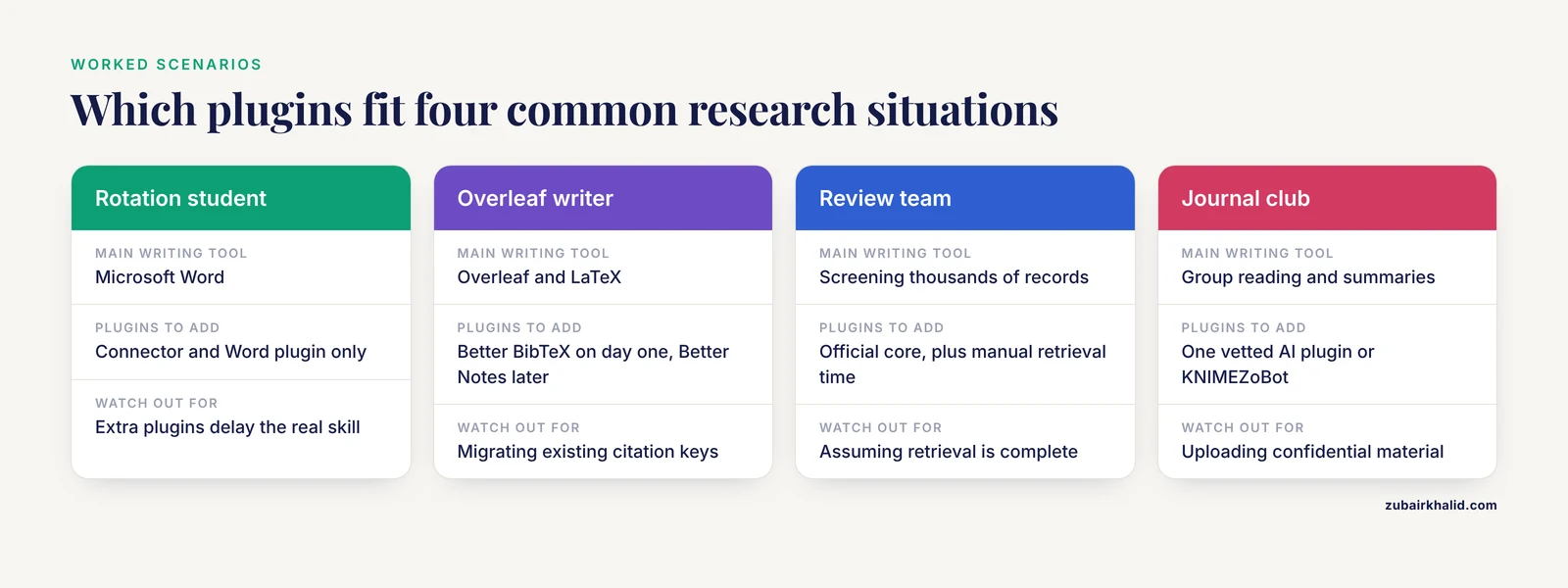
Scenario 1, a first-year rotation student writing in Word. Install the Connector and the Word plugin, pick your target journal's citation style, and stop there. Every additional plugin at this stage delays the actual skill, which is capturing cleanly and citing as you write.
Scenario 2, a computational biology doctoral student living in Overleaf. Add Better BibTeX on day one, define a citation-key pattern such as first author plus year, set an auto-export to a synced folder, and point the Overleaf project at that file. Better Notes is the worthwhile second addition once the reading load grows.
Scenario 3, a systematic review team screening thousands of records. The official core does the heavy lifting, and the retrieval lesson applies with force. Teams that assume automatic PDF retrieval completed their collection will undercount it, so budget time for manual retrieval of what the tools miss and record which version of each PDF supplied your extracted data [7].
Scenario 4, a journal club that wants AI summaries. Pick one vetted AI plugin, create a dedicated capped API key, agree as a group on what may and may not be uploaded, and consider the KNIMEZoBot route if the group wants visible, inspectable steps between the library and the model.
Common Mistakes and Limitations
- Confusing the two official add-ons. The Connector captures sources from the browser, the word processor plugin inserts citations in documents, and neither substitutes for the other.
- Ignoring version compatibility. A plugin built for Zotero 6 may fail under Zotero 7, so check the supported version before installing and after every major Zotero upgrade.
- Trusting automatic retrieval completely. Full-text tools miss available items and sometimes deliver the wrong version, so spot-check anything you cite [7].
- Pointing an AI assistant at confidential material by default. Unpublished manuscripts and peer-review documents deserve a deliberate decision, not an accidental upload.
- Mass-editing without a backup. Before running any plugin that rewrites items in bulk, copy your Zotero data directory or export a full-library backup.
- Assuming community plugins are maintained forever. Check the last release date and compatibility notes, and prefer plugins with active issue trackers.
- Expecting plugins to repair bad metadata. A rename-and-file plugin cannot guess correct authors from a broken import, so clean records at capture time.
- Delaying the style decision. Choosing a citation style after writing hundreds of bracketed citations forces a reformat that occasionally surfaces oddities in long documents.
Two boundaries frame all of this. Plugin ecosystems shift quickly, so treat any specific plugin name as a snapshot and verify current maintenance before adopting it. The right set of plugins also depends on your field and your writing tools, which is why the scenarios above diverge rather than converge on a single answer.
Frequently Asked Questions
Which plugins should a Zotero beginner install first?
Start with the two official add-ons, the Zotero Connector and the word processor plugin for your editor. Those two handle capture and citation, which cover most of what a reference manager is for, and community plugins make more sense once those habits feel automatic.
Do Zotero plugins cost money?
The plugins covered here are free to install. The exception to watch is AI assistants, which typically require an API key from a model provider, and that provider bills you for the usage the plugin generates.
Do I need Better BibTeX if I write in Microsoft Word?
No. Better BibTeX serves LaTeX, Overleaf, and Pandoc workflows where stable citation keys and auto-exported .bib files matter. The built-in word processor plugin already handles styles, citations, and bibliographies in Word.
Are AI plugins safe to use with unpublished manuscripts?
Treat them as external services. A plugin that chats about your papers sends that text to a model provider, so check what it transmits, prefer endpoints you control, and use a dedicated key with a spending cap before opening confidential material.
How do I install a Zotero plugin without breaking my library?
Match the plugin to your Zotero version, install it through the Tools menu, restart Zotero, and back up your data directory before running any plugin that edits items in bulk. Those four steps prevent nearly every installation problem users report.
Should I choose Zotero or EndNote as my citation manager?
Choose Zotero for a free, open-source workflow you can back up and migrate, and choose EndNote when your institution supplies it and your collaborators already run on it. Head-to-head testing shows the two trade strengths rather than one dominating the other.
Sources
- Research Guides: Zotero setup: Downloading Zotero and word processor plugins
- BiblioGuides: Zotero - reference management software: 2. Install Zotero and plugins
- Research Guides: Zotero: Plugins & Mobile
- Research Guides: Zotero: A How-To Guide: Downloading Zotero & Related Plugins
- LibGuides: Zotero: Plugins for Word & Open Office
- ANALISIS PEMANFAATAN, FAKTOR PENDUKUNG DAN PENGHAMBAT, SERTA UPAYA OPTIMALISASI APLIKASI ZOTERO DALAM PENULISAN KARYA ILMIAH
- Finding full texts in bulk: a comparison of EndNote 20 versus Zotero 6 using the University of York's subscriptions
- Foreign Experiences In Developing Research Competencies Of Prospective Teachers Through Digital Technologies
- Digital Reference Management Tools in Pharmaceutical Sciences: A Comprehensive Review of Zotero and Its Plugins for Enhancing Research Quality and Scientific Writing
- Zotero as a teaching tool for independent study courses, honors contracts, and undergraduate research mentoring
- Pelatihan Reference Managemenet Software (RMS) Zotero dalam pengelolaan Sumber Rujukan Penelitian
- Pelatihan Pemanfaatan Manajemen Referensi Zotero