Best Free Scientific Poster Templates: Options Compared
By Dr. Zubair Khalid, DVM, MS, PhD ·

The difference between free poster tools comes down to how much control you trade away for convenience. PowerPoint and Google Slides templates are fast and forgiving, Canva is the easiest for visual design, and LaTeX templates give you publication-grade typography at the cost of a learning curve. The rule of thumb is simple. If your conference deadline is within a week and you already know one of these tools, use that tool with its free templates. If you have time to learn and you care about precise figure placement, LaTeX gives the cleanest result.
This article compares the best free scientific poster templates options across the tools most researchers actually use, explains the pros and cons of each, and walks through how to make a scientific poster from a template without falling into the layout traps that make posters hard to read.
What a Poster Template Actually Does
A scientific poster is a large-format visual summary of a research project, usually printed on a single sheet between about 36 and 48 inches on the long side, displayed at a conference during a scheduled poster session. A template is a prebuilt file that already contains the canvas size, column guides, title banner, and placeholder boxes for sections such as Introduction, Methods, Results, and Conclusions.
Good research poster design separates three jobs that beginners tend to merge:
- Structure. The reading order of sections, usually left to right across three or four columns.
- Layout. The grid of columns and boxes that holds figures, text, and white space.
- Style. Fonts, colors, and logo placement, which should follow your institution or conference brand if one exists.
A template handles layout and often style. Structure is always yours. Many scientific societies publish poster guidance for their meetings, and the consistent message across that guidance is that a poster is a conversation starter, not a paper printed large, so the template you pick should leave room for big figures and short text.
Comparison Table: Free Scientific Poster Template Options
| Tool | Free templates available | Learning curve | Best for | Main limitation |
|---|---|---|---|---|
| PowerPoint (plus university templates) | Many, especially institutional | Low | Most academic conferences, printing | File size and figure export issues on large canvases |
| Google Slides | Community-made, easy to convert | Low | Group projects and remote collaboration | Coarser print control than PowerPoint |
| Canva (free plan) | Large built-in library, some academic | Low | Visual polish with almost no design skill | Some elements are paid, export limits |
| LaTeX (beamerposter, tikzposter) via Overleaf | Several well-maintained templates | High | Math-heavy work, reproducible builds | Steep learning curve, slow iteration |
| LibreOffice Impress | Converted PowerPoint templates | Low to medium | Offline work without a license | Font substitution when importing .pptx |
| BioRender (free tier) | Poster templates with science icons | Low | Life science posters with illustrated figures | Free exports include attribution and limited size |
| Adobe Express (free plan) | Poster templates, searchable | Low | Quick drafts and digital posters | Advanced features locked behind the paid plan |
The Options in Detail
PowerPoint Templates, Including Institutional Templates
PowerPoint remains the default poster tool in most academic settings because nearly every computer in a department already has it, and most campus print shops accept PowerPoint files directly. Microsoft's own support documentation explains how to set a custom slide size, which is the key step in turning a normal 16:9 slide into a poster canvas, for example 48 by 36 inches.
Three families of free templates matter here:
- Built-in templates. PowerPoint ships with a handful of poster-sized layouts, mostly generic.
- Institutional templates. Most universities maintain branded poster templates sized to the common conference formats, usually 36 by 48 inches or 42 by 60 inches, with the logo, fonts, and color palette already placed. Searching your institution name plus "poster template" usually finds them.
- Conference-specific templates. Some meetings distribute required templates so that all posters in a session match.
Pros. Full control over object placement, direct PDF export, wide print-shop acceptance, and figure pasting from Excel or Prism at high quality. Because the file format dominates academic poster sessions, help is easy to find when something breaks.
Cons. PowerPoint was built for slides, not posters, so working at 48 inches wide can feel clumsy, embedded figures inflate file size, and fonts render slightly differently on the print shop's computer if you do not embed or outline them.
Google Slides Templates
Google Slides has no official poster templates sized for conference printing, but you can set a custom page size up to 300 inches through the Page setup dialog, and a large community of universities shares free Google Slides poster templates that students copy into their own Drive.
The workflow is simple. A department shares a template link, you choose "Make a copy," change the page size to your conference's dimensions, and replace placeholder boxes with your content. Collaboration is the reason to pick this route. Multiple authors can edit the same poster simultaneously, comments replace email chains, and version history protects you from losing a late-night revision.
Pros. Real-time collaboration, automatic saving, free with a Google account, and accessible from any computer at the conference if your laptop dies.
Cons. PDF export quality is adequate but offers less control than PowerPoint, font choices are limited to what Google hosts unless you install fonts, and very large raster images can slow the file down.
Canva Free Templates
Canva offers a searchable library of poster templates, including academic and research-themed designs, on its free plan. You search "research poster," pick a layout, drag your figures into placeholder frames, and adjust colors. Canva's help documentation covers how to resize designs and export as PDF, which is what most print shops request.
For researchers who have no design background, Canva produces the most polished-looking posters with the least effort. The alignment guides, font pairing suggestions, and icon library remove the fiddling that consumes hours in PowerPoint.
Pros. Fastest path to a professional look, huge template variety, cloud-based with sharing, and a genuinely usable free tier.
Cons. Some templates and elements are locked behind the paid plan, which you discover mid-edit, the free tier restricts some export options, and heavy use of Canva's decorative stock elements can make an academic poster look like a marketing flyer. Reviewers notice.
LaTeX Templates: beamerposter and tikzposter
LaTeX is a typesetting system widely used in mathematics, physics, computer science, and quantitative biology. Two free template families dominate poster work in LaTeX. beamerposter extends the Beamer presentation class to large formats, and tikzposter builds posters from TikZ drawing primitives. Both are freely available through standard LaTeX distributions, and Overleaf provides editable examples of each that compile in the browser without any local installation.
The template defines the column structure, font scaling, and color theme in code. You add blocks of content, and LaTeX handles alignment and typography with the precision that makes LaTeX papers look the way they do.
Pros. Excellent typography, precise alignment, small text files that version cleanly in Git, and reproducible builds that survive supervisor edits without drifting.
Cons. You must learn LaTeX syntax, every figure must be exported as PDF or high-resolution image separately, and iterating on a design takes longer because you recompile to see changes. If your advisor wants to drag a box two inches to the left, PowerPoint serves them better.
LibreOffice Impress
LibreOffice Impress is the free, open-source presentation program in the LibreOffice suite. It opens PowerPoint files, which means every free PowerPoint poster template doubles as a LibreOffice template. Set the slide size through Slide Properties, and the workflow mirrors PowerPoint.
Pros. Completely free and offline, runs on Linux where PowerPoint does not, and handles the .pptx templates your university provides.
Cons. Font substitution is the recurring problem. If your template uses a licensed font that is not installed, Impress silently swaps it, which shifts text and breaks layouts. Always check rendering before export, and export to PDF rather than handing the raw file to a printer.
BioRender Free Tier
BioRender is a life-science illustration tool with a large library of icons for cells, pathways, molecules, and lab equipment. Its free tier includes access to poster-sized templates and a restricted set of illustrations, with exported files carrying a BioRender attribution mark and some size limits. For life science posters, this solves the hardest design problem, which is producing clear scientific figures rather than text-heavy boxes.
Pros. Publication-quality biology icons, templates built around scientific storytelling, and a low learning curve.
Cons. The free tier's attribution requirement and size limits may not suit every conference, and full icon access requires the paid plan. Check the current free-plan terms before committing, because they change over time.
Adobe Express Free Plan
Adobe Express, the free web-based design tool from Adobe, offers poster templates with a search interface similar to Canva's. The free plan covers basic templates and export, with the deeper asset library and brand controls on paid tiers. It is a reasonable fallback when Canva's free templates do not fit your field, but for most academic users Canva and PowerPoint cover the same ground with fewer limits.
How to Choose Between the Best Free Scientific Poster Template Options
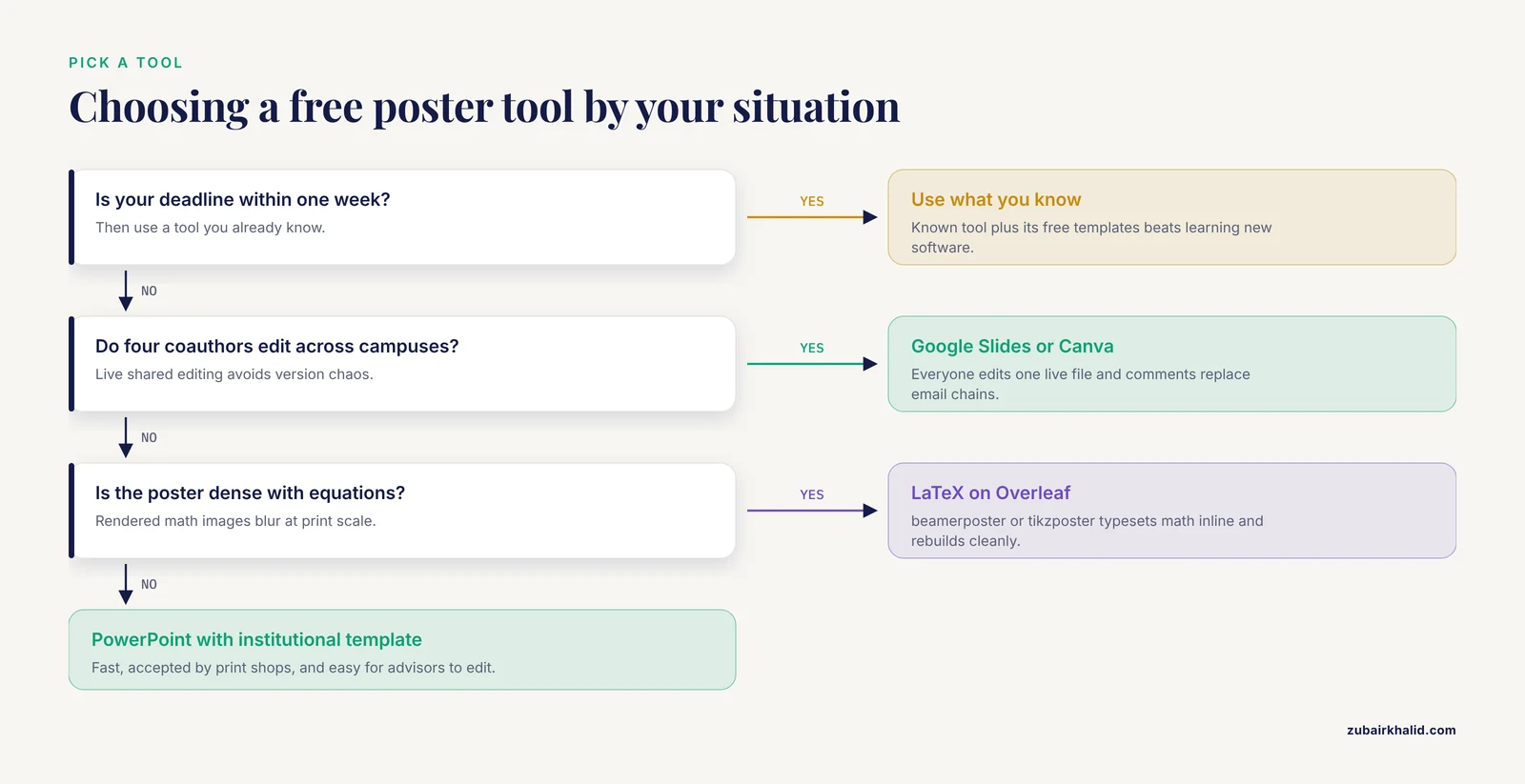
Four criteria decide real choices more reliably than feature lists.
Print requirements come first
Ask the conference two questions before you open any tool. What are the exact poster dimensions, and is the poster printed by you or by the conference? A 42 by 60 inch portrait poster forces different template choices than a 36 by 48 inch landscape one. Portrait templates can be adapted to landscape, but adaptation consumes time you may not have. If the conference prints the poster for you, they will specify a file format, usually PDF, which every option above can produce.
Collaboration style
Solo poster with one advisor? PowerPoint is fine. Four coauthors across three time zones revising figures until midnight? Google Slides or Canva, where everyone edits one live file, will save you from merging conflicting versions. LaTeX fits collaborative writing through shared repositories but is awkward for advisors who give visual feedback by pointing.
How much your figures dominate
If your poster lives or dies on four large figures, pick the tool that treats images best. PowerPoint and LaTeX both place figures precisely. Canva frames them elegantly but constrains placement to its grid. If your poster is mostly text and simple charts, any tool works and you should simply use the one you know.
Your deadline
Be honest about it. Learning beamerposter from scratch two weeks before a conference is a poor trade. The best free scientific poster template is the one in a tool you already know, customized with your institution's branding.
How to Make a Scientific Poster, Step by Step
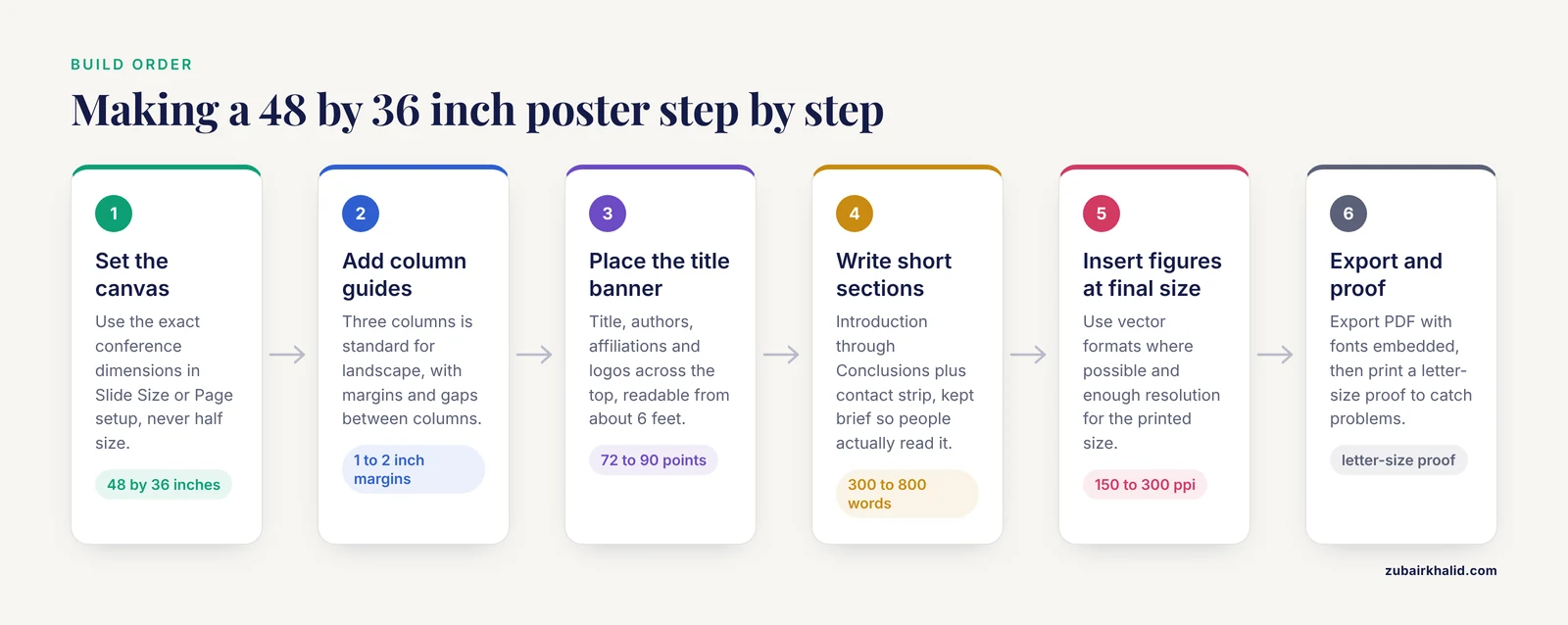
The research poster design workflow is nearly identical across every tool above. Here is the sequence with concrete settings that work for the most common format, a 48 by 36 inch landscape poster.
- Set the canvas. Create a new file and set the page size to exactly the conference dimensions. In PowerPoint, use Design, then Slide Size, then Custom. In Google Slides, use File, then Page setup, then Custom. Never build at half size intending to scale up, because fonts and line weights scale unevenly.
- Set column guides. Three columns is standard for a landscape poster of this size. Leave at least 1 to 2 inches of margin on every edge and roughly 0.5 to 1 inch between columns. Most templates ship with guides already placed, so snap your boxes to them.
- Place the title banner. Title, authors, affiliations, and logos across the top, readable from about 6 feet away. A title around 72 to 90 points works at poster scale, though exact sizes depend on dimensions. Body text typically falls between 24 and 32 points. Anything smaller fails the hallway test, meaning a reader standing a few feet away cannot read it.
- Write the sections. Introduction, Methods, Results, Conclusions, References, and an Acknowledgments or contact strip. Keep the total word count near 300 to 800 words. A poster that reads like a journal article will not be read.
- Insert figures at final size. Paste figures at the size they will print and use vector formats such as PDF, SVG, or EMF where possible, because vectors stay sharp at poster scale. Raster images need enough resolution for their printed size, roughly 150 to 300 pixels per inch at poster scale.
- Check color and contrast. Keep a dark-on-light scheme, avoid red-green pairs for the roughly 1 in 12 men with red-green color vision deficiency, and test that your figure backgrounds match the poster background.
- Export to PDF. Export with fonts embedded or as outlines, at the full poster size. Open the PDF at 100 percent zoom, check a corner region at print scale, and verify nothing is cropped.
- Print a small proof. Print a letter-size version of the PDF. Small text that is readable on paper is usually readable on the poster, and the proof catches alignment and color problems the screen hides.
Many scientific societies and research institutions publish similar checklists for their meetings and trainees, and following one of these step sequences from a template removes most of the improvisation that causes layout errors.
Worked Scenarios
Scenario 1: The solo graduate student, three weeks out
A PhD student presents a 36 by 48 inch landscape poster at a national meeting. She has used PowerPoint for years and her university publishes a branded poster template in that format. She downloads the institutional template, deletes the placeholder sections she does not need, drops in four figures exported as EMF files from GraphPad Prism, and keeps body text at 28 points. Total design time is about six hours spread over a week, plus printing. PowerPoint was the right call because the template already met her institution's brand rules and her print shop accepts the file directly.
Scenario 2: The four-author collaboration across campuses
A lab group spread over two universities must produce a poster in ten days. Constant email attachments would create version chaos. They copy a university Google Slides poster template into a shared Drive folder, set the page size to 48 by 36 inches, and each coauthor edits their own section live. The advisor leaves margin comments inside the file. On the final day one member exports the PDF and submits it to the campus print center. Collaboration was the deciding criterion, and Slides won.
Scenario 3: The mathematics conference poster
A postdoc in probability theory needs a poster dense with equations. Rendering equations as images in PowerPoint produces inconsistent baseline alignment and blurry math at print scale. He instead starts from a beamerposter template on Overleaf, writes the math inline in LaTeX where it typesets perfectly, and rebuilds the poster each time a coauthor suggests changes because the source file is text. The learning curve was already paid from writing papers in LaTeX, so the choice was low risk.
Common Mix-ups When Picking a Template
- Confusing poster size with slide size. A template designed for 36 by 48 inches will not print correctly at 42 by 60 inches just because you hit print. Set the canvas first, then design.
- Assuming every Canva template is free. Templates marked with a crown require a paid plan. Filter to free elements before you invest an hour in a design.
- Equating "free" with "no attribution." Some free tiers, such as BioRender's, require an attribution notice on exported files. That is a real condition for a conference poster, so read the terms.
- Mixing landscape and portrait mid-project. Changing orientation late in the process forces a full redesign. Confirm the orientation from the conference's acceptance email before starting.
- Choosing a tool your print shop cannot handle. Nearly every print shop takes PDF and PowerPoint. Fewer take .tex files or Canva links. Export to PDF from any tool and the problem disappears.
Common Mistakes and Limitations
- Text set at body-font sizes from papers. Text at 11 or 12 points is unreadable at poster distance. Scale everything up and cut words instead.
- Figures pasted as low-resolution screenshots. A 72 pixels-per-inch screenshot stretched across two poster columns prints as visible pixels. Re-export figures at the size you need them.
- Filling every inch of the canvas. White space is not wasted space. It guides the eye between sections. If removing content feels impossible, move detail to a handout or a QR code linking to the paper.
- Relying on color alone to encode data. Readers with color vision deficiencies and readers printing in grayscale both lose information. Add shapes, line styles, or direct labels.
- Not embedding fonts before export. Text that renders in Calibri on your laptop may substitute to something else on the print shop's machine and overflow its box. Export to PDF with fonts embedded, or convert text to outlines for final delivery.
- Skipping the printed proof. Screen previews hide color shifts, thin lines that vanish in print, and margins that sit closer to the edge than the printer can print. Print a letter-size proof and read it at arm's length.
- Last-minute changes by coauthors after proofing. Any edit after the proof invalidates the proof. Freeze content at least a few days before printing.
One limitation applies across all of these options. Conference requirements vary widely in size, orientation, mounting style, and file format, and individual cases need checking against the specific instructions your meeting sends. When a conference rule and a template conflict, the conference rule wins.
Frequently Asked Questions
What size should a scientific poster be?
Use whatever size your conference specifies, because it varies by meeting. The most common academic formats are 36 by 48 inches and 42 by 60 inches in landscape orientation, with A0 (about 33 by 47 inches) common at international meetings. Set your canvas to the exact dimensions before designing, not after.
Are free poster templates really free?
Yes for the tools covered here, with conditions. PowerPoint templates require a Microsoft 365 license unless your institution provides one, Google Slides and LibreOffice are free outright, and Canva, Adobe Express, and BioRender have genuine free tiers with limits such as fewer elements, attribution marks, or restricted export options. Read each free tier's current terms before you start, because they change.
Is PowerPoint or LaTeX better for a scientific poster?
PowerPoint is better for most people because it is faster, widely supported by print shops, and easy for coauthors to edit. LaTeX is better when your poster is equation-heavy or when you want version-controlled, reproducible source files. If you do not already know LaTeX, PowerPoint will get you to a finished poster sooner.
How do I make a scientific poster from scratch without a template?
Set your canvas to the conference dimensions, add three or four column guides with 1 to 2 inch margins, place a title banner across the top, then add section boxes in reading order from Introduction through Conclusions. Keep body text at 24 to 32 points, insert figures at their final printed size, and export to PDF with fonts embedded. A template simply automates these setup steps, so knowing the sequence means you can build one anywhere.
Can I use a Canva template for an academic poster?
Yes, as long as you use only free elements and export a print-ready PDF. Canva's research and academic template categories include several conference-style layouts, and you can resize any poster template to custom conference dimensions. The main risk is accidentally using paid elements, so check the template's asset list before you build on it.
How far in advance should I start my poster?
Start at least two to three weeks before the printing deadline, not the conference date. That leaves time for figure re-exports, coauthor edits, a printed proof, and print-shop turnaround, which at many campus print centers takes several business days during conference season. Posters started the week before printing almost always contain a fixable mistake that there is no longer time to fix.