Choosing the Right File Format for Your Data Deposit
By Dr. Zubair Khalid, DVM, MS, PhD ·

Choosing the right file format for your data deposit is the difference between a dataset other scientists can actually reuse and one that sits in a repository unread. The rule of thumb is simple: deposit your data in open, nonproprietary formats that any computer can read without special licensed software, keep the raw instrument output alongside any processed files, and pair both with structured metadata in a documented format.
This article walks through the best file formats for data repositories across the major data types in the life sciences, compares them side by side, and shows what happens when the wrong choice gets made. The evidence is sobering. A recent audit of 115 shared datasets in visual cognition research found that 28 datasets had to be excluded from analysis entirely because of broken links, restricted access, or interoperability problems caused by closed file formats [1]. In proteomics, reviewers attempting to reanalyze deposited mass spectrometry projects described the result as "data tombs," meaning datasets that are technically open access but practically impossible to reuse, partly because of proprietary-only outputs that blocked open reanalysis [2]. Format choice is where research data sharing succeeds or fails.
Why File Format Decides Whether Your Data Gets Reused
A repository stores whatever you upload. It does not convert your files, document your columns, or explain your coding schemes. That work falls on the next person who downloads the data, and if that person cannot open your files or make sense of them, the deposit has failed its purpose even though it technically exists.
The visual cognition audit illustrates how deep the problem runs. Across the 115 datasets examined, researchers identified more than 3,000 unique column names, with most appearing only once. Even for the four variables common to nearly every experiment in the field, participant identifiers, trial identifiers, response accuracy, and response times, labeling varied dramatically. Many datasets looked like uncurated exports straight from data collection software, containing redundant variables, inconsistent coding schemes, and ambiguous column headings [1]. The file format itself was only part of the problem, but closed formats made it worse, because a locked binary file gives a reuser nothing to work with.
The same pattern appears in proteomics. A teaching exercise that asked six student teams to reanalyze six deposited proteomics projects with a common R-based workflow found recurring systemic barriers, including proprietary-only outputs from instruments and analysis software such as Thermo .msf and Progenesis files, inconsistent file naming, and missing metadata [2]. Data deposited in interoperable, community-standard formats, by contrast, could be picked up and processed by every team.
The lesson generalizes across life science disciplines. Format is not a technical afterthought. It is the interface between your work and every person who will ever try to build on it.
Side-by-Side Comparison of Common Deposit Formats
The table below summarizes the main options researchers weigh when choosing a file format for a data deposit. Details for each category follow in the sections below.
| Format | What it stores | Open or proprietary | Best suited for | Main drawback |
|---|---|---|---|---|
| CSV (.csv) | Tabular data, one record per row | Open | Survey results, behavioral data, phenotype tables, metadata | No built-in data dictionary, easy to encode inconsistently |
| TSV (.tsv, .txt) | Tabular data separated by tabs | Open | Tabular data with commas inside values, genomics outputs | Same lack of self-documentation as CSV |
| XLSX (.xlsx) | Spreadsheets with formatting, formulas, multiple sheets | Spec is documented but software-dependent in practice | Working files during analysis | Formatting corrupts values, poor for long-term preservation |
| JSON (.json) | Nested structured data and metadata | Open | Structured metadata, configuration, hierarchical records | Unwieldy for large rectangular tables |
| FASTQ (.fastq, .fq) | Raw sequencing reads with base qualities | Open | Raw output of next-generation sequencing | Large file sizes, needs compression |
| BAM / CRAM | Aligned sequence reads | Open (binary/compressed) | Mapped reads for genomics pipelines | Binary, needs an index and reference to interpret |
| POD5 | Raw nanopore signal data | Open (community-published) | Raw Oxford Nanopore Technologies signal | Specialized tooling needed for inspection |
| mzML | Mass spectrometry raw and peak data | Open (community standard) | Proteomics and metabolomics raw spectra | Large files, conversion step required from vendor output |
| mwTab and JSON | Metabolomics study data and metadata | Open (repository standard) | Metabolomics Workbench deposits | Requires validation to catch format errors |
| DICOM, NIfTI, BIDS-style structures | Medical and research imaging | Open | MRI, CT, and derived image data | Domain-specific, conversion needed from vendor DICOM |
| .afm 3D-density files | Atomic force microscopy volumes readable by structural biology tools | Open (published format) | AFM data meant to interoperate with cryo-EM and crystallography toolchains | New format, adoption still growing |
| SDRF | Sample metadata mapped to data files | Open (community standard) | Proteomics sample annotation | Discipline-specific, unfamiliar outside proteomics |
| PDF (.pdf) | Documents, protocols, codebooks | Open (readable everywhere) | Documentation, data dictionaries, protocols | Unusable as a data format itself |
| Vendor proprietary formats | Instrument native output | Proprietary | Long-term raw archival only when no open equivalent exists | Locked behind specific software, blocks reuse |
Tabular Data: CSV and TSV as the Default
For most behavioral, survey, clinical, and phenotype data, the best file format for a data repository is a plain delimited text file, most often comma-separated values (CSV). A CSV is a plain text file where each row is a record and each value is separated by a comma. A TSV does the same with tabs, which is useful when the values themselves contain commas. Both open in any text editor, spreadsheet program, or scripting language without licensed software, and both will still be readable decades from now.
Real deposits show why this matters. A survey dataset of ventilation practices in Great Britain, covering 2,039 adults and 396 variables spanning binary, continuous, discrete, categorical, and free-text responses, was deposited as a single CSV file [3]. A dataset of synchronized electrocardiogram, electrodermal activity, skin temperature, and accelerometer recordings from 44 adults watching emotional videos was stored as timestamped raw text files at a 1000 Hz sampling rate, with one file per stimulus, plus structured demographic metadata in JSON format [4]. Both choices keep the data machine-readable and independent of any specific software vendor.
The tradeoff with CSV and TSV is that they carry no self-description. A CSV column named "cond" could mean condition, condensation, or conductivity. The visual cognition study mentioned above found that the overwhelming majority of more than 3,000 column names across 115 datasets appeared only once, which makes cross-dataset reuse nearly impossible [1]. The fix is not a different file format but better practice within the format. Use full, unambiguous column names, spell out the "Big Four" experimental variables consistently (participant identifier, trial identifier, response accuracy, response time), keep one row per observation, and attach a data dictionary that defines every column and every coded value [1].
Excel files deserve a specific warning. They are fine for working during analysis, but as deposit formats they introduce silent problems. Spreadsheet software rewrites values on save, turning gene symbols into dates, stripping leading zeros from identifiers, and storing formulas instead of results. Deposit a CSV export of the final data instead, and keep the Excel file as a private working copy if you like.
Sequencing Data: FASTQ, Aligned Formats, and Raw Signal
High-throughput sequencing has some of the most settled format conventions in the life sciences, which makes it a useful model. Raw reads are deposited as FASTQ files, a plain text format that stores the nucleotide sequence and a per-base quality score for each read. Repositories such as the Gene Expression Omnibus (GEO), the Sequence Read Archive, ENA, and DDBJ all accept FASTQ as the raw submission format, and retrieval tools such as iSeq, which pulls sequencing data and metadata from the Genome Sequence Archive, SRA, ENA, and DDBJ in one command-line interface, are built around these standard formats and accession schemes [5].
Because raw FASTQ files are enormous, aligned reads are typically shared as BAM files, a compressed binary format that stores reads mapped to a reference genome, or as CRAM files, which compress further by referencing the genome sequence. Both are open formats with mature tooling, which is exactly what a repository deposit should be.
Nanopore sequencing adds a newer wrinkle. Oxford Nanopore Technologies adopted the POD5 format for storing raw signal data, and the community has since built open tooling around it, including graphical tools that let users inspect, plot, and export individual reads from POD5 files without programming skills [6]. The lesson for depositors is that a well-documented open format attracts an ecosystem of tools, which in turn makes deposited data easier for others to explore and reuse.
If your sequencing data goes to a repository, the deposit checklist is straightforward. Deposit the raw FASTQ (or raw signal format), any aligned BAM or CRAM files you want to share, and the sample metadata in a structured, documented format.
Imaging Data: Standards Built for Interoperability
Imaging is a discipline where format problems were severe enough that communities built their own standards. Vendor formats vary, modalities vary, and analysis pipelines vary, all of which made cross-center reproduction difficult. The Open and Reproducible Musculoskeletal Imaging Research (ORMIR) community responded with ORMIR-MIDS, a data format derived from the existing Brain and Medical Imaging Data Structures (BIDS and MIDS) and extended to musculoskeletal applications. It defines a standard specification plus software tools that convert image data into an organized folder structure and produce metadata files covering data-processing information, patient data, and complete image header tags, including enough information to convert back to the original format [7].
The practical takeaway is that a folder structure with consistent naming and standardized metadata files is itself part of the format choice. When you deposit imaging data, follow the standard your community has adopted rather than inventing your own layout. If your imaging modality has no established standard, apply the same principles: open file formats, a documented folder structure, and complete metadata.
Atomic force microscopy shows what happens when a community builds a bridge format deliberately. Structural biology techniques such as cryogenic electron microscopy, X-ray crystallography, and nuclear magnetic resonance produce data that are interchangeable and cross-verifiable because they share common file conventions. AFM historically could not join that ecosystem. Researchers addressed this by developing a pipeline that converts AFM data into 3D-density files in a published .afm format, readable by the same programs used to visualize and analyze other structural data, which allows AFM researchers to deposit data in a format that supports comparison and cross-verification with other techniques [8]. The general principle applies to any modality: if your instrument's native format isolates your data, look for or advocate for a conversion path into the open formats your field's repositories and tools already support.
Proteomics and Metabolomics: Community Standards or Data Tombs
Proteomics and metabolomics both run on mass spectrometry and both have learned the same lesson about proprietary formats.
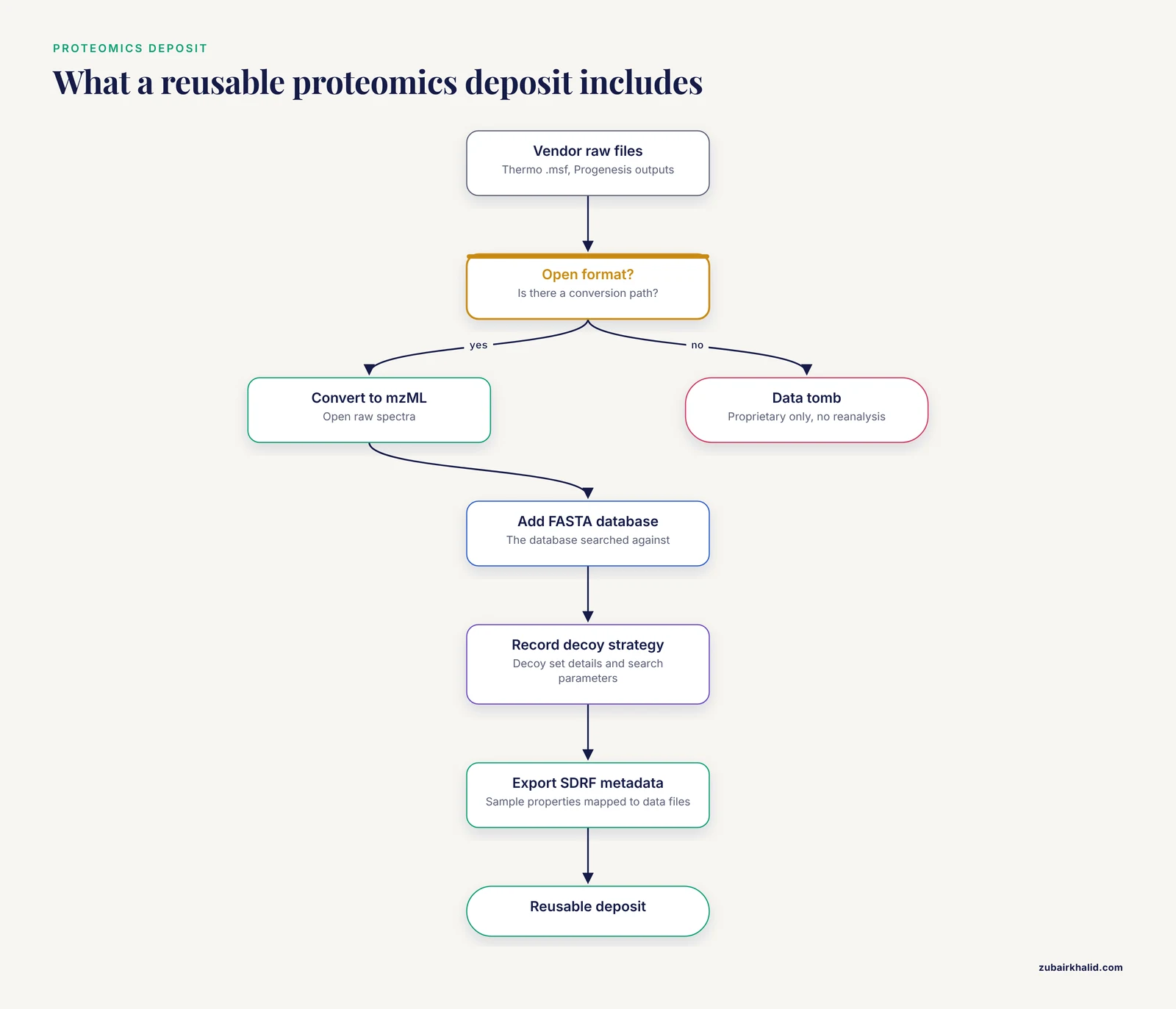
On the proteomics side, the reanalysis exercise that coined the "data tombs" phrase found that proprietary-only outputs, including Thermo .msf files and Progenesis outputs, impeded open reanalysis in interoperable, community-standard formats. The same exercise flagged missing sample and data relationship metadata, missing decoy set details for false discovery rate assessment, and missing protein sequence database (FASTA) files [2]. The fix on the metadata side has been standardization. The MaxQuant analysis platform now exports sample metadata as SDRF, a standard format that maps sample properties to proteomics data files, and annotates output tables with it so downstream analysis can proceed directly on standardized, annotated data [9]. When you deposit proteomics data, the goal is raw spectra in an open format, the FASTA database used for the search, search parameters, and sample metadata in SDRF.
Metabolomics has a repository-native answer. The Metabolomics Workbench accepts deposits in its mwTab text format and a corresponding JSON format, and the repository's associated Python library has been updated with extensive validation capabilities to catch format errors across all deposited datasets, supporting curation, FAIRness, and reuse for meta-analyses [10]. Validation matters because format standards only help if the files actually conform to them. If your metabolomics workflow runs through platforms such as Workflow4Metabolomics, which processes LC-MS, GC-MS, and NMR data through modular workflows, the processing pipeline itself can produce analysis-ready outputs that travel well into a repository [11].
For both disciplines, the pros and cons of format options resolve the same way. Vendor-native formats preserve every instrument detail but lock the data. Community-standard open formats require a conversion step, sometimes a learning curve, but they are the only formats that independent researchers can actually process.
Metadata Formats: The Half of the Deposit People Skip
Every dataset described above needed metadata to be reusable, and metadata has its own format question. The good news is that the answer is usually simple.
For structured sample and experiment metadata, JSON has become the default. It is open, text-based, readable by every programming language, and handles nested information such as participant demographics, stimulus properties, or treatment hierarchies. The physiological signals dataset discussed above paired its raw text data files with demographic metadata in JSON format for exactly this reason [4].
For discipline-specific sample annotation, use the standard your community has built. In proteomics, that means SDRF, which explicitly maps sample properties to data files so that anyone joining your data with metadata does not have to reverse-engineer your file naming [9]. In metabolomics submissions to the Metabolomics Workbench, the mwTab format itself carries the study metadata alongside the data [10].
For human-readable documentation, a plain text README or a PDF data dictionary is the right vehicle. The point is that documentation files are supplements to the data, never substitutes for it. A PDF of a spreadsheet is not a data deposit.
One caution applies to all metadata: inconsistent formats in public repositories hinder other researchers' ability to reproduce and reuse datasets, which is the exact problem standardized metadata exports were built to solve [9]. Free-text notes scattered across files are the metadata equivalent of the ambiguous column headings found in the visual cognition audit [1].
How to Choose: The Criteria That Actually Decide
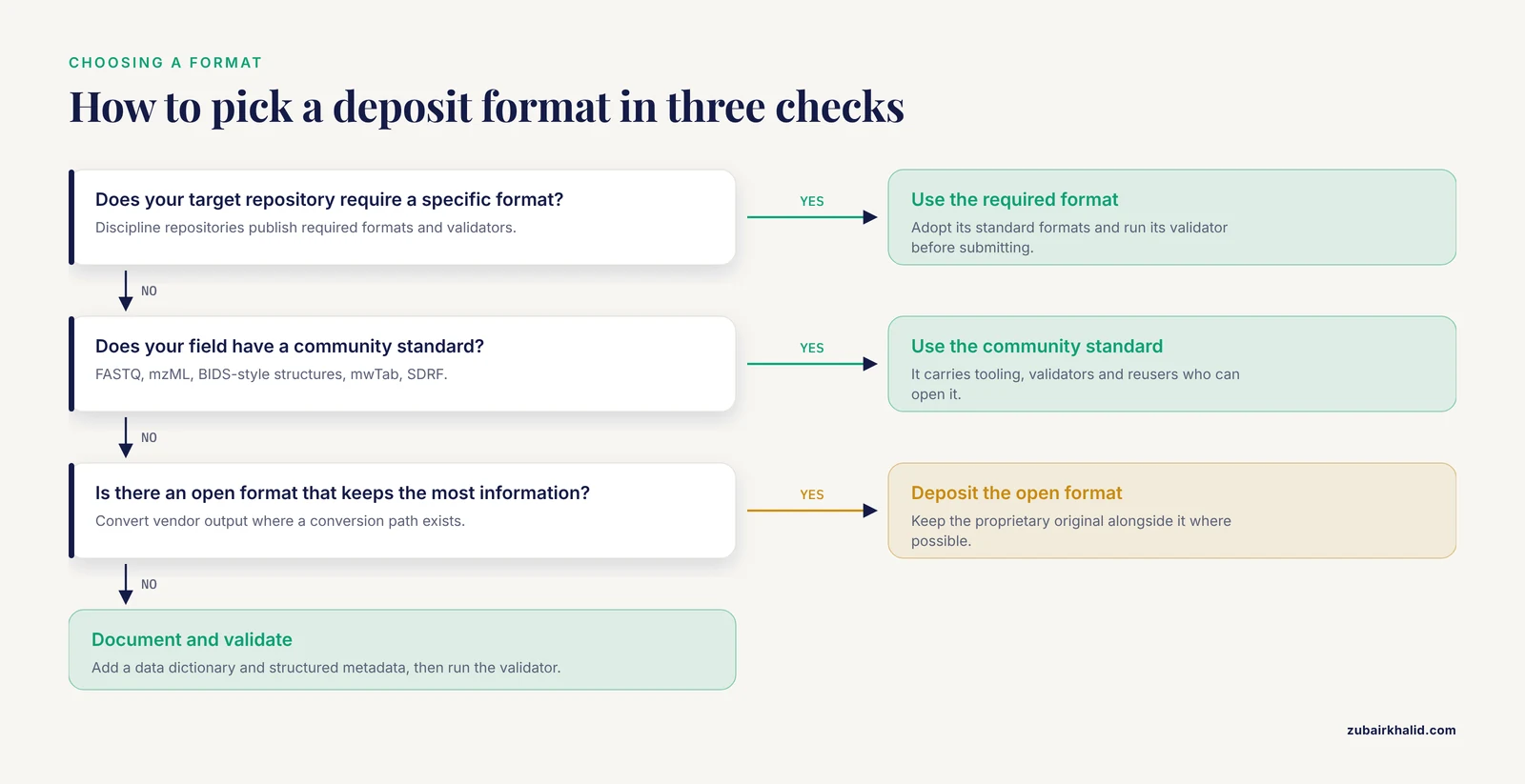
When researchers compare file formats for data repositories, four criteria separate the good options from the bad.
Openness. Can the file be read without licensed, vendor-specific software? Open formats survive changes in software vendors and operating systems. Closed formats are the single clearest cause of inaccessible deposits, as the 28 excluded datasets in the visual cognition audit demonstrate [1].
Community adoption. Is the format the recognized standard in your field? FASTQ in sequencing, mzML in mass spectrometry, BIDS-style structures in imaging, and mwTab in metabolomics each carry an ecosystem of tools, validators, and reusers. A well-documented open format with active tooling, such as POD5 for nanopore signal, beats an obscure open format with none [6].
Stability of meaning. Does the file preserve your variables, units, and coding schemes unambiguously? This is where CSV plus a data dictionary beats both raw software exports and locked binaries. Raw exports carry redundant or irrelevant variables and ambiguous headings [1]. Curated files with standardized column names carry meaning forward.
Machine-readability at scale. Can a pipeline read the file without a human in the loop? Automated and semi-automated systems that register heterogeneous research assets, including sequencing files, processed matrices, imaging data, analysis-ready objects, tabular files, and documents, rely on file-type recognition and format-aware metadata extraction [12]. Deposits in recognized formats feed these systems cleanly.
A useful sequence for any deposit: ask first what format your target repository requires, second what your community standard is, and third what open format preserves the most information if neither is fixed.
Data Repository Comparison: What Different Repositories Expect
Repositories differ in what they accept, and the data repository comparison you do before depositing should include format requirements.
Generalist repositories such as Mendeley Data accept a broad range of file types and are common homes for datasets that accompany data descriptor articles, including the physiological signals dataset and the ventilation survey dataset discussed above [4] [3]. They give you flexibility but put the format burden on you.
Discipline-specific repositories impose formats by design. GEO for gene expression and sequencing data involves multistep submissions with metadata preparation, file uploads, and MD5 checksum validation, a process that tools now automate by handling uploads, checksum calculations, and template-based metadata completion to reduce submission errors [13]. The Metabolomics Workbench requires the mwTab or JSON deposition format and actively validates deposited files against the current format specification [10]. Sequencing archives operate around FASTQ raw submissions and structured accession systems that retrieval tools parse across databases [5].
Institutional systems occupy a different niche. Governance layers such as MetaServe manage pre-publication research assets, including heterogeneous file types in nested project structures, without requiring repository-grade standardization, using file-type recognition and metadata extraction to make controlled institutional access workable [12]. That works for internal sharing, but it is not a substitute for a public deposit in standard formats when you publish.
The practical rule: match your format to your destination. Depositing to a discipline repository means adopting its standard formats and validators. Depositing to a generalist repository means choosing the open formats yourself, and choosing well.
Worked Scenarios
Scenario 1: A behavioral experiment. You ran a reaction time study in psychology software that exports a proprietary log file. Deposit three things: the CSV export of the cleaned trial-level data with standardized column names for participant ID, trial ID, accuracy, and response time, following the naming recommendations from the visual cognition study [1], the raw export file for completeness, and a plain text data dictionary. Do not deposit only the .xlsx workbook you used for analysis.
Scenario 2: A mass spectrometry proteomics experiment. Convert your vendor raw files to an open format, deposit the FASTA protein sequence database you searched against, record your decoy set strategy and analysis parameters in the documentation, and export your sample metadata as SDRF if your analysis platform supports it [9]. Depositing only the vendor's proprietary analysis output risks creating another dataset that teams cannot reanalyze [2].
Scenario 3: A multimodal physiology dataset. You have synchronized signals from multiple sensors at 1000 Hz. Store the raw signals as timestamped text files, one file per recording segment with consistent segmentation across participants, put the demographic and stimulus metadata in JSON files alongside them, and deposit the whole structured folder to a generalist repository [4]. The folder structure and naming consistency are part of the format.
Common Mistakes and Limitations
The most common mistakes in choosing a deposit format are predictable and avoidable.
Depositing only processed data. Raw files are what allow reanalysis with new methods. The proteomics reanalysis teams needed raw spectra, and where raw data or essential parameters were missing, reanalysis stalled [2].
Depositing uncurated software exports. Exporting directly from data collection software and calling it a deposit passes your coding quirks to every reuser. The visual cognition audit found redundant variables, inconsistent coding schemes, and ambiguous headings throughout shared datasets [1]. Spend an hour curating before you upload.
Using closed file formats when open equivalents exist. This is the mistake with the clearest documented cost, datasets rendered inaccessible or unworkable for reusers [1].
Skipping machine-readable metadata. A README describing samples in prose is not the same as structured metadata in JSON or a discipline standard. Standardized metadata exports exist because free-text descriptions block automated joining of sample information with data [9].
Inconsistent file naming. Inconsistent naming was among the recurring barriers that made proteomics projects hard to reanalyze [2]. Pick a naming scheme, document it, and apply it to every file.
Ignoring repository validation. Formats such as mwTab have validation tooling precisely because format errors are common, and validated deposits are more reusable for meta-analysis [10]. Run the validator before you submit, not after.
One limitation to keep in mind: format conventions evolve, and the right choice for your field depends on your specific data type, your target repository, and your community's current standards. Check the deposition guidelines of your specific repository before you export anything, because this article gives you the general principles and the documented failure modes, not a substitute for the submission requirements of the place you are depositing.
Frequently Asked Questions
What are the best file formats for data repositories?
The best file formats for data repositories are open, nonproprietary formats that match your data type: CSV or TSV for tabular data, FASTQ for raw sequencing reads, mzML for mass spectrometry data, JSON for structured metadata, and community-standard structures for imaging. Pair every data file with a data dictionary and structured metadata.
Should I deposit raw data, processed data, or both?
Deposit both when the repository allows it. Raw files enable reanalysis with new methods, which is the main reason shared datasets get reused, and processed files let others check your analysis. The proteomics reanalysis failures happened largely because raw data, search parameters, or essential supporting files were missing [2].
Can I deposit Excel files to a data repository?
You can deposit them, but you should not make them your primary data format. Export the final data to CSV for the deposit and keep the workbook as a working file, because spreadsheet software changes values on save and the format is software-dependent in practice.
What format should I use for my metadata?
Use JSON for structured metadata such as sample demographics and experimental conditions, and use your field's standard where one exists, such as SDRF for proteomics sample annotation [9]. Always include a plain text or PDF data dictionary that defines every column and coded value.
What if my instrument only exports proprietary formats?
Look for an open conversion path, because one usually exists. Mass spectrometry vendors' output converts to mzML, imaging vendor data converts into standardized structures [7], and AFM data can be converted into open 3D-density formats readable by structural biology tools [8]. Deposit the converted open-format file alongside the proprietary original where possible.
How do I know what format a specific repository requires?
Check that repository's deposition guidelines before you prepare files, and use its validation tools where they exist. Discipline repositories such as the Metabolomics Workbench publish their required format specifications and provide validators [10], and tools for repositories such as GEO automate the upload and checksum steps [13]. Generalist repositories accept more formats, which means the choice of open formats is yours to make well.
Sources
- "It makes sense to me": Examining data file column names in the visual cognitive literature.
- Preventing Proteomics Data Tombs Through Collective Responsibility and Community Engagement.
- Survey data on ventilation provision and use in homes in Great Britain.
- Physiological responses to emotional video stimuli: ECG, EDA, and temperature data.
- iSeq: an integrated tool to fetch public sequencing data.
- Pod5Viewer: a GUI for inspecting raw nanopore sequencing data.
- ORMIR-MIDS: an open standard for curating and sharing musculoskeletal imaging data.
- A structural biology compatible file format for atomic force microscopy.
- Facilitating analysis and dissemination of proteomics data through metadata integration in MaxQuant.
- A Major Update and Improved Validation Functionality in the mwtab Python Library and the Metabolomics Workbench File Status Website.
- Workflow4Metabolomics (W4M): A User-Friendly Metabolomics Platform for Analysis of Mass Spectrometry and Nuclear Magnetic Resonance Data.
- MetaServe: a lightweight, metadata-aware governance and delivery layer for pre-publication research omics data.
- GEO uploader: simplifying the data deposition in the GEO repository.