How to Automate Research Workflow Notifications
By Dr. Zubair Khalid, DVM, MS, PhD ·

By the end of this guide you will be able to automate research workflow notifications so that the right people hear about the right event without anyone checking a dashboard by hand. You will build a working pipeline that sends a Slack or email alert when a computation finishes, a scheduled reminder when a deadline approaches, and a daily digest that summarizes overnight activity. You will also learn how to test the pipeline, fix the errors that show up most often, and avoid the failure modes that make labmates mute your alerts within a week.
You need four things on hand before you start. First, a computer with Python 3.10 or newer installed and access to a terminal. Second, a Slack workspace (or a Microsoft Teams tenant, or an email list you control) where you have permission to create a webhook or send to a channel. Third, a research workflow you want to monitor, whether that is a Snakemake or Nextflow pipeline, a shared instrument calendar, a sample tracking spreadsheet, or an electronic lab notebook. Fourth, about ninety minutes for the first setup. Everything in the walkthrough uses free tools.
Why Automate Research Workflow Notifications
Most research delays are communication delays. An analysis finishes at 2 AM and nobody notices until the next afternoon. A sequencer run passes QC but the person who needs the data is at a conference. A reagent order sits unapproved for a week. Automating notifications removes the human relay step from these loops.
There is solid evidence that digital collaboration tooling changes team communication for the better. A survey of 557 professionals found that tools such as Asana, Trello, and Slack significantly enhance communication and collaboration within organizations, and that the frequency and purpose of tool usage were key factors in that effect [1]. The same logic applies inside a lab or research group. Automated alerts are simply collaboration tools pointed at your workflow instead of your task list.
Automation also supports scientific collaboration across distances. Remote operations research in ocean exploration found that shoreside teams need explicit specifications for situational awareness, meaning they must be told what changed, when, and with what confidence, rather than discovering changes themselves [2]. A well designed notification does exactly that. Similarly, the NASA and JAXA UTM and D-NET collaboration on disaster response identified coordinated information sharing among multiple organizations as the difference between timely and wasted responses, a lesson that transfers directly to multi-institution research projects where no single person can see every system [3].
Finally, automation projects succeed or fail on communication more than on code. An analysis of DevOps implementation across technology, finance, and healthcare organizations found that strong leadership support accounted for about 35 percent of implementation success, continuous learning about 30 percent, and effective communication about 20 percent, while automation tool investment mattered less than these human factors [4]. If you are introducing automated notifications to a lab, treat it as a team practice change, not a solo script.
Plan Your Triggers Before You Write Any Code
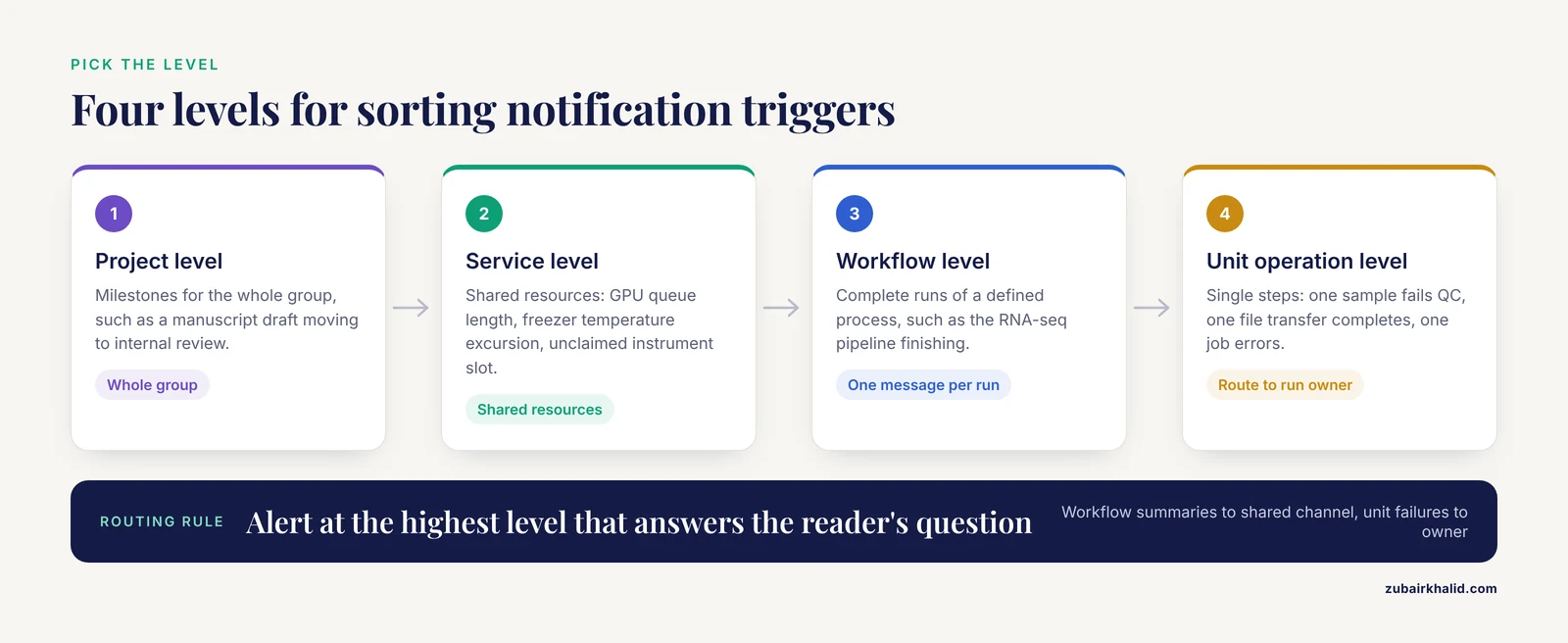
The first mistake researchers make is automating whatever event they think of first. A better approach is to inventory your workflow and decide which events deserve an alert. A useful framework comes from synthetic biology, where an abstraction hierarchy organizes biofoundry activities into four interoperable levels: Project, Service/Capability, Workflow, and Unit Operation, in order to streamline the Design-Build-Test-Learn cycle and improve communication between researchers and systems [5].
You can borrow that structure directly. Sort every candidate notification into one of four levels.
- Project level. Milestones that matter to the whole group. Examples: a manuscript draft moves to internal review, a grant report is due in two weeks, a student rotates out.
- Service or capability level. Shared resources. Examples: the GPU cluster queue length crosses a threshold, the -80 freezer logs a temperature excursion, a shared instrument calendar shows an unclaimed slot tomorrow.
- Workflow level. Complete runs of a defined process. Examples: the RNA-seq pipeline finishes, the weekly image analysis batch completes, a collaborator's dataset finishes downloading.
- Unit operation level. Single steps. Examples: one sample fails a QC threshold, one file transfer completes, one job exits with an error.
Alert at the highest level that answers the reader's question. A postdoc does not need a message for every unit operation in a 200-step pipeline. They need one message per workflow with a failure count and a link to logs. A technician troubleshooting a run does need unit operation detail. Most labs end up routing unit operation failures to the person who owns the run and workflow summaries to a shared channel.
Choose Your Channel
Each channel has different latency, effort, and audience properties. The table below summarizes the options covered in this guide.
| Channel | Trigger types it suits | Latency | Setup effort | Best for |
|---|---|---|---|---|
| Slack incoming webhook | Job completion, failures, digests | Seconds | Low (one URL, one script) | Team-wide visibility, urgent failures |
| Email via SMTP | Digests, deadline reminders, weekly reports | Seconds to minutes | Low to medium | Formal records, people outside your chat system |
| cron on a lab server | Scheduled checks and digests | Minutes | Low | Time-based reminders, polling file shares |
| GitHub Actions on a schedule | Repo-based digests, weekly summaries | Minutes, minimum 5 minute interval | Medium | Notification logic that lives with your code |
| ELN or LIMS webhooks (if offered) | Sample status changes, approvals | Seconds | Varies by system | Sample and protocol tracking |
Two principles guide the choice. Match urgency to channel, so a freezer alarm goes to a phone-pinging channel while a weekly report goes to email. And match audience to channel, since a shared channel builds group awareness while a direct message builds individual accountability. Research on organizational digital transformation emphasizes that the quality of interactions these tools enable, not just their presence, drives their value [1], and institutional studies of digital enablement find that digital tools support transparency and real-time decision-making when they are aligned with how the group actually works [6].
How to Automate Research Workflow Notifications Step by Step
Step 1: Create a Slack incoming webhook
An incoming webhook is a unique URL that accepts a JSON payload and posts a formatted message to one Slack channel. In your Slack workspace, go to the app directory, search for "Incoming WebHooks", install it, choose the destination channel, and copy the webhook URL. It looks like this:
https://hooks.slack.com/services/T00000000/B00000000/XXXXXXXXXXXXXXXXXXXXXXXXTreat that URL as a password. Anyone who has it can post to your channel, so store it in an environment variable or a secrets manager, never in a shared script or a Git repository.
Create a dedicated channel such as #lab-pipeline-alerts rather than posting to a general channel. This gives people a single place to opt in or out of, which protects the channels where they do their day-to-day talking.
Step 2: Test the webhook from the command line
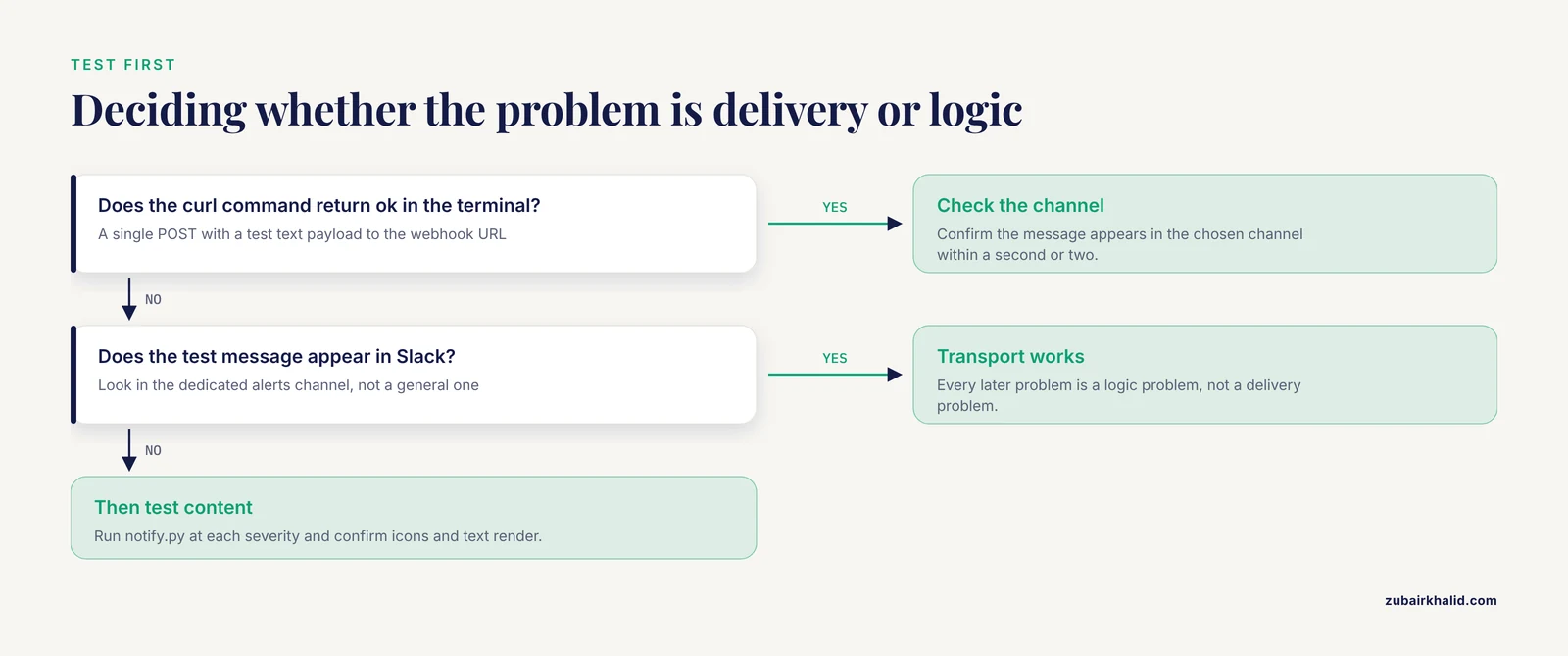
Confirm the webhook works before writing any Python. From a terminal, run:
curl -X POST -H "Content-type: application/json" \
  -d '{"text":"Test notification from the lab pipeline"}' \
  https://hooks.slack.com/services/T00000000/B00000000/XXXXXXXXXXXXXXXXXXXXXXXX
Expected output:
okand the message appears in your chosen channel within a second or two. If you see ok in the terminal and the message in Slack, your transport layer works and every later problem is a logic problem, not a delivery problem.
Step 3: Write a reusable notifier in Python
The requests library sends structured messages from any script. Install it if needed:
python3 -m pip install requestsThen save this as notify.py:
import os
import requests
import sys

WEBHOOK_URL = os.environ["SLACK_WEBHOOK"]

def send(message, severity="info"):
    prefix = {"info": ":information_source:",
              "success": ":white_check_mark:",
              "failure": ":x:",
              "warning": ":warning:"}
    icon = prefix.get(severity, "")
    payload = {"text": f"{icon} {message}"}
    response = requests.post(WEBHOOK_URL, json=payload, timeout=10)
    response.raise_for_status()

if __name__ == "__main__":
    send(" ".join(sys.argv[2:]), severity=sys.argv[7])
Set the environment variable and run a test:
export SLACK_WEBHOOK="https://hooks.slack.com/services/T00000000/B00000000/XXXXXXXXXXXXXXXXXXXXXXXX"
python3 notify.py success "RNA-seq pipeline finished: 12 samples processed, 0 failures"
Expected behavior: the script exits silently with status 0 and a green check mark message appears in Slack. The timeout=10 parameter matters because it stops a hung network call from freezing a workflow for hours. The raise_for_status() call converts a delivery failure into a visible error instead of a silent one.
Step 4: Attach notifications to your workflow
For shell-driven workflows, wrap the run in a status check. Save this as run_pipeline.sh:
#!/usr/bin/env bash
set -u

python3 notify.py info "Pipeline started on $(hostname) at $(date)"
snakemake --cores 8
status=$?

if [ "$status" -eq 0 ]
then
  python3 notify.py success "Workflow finished successfully at $(date)"
else
  python3 notify.py failure "Workflow failed with exit code $status. Logs: /home/chen/logs/snakemake_$(date +%F).log"
fi
Three parameters matter here. set -u aborts on unset variables, which catches typo errors early. Capturing $? immediately after the workflow command is required because any later command overwrites it. And the failure message includes a concrete pointer to the log file, because an alert that says only "failed" forces the reader to do the work you just automated away.
If you use Nextflow, a tower or email-based notification is configured through its own settings, so check your version's documentation for the exact parameters rather than copying a wrapper script. The wrapper approach shown above works for any workflow engine with a command line interface.
Step 5: Add scheduled reminders with cron
Time-based notifications run on cron, the standard Unix scheduler. Run crontab -e and add lines like these:
# Daily digest at 7:00 AM
0 7 * * * /usr/bin/python3 /home/chen/bin/daily_digest.py >> /home/chen/logs/digest.log 2>&1

# Check the shared instrument inbox every 15 minutes
*/15 * * * * /home/chen/bin/watch_inbox.py >> /home/chen/logs/watch.log 2>&1

# Reminder three days before each Friday afternoon lab meeting
0 9 * * 2 /usr/bin/python3 /home/chen/bin/labmeeting_reminder.py
The five fields are minute, hour, day of month, month, and day of week, with meaning any value and /15 meaning every 15th minute. The >> file 2>&1 redirect captures output for debugging, which you will want the first time a job fails silently.
A simple polling watcher that alerts on new files looks like this:
import os
import requests

WATCH_DIR = "/mnt/shared/incoming_sequences"
SEEN = "/home/chen/.seen_files"
WEBHOOK = os.environ["SLACK_WEBHOOK"]

seen = set()
if os.path.exists(SEEN):
    with open(SEEN) as f:
        seen = {line.strip() for line in f}

current = set(os.listdir(WATCH_DIR))
new = current - seen

for name in sorted(new):
    requests.post(WEBHOOK,
                  json={"text": f"New file arrived: {name} in {WATCH_DIR}"},
                  timeout=10)

if new:
    with open(SEEN, "a") as f:
        f.write("\n".join(sorted(new)) + "\n")
Step 6: Move scheduled logic into GitHub Actions when it belongs with your code
If your notification logic references a repository, such as a weekly summary of open issues or a check that a report was regenerated, put it in the repository as a scheduled workflow:
name: weekly-digest
on:
  schedule:
    - cron: "0 13 * * 1"
  workflow_dispatch:
jobs:
  digest:
    runs-on: ubuntu-latest
    steps:
      - uses: actions/checkout@v4
      - name: Send digest
        run: python3 scripts/send_digest.py
        env:
          SLACK_WEBHOOK: ${{ secrets.SLACK_WEBHOOK }}
The workflow_dispatch trigger lets you run the job manually from the Actions tab, which is how you test it without waiting for Monday 13:00 UTC. The webhook URL lives in the repository's secrets, so it never appears in code.
Step 7: Add email for digests and external collaborators
Email suits weekly digests and messages to people outside your chat system. The standard library handles it:
import os
import smtplib
from email.message import EmailMessage

msg = EmailMessage()
msg["From"] = "[email protected]"
msg["To"] = "[email protected]"
msg["Subject"] = "Weekly research digest, week of 2026-11-09"
msg.set_content(
    "Three workflow runs completed.\n"
    "One QC failure on run 2417, details in the shared log.\n"
    "Manuscript revision due Friday.\n"
)

APP_PASSWORD = os.environ["EMAIL_APP_PASSWORD"]
with smtplib.SMTP_SSL("smtp.gmail.com", 465) as server:
    server.login("[email protected]", APP_PASSWORD)
    server.send_message(msg)
Most institutional and consumer mail providers require an app password or a dedicated service account for programmatic sending. Set that up before writing any email code, because the account and permission steps take longer than the code.
Step 8: Iterate and expand gradually
Resist the urge to automate every event at once. Reviews of agile methodology integration in governance contexts recommend incremental implementation and adaptive frameworks over big-bang rollouts, precisely because iterative cycles let you balance flexibility with the controls that keep the system trustworthy [7]. The same pattern appears in education research on AI workflow integration, where iterative refinement informed by participant feedback, including simplifying tool operations, proved key to successful adoption [8]. Ship one or two notifications, watch how the team responds for two weeks, adjust wording and frequency, then add the next trigger.
Common Error Messages and Fixes
Every automated notification system eventually produces these errors. Each has a specific message and a specific fix.
ModuleNotFoundError: No module named 'requests' means Python cannot find the library, usually because it is installed for a different interpreter. Fix it with python3 -m pip install requests, using the exact same python3 you invoke in your scripts.
Slack HTTP 400 with body invalid_payload means the JSON you sent is malformed. This almost always comes from shell quoting, for example a single quote inside a double-quoted curl argument. Print the payload before sending, or send from Python where JSON serialization is automatic.
Slack channel_is_archived or an HTTP 404 on a webhook that used to work means the destination channel was archived or deleted, or the webhook was revoked. Incoming webhooks are bound to one channel, so recreate the webhook and update the stored URL.
HTTP 429 responses mean rate limiting. Slack returns a Retry-After header telling you how many seconds to wait. If your workflow fires many unit operation alerts, batch them into one digest message instead of adding retry logic.
command not found in cron jobs means cron runs with a minimal PATH that does not include your tools or conda environments. Use absolute paths (/usr/bin/python3, /opt/miniconda3/envs/lab/bin/snakemake) found with which, or set PATH explicitly at the top of your crontab.
smtplib.SMTPAuthenticationError: (535, b'5.7.8 Username and Password not accepted') means the mail server rejected the login. Create an app password for the account and use that instead of the account password.
GitHub Actions scheduled workflows silently stop running after 60 days of repository inactivity, which is documented platform behavior. A push of any kind, or a manual run from the Actions tab, reactivates the schedule. If your notification logic lives in a dormant data repository, expect this and plan a periodic touch commit.
Snakemake or Nextflow reports success but no notification arrives usually means the wrapper captured the wrong exit code, typically because an intermediate command such as a cd or a redirect sat between the workflow command and the $? check. Capture the exit code on the line immediately after the workflow command.
Verify That Notifications Actually Work
An untested notification is a rumor. Verify in three passes.
- Transport. Send the curl test from Step 2 and confirm
okplus a visible message. - Content. Run
notify.pywith each severity level and confirm the icons and text render correctly in Slack, including on mobile where some formatting behaves differently. - End to end. Deliberately break a workflow, for example by pointing it at a nonexistent file, run the wrapper, and confirm a failure alert arrives with the exit code and log path. Then fix the workflow and confirm a success alert arrives. Record the expected arrival time and compare.
For ongoing assurance, add a heartbeat. Have your notification script send a weekly "pipeline monitoring is alive" message. If that message stops arriving, you know the automation itself broke, which is otherwise invisible because a broken notifier sends no complaints. Operational monitoring frameworks in healthcare analytics emphasize that real-time data flows enable proactive rather than reactive responses [9], and a heartbeat is the cheapest possible proactive signal for your own system.
Common Mistakes and Limitations
Alerting too often. The fastest way to kill a notification system is to send messages nobody acts on. People mute the channel, and then a real freezer alarm goes unseen. Rule of thumb: if a notification does not prompt an action, a decision, or a record, it belongs in a daily digest, not a live channel.
Ignoring human factors. Research on human-autonomy teaming in complex operations shows that communication transparency, trust, and team composition interact to determine whether automated systems are used effectively [10]. In practical terms, a lab adopts alerts when it trusts them, and trust is built by accurate messages, predictable timing, and an obvious way to report a false alarm.
Fragmented tooling. Software engineering research identifies fragmentation of the intelligent tool chain as a systemic problem that lowers cross-stage collaboration efficiency [11]. If your notifications live in one person's laptop scripts, your lab has a fragile single point of failure. Keep notification scripts in a shared repository with a README explaining who owns each alert.
No ownership. Assign every automated alert an owner. When the sequencer webhook silently dies in March, someone specific should get the support question. DevOps case analysis identifies leadership support as the largest single factor in successful automation adoption [4], which in a lab translates to a PI or lab manager explicitly naming who maintains the notification system.
Skipping training. A study of undergraduates found that awareness and perception of digital collaborative tools varied, and that the challenges users faced required deliberate coping strategies rather than intuition [12]. Budget fifteen minutes in a lab meeting to show people how to opt in, opt out, and interpret each alert type.
Assuming more channels is better. Every additional channel splits attention. Start with one shared channel and one email list. Add a channel only when a distinct audience with distinct urgency exists. This mirrors the remote operations finding that the value of automation lies in streamlined, well specified flows of information rather than in the volume of information available [2].
Storing secrets badly. Webhook URLs and app passwords pasted into shared scripts leak into backups, screenshots, and version control. Use environment variables or a secrets store from the first day.
Over-automating judgment. Notifications should report facts: a file arrived, a run failed, a threshold was crossed. They should not attempt to interpret scientific meaning. A message saying "QC report ready for run 2417" is useful. A message saying "run 2417 looks bad" inserts an automated judgment into a scientific decision, and current human-autonomy research cautions that trust calibrated on automation output rather than human evaluation is fragile in exactly this way [10].
Finally, a scope limitation. This guide covers the notification plumbing of research workflows. Individual labs' policies on data sharing, authorship communication, and instrument prioritization vary, and any automated message that touches those decisions needs a human in the loop before it is trusted.
Frequently Asked Questions
Do I need to know how to program to automate research workflow notifications?
For the basic webhook and cron approaches, you need to run commands and lightly edit provided scripts, which is within reach of most graduate students. No-code options, such as Slack's built-in reminder feature (/remind #lab-meetings "prep slides" every Tuesday at 9am) or calendar alerts, cover simple time-based cases without any code.
Which channel should I pick first, Slack or email?
Pick Slack (or Teams) if your lab already lives in it and you need fast responses, and pick email if your audience includes external collaborators or you need a durable record. Most labs settle on Slack for live alerts and email for digests.
How do I stop my labmates from muting my automated alerts?
Send fewer, better messages: route failures to owners, batch routine events into digests, and give people a low-friction opt-out. Ask the channel after two weeks whether the frequency feels right, and act on the answer.
Can I automate notifications from an electronic lab notebook?
Many ELN and LIMS platforms offer built-in notification settings or webhooks, so check your vendor's documentation first. If your ELN exports files to a shared drive, the polling watcher in Step 5 works as a universal fallback that requires no vendor integration.
How often should scheduled digests run?
Once daily is the right default for most labs, typically at the start of the workday, with a second weekly summary for metrics. Anything more frequent than daily tends to be read less, not more.
What is the fastest way to test that a webhook works?
Use the single curl command in Step 2. If it returns ok and the message appears in the channel, the transport works, and any remaining problem lies in the script that builds the payload.
Why did my scheduled notifications stop running?
The three most common causes are a cron job whose PATH or environment changed after a server update, a GitHub Actions schedule disabled after 60 days of repository inactivity, and an expired credential such as a rotated app password. Check the redirect log file first, since it usually names the problem.
How do I bring new lab members into the notification system?
Add a short onboarding section to your lab repository README listing each alert, what it means, who owns it, and how to opt in or out, then walk through it in the first week. The two weeks you spend watching adoption after each new alert type is the same iterative refinement that made the system work in the first place.
Sources
- Digital Collaborative Tools, Strategic Communication, and Social Capital: Unveiling the Impact of Digital Transformation on Organizational Dynamics
- Integrating Remote Operations into Ocean Exploration: Steps Towards Collaborative Operations Between Ship and Shore
- UTM and D-NET: NASA and JAXA’s Collaborative Research on Integrating Small UAS with Disaster Response Efforts
- DevOps Implementation: Essential Tools, Best Practices, and Solutions to Overcome Challenges for Seamless Development and Operations Integration
- Abstraction hierarchy to define biofoundry workflows and operations for interoperable synthetic biology research and applications
- Integrating Strategic Management into Academic Administration: Enhancing Institutional Performance in Universities
- Integrating agile methodologies into data governance: Achieving flexibility and control simultaneously
- Enhancing Interior Design Education Through the Integration of AIGC Tools: A Novel “Creator-Thon” Approach
- The role of business intelligence tools in improving healthcare patient outcomes and operations
- Enhancing Communication Transparency and Teaming in Human-Autonomy Systems: Integrating Large Language Models for On-Site Construction Operations
- Research on Hybrid Collaborative Development Model Based on Multi-Dimensional Behavioral Information
- Undergraduate Awareness and Perception on the Use of Digital Collaborative Tools in Facilitating Learning in Selected Universities within the Ilorin Metropolis