How to Automate Data Curation and Deposition: Tools and Scripts
By Dr. Zubair Khalid, DVM, MS, PhD ·

By the end of this guide you will be able to build a repeatable, script-driven pipeline that inventories your raw data files, generates checksums, validates a metadata spreadsheet, screens for sensitive identifiers, assembles a complete submission package, uploads it to a repository, and records the accession number and provenance trail your paper will cite. You will also know how to compare repositories, which settings to choose at deposit time, and which errors to expect.
What you need on hand before starting:
- A Unix-like shell (macOS Terminal, Linux, or Windows Subsystem for Linux)
- Python 3.8 or later with the pandas and PyYAML packages installed
- A spreadsheet program for editing metadata templates
- An account on your target repository and its current metadata template
- Your raw data files in their original, unmodified form
Why Automate Data Curation and Deposition
Data deposition is the act of placing research data in a public repository with a permanent identifier so others can find and reuse it. It is the practical core of research data sharing, and it is where most projects lose time. The Gene Expression Omnibus (GEO) repository, for example, requires a multistep submission involving metadata preparation, file transfer, and checksum validation, and the manual version of this process is documented as error-prone, time-consuming, and dependent on bioinformatics expertise [1].
Automation attacks three problems at once. First, it removes repetitive mechanical work such as calculating MD5 checksums or copying filenames into spreadsheets. Second, it enforces consistency, because a script that checks metadata will reject the same mistake the same way every time. Third, it makes the deposit reproducible, which matters when a reviewer, a collaborator, or your own future lab needs to repeat the submission for a revised dataset.
The motivation is broader than convenience. A 2023 international survey of 222 traumatic stress researchers across 28 countries found that most participants held positive views toward data sharing and re-use, endorsing scholarly altruism and the ethical case for sharing, which suggests the main obstacles are practical friction and workflow burden rather than unwillingness [2]. Automation directly reduces that friction.
There is also a scientific-integrity argument. Provenance, the record of where data came from and every step applied to it, leads to higher interpretability of results and enables reliable collaboration and data sharing. A scoping review of biomedical provenance approaches searched PubMed and Web of Science for work published from 2006 to 2022 and identified 764 papers, of which 624 remained after deduplication and 66 met the inclusion criteria, reflecting a substantial but fragmented literature on doing provenance well [3]. A deposition script that writes a timestamped, versioned record of what was deposited is a simple, practical form of provenance tracking.
Data Repository Comparison: Picking Where Your Data Goes
Before you automate anything, decide on the destination, because the destination dictates your metadata template, file formats, and upload mechanism. Repositories fall into three broad categories, and the trade-offs between them are the substance of any data repository comparison.
Discipline-specific repositories
These repositories accept one data type and enforce community-specific formats and metadata. GEO, hosted by NCBI, is the primary example for functional genomics, and its submission structure is well documented and scriptable [1]. A newer example is PKRxiv, a discipline-specific pharmacokinetic repository built around FAIR principles, the standards requiring data to be Findable, Accessible, Interoperable, and Reusable. As of the end of September 2025, PKRxiv held over 5,500 individual drug concentration-time data points from more than 900 unique participants across 3 continents, and it assigns persistent digital object identifiers (DOIs) so deposited datasets are citable [4]. Discipline-specific repositories give the best discoverability within your field, but their templates are stricter and their validators less forgiving.
Generalist repositories
Generalist repositories accept any data type. They are the right choice when no discipline-specific home exists or when your dataset mixes types that no single field repository handles. An assessment of FAIR data sharing in life cycle assessment research found that studies adhering to FAIR principles achieved it primarily through the use of generic repositories, because generic repositories provide tooling that supports sharing even where field-specific guidance is absent [5]. The trade-off is that a generalist repository cannot enforce deep domain metadata, so reuse value depends on the quality of the metadata you supply yourself.
Institutional repositories
Many universities run their own FAIR repositories. A workflow developed for spectroscopic data showed that a data package generated from raw instrument files, with both human-readable supporting information and machine-readable metadata, can be published either alongside a journal article or independently in an institutional FAIR repository [6]. Institutional repositories are convenient and often free to their own researchers, but they vary widely in discoverability and long-term funding.
| Repository type | Best suited for | Automation characteristics |
|---|---|---|
| Discipline-specific (GEO, PKRxiv) | Data types with an active user community | Strict templates, checksum requirements, accession-based verification |
| Generalist | Mixed data types, cross-disciplinary work | Flexible metadata, DOI minting, API-based upload |
| Institutional | Compliance with funder and university mandates | Local support, variable tooling, DOI or handle minting |
Sharing models and embargoes
Two deposit-time settings deserve early attention because they affect how you script the deposit. PKRxiv illustrates the pattern well. Contributors choose one of three data sharing models, unrestricted, noncommercial, or contributor-controlled, and can optionally apply an embargo period during which the data exist but are not publicly visible [4]. If your grant or ethics approval restricts commercial reuse, the sharing model must be set at deposit, not after. Build it into your submission metadata file so the script writes it consistently every time.
How to Automate Data Curation and Deposition, Step by Step
This walkthrough assumes a hypothetical RNA sequencing project with paired-end FASTQ files, but the structure transfers to any data type. The goal is a folder called submission_package that contains the data, the metadata, the checksums, and a provenance record, ready for upload in one command.
Step 1: Inventory the raw files and generate checksums
A checksum is a fixed-length fingerprint computed from a file. If even one byte changes, the fingerprint changes. MD5 is the checksum algorithm most repositories expect for upload verification, and GEO Uploader automates MD5 calculation as part of its submission pipeline precisely because manual calculation is a common failure point [1].
From your project root, list the files and compute checksums:
find ./rawdata -type f -name "*.fastq.gz" | sort > filelist.txt
md5sum $(cat filelist.txt) > md5sums.txt
Expected output in md5sums.txt looks like this:
3f5a8c9d2e1b4476a0f9e8d7c6b5a431  rawdata/sample01_R1.fastq.gz
b21c9d8e7f6a5b4c3d2e1f0a9b8c7d6e  rawdata/sample01_R2.fastq.gz
Count the files to confirm the inventory matches your sample sheet:
wc -l filelist.txt md5sums.txtExpected output:
24 filelist.txt
24 md5sums.txt
If these two numbers differ, stop. A mismatch means files were added or removed after your last check, and you need to resolve that before any deposit.
Step 2: Build the metadata table
Metadata is structured description that lets a stranger understand your data without contacting you. Most repositories provide a spreadsheet template. Fill it once by hand for one sample, then generate the rest programmatically to avoid transcription errors. Your metadata.csv should have one row per sample and columns such as sample_id, organism, tissue, condition, read1_file, read2_file, and protocol.
A template-based approach to metadata is one of the core error-prevention mechanisms in automated deposition tooling, because filling a fixed template prevents the free-text omissions that cause repository curators to reject submissions [1].
Step 3: Validate the metadata before anything leaves your machine
Write a validation script that enforces your repository's rules. This is the single highest-value script in the whole workflow because it catches problems at zero cost instead of after a curator email weeks later.
import os
import pandas as pd

meta = pd.read_csv("metadata.csv", dtype=str)

required = ["sample_id", "organism", "tissue",
            "condition", "read1_file", "read2_file", "protocol"]
missing = [c for c in required if c not in meta.columns]
if missing:
    raise SystemExit(f"Missing required columns: {missing}")

dupes = meta.loc[meta["sample_id"].duplicated(), "sample_id"].tolist()
if dupes:
    raise SystemExit(f"Duplicate sample_id values: {dupes}")

for f in list(meta["read1_file"]) + list(meta["read2_file"]):
    path = os.path.join("rawdata", f)
    if not os.path.exists(path):
        print(f"MISSING FILE: {f}")

print(f"Validated {len(meta)} samples against file inventory.")
Expected output for a clean run:
Validated 12 samples against file inventory.Expected output when a referenced file is absent:
MISSING FILE: sample07_R2.fastq.gzThe dtype=str argument forces every column to be read as text, which prevents a classic silent error where a spreadsheet turns a sample ID like 007 into the number 7.
Step 4: Screen for sensitive information
If your data involve human participants, screening for identifiers is part of curation, not an optional extra. Researchers in traumatic stress and other health fields are advised to use systematic, data-analytic approaches to assess re-identification risk rather than relying on intuition, and a published checklist exists for exactly this purpose [7]. For qualitative data such as interview transcripts, dedicated software support is emerging, as shown by the Qualitative Data Sharing (QuaDS) Software project, which helped 28 qualitative health science researchers de-identify and prepare data for repository deposit [8].
A minimal first-pass scan of your metadata and file names for common identifier patterns:
grep -rniE "patient|mrn|birthdate|[0-9]{3}-[0-9]{2}-[0-9]{4}" metadata.csv filelist.txtNo output means no matches were found. Any output line is a candidate identifier to remove or recode before deposit. Note that if you share human genomic data through a covered entity, the HIPAA Privacy Rule's minimum necessary standard, which limits disclosure to the least information required for the purpose, applies to how you characterize and scope the sharing activity, and this characterization affects day-to-day workflows [9]. Consult your institution's compliance office for that determination.
Step 5: Assemble the submission package
Copy the validated files into a clean directory and write a machine-readable provenance record. PyYAML produces a structured summary of what was deposited, when, and with which script versions.
import hashlib, os, shutil, yaml, subprocess

os.makedirs("submission_package", exist_ok=True)
shutil.copytree("rawdata", "submission_package/rawdata", dirs_exist_ok=True)
shutil.copy("metadata.csv", "submission_package/metadata.csv")
shutil.copy("md5sums.txt", "submission_package/md5sums.txt")

def md5sum(path):
    h = hashlib.md5()
    with open(path, "rb") as fh:
        for chunk in iter(lambda: fh.read(1 << 20), b""):
            h.update(chunk)
    return h.hexdigest()

checksum_ok = True
with open("md5sums.txt") as fh:
    for line in fh:
        expected, fname = line.split()
        if md5sum(fname) != expected:
            print(f"CHECKSUM MISMATCH: {fname}")
            checksum_ok = False

git_commit = subprocess.check_output(
    ["git", "rev-parse", "HEAD"]).decode().strip()

record = {
    "deposit_date": "2026-11-11",
    "dataset_title": "Example RNA-seq of treated vs control tissue",
    "n_samples": int(len(pd.read_csv("metadata.csv"))),
    "checksum_algorithm": "MD5",
    "checksums_verified": checksum_ok,
    "curation_script_commit": git_commit,
    "sharing_model": "unrestricted",
    "embargo_months": 0
}
with open("submission_package/provenance.yaml", "w") as fh:
    yaml.safe_dump(record, fh)

print("Package ready:", checksum_ok)
Expected output:
Package ready: TrueThe provenance record matters because the biomedical literature identifies provenance tracking as a foundation for interpretable, trustworthy data reuse, even though approaches remain fragmented across the field [3]. Recording the curation script's git commit means anyone can reconstruct exactly how the deposited files were produced.
Step 6: Upload
You have two routes. The first is a purpose-built tool. GEO Uploader is an open-source web application that automates the entire GEO submission workflow through a browser interface, handling file uploads, MD5 calculations, and metadata template population. Deployed across more than 30 users and over 50 upload sessions, including datasets exceeding hundreds of gigabytes, it reduced submission initiation time from 2 to 3 hours to under 20 seconds [1]. If your target repository has an equivalent tool, use it. If your target is a pharmacokinetic dataset, PKRxiv provides a structured submission workflow for pharmacokinetic, pharmacogenetic, and safety or efficacy data with DOI minting on acceptance [4].
The second route is the command line, which you control entirely. Set your connection details once and mirror the package to the repository's upload server:
export REPO_HOST="the-ftp-host-your-repository-provides"
export REPO_USER="your_submission_username"

lftp -u "$REPO_USER" "$REPO_HOST" << 'EOF'
mirror -R submission_package/ /uploads/my_project_submission
quit
EOF
The mirror -R command recursively uploads the local directory and retries failed transfers automatically. For a single large file, curl is simpler:
curl -T submission_package/rawdata/sample01_R1.fastq.gz \
  ftp://"$REPO_HOST"/uploads/my_project_submission/
For repositories with an API rather than FTP, the same pattern applies with an HTTP upload and a token. Package the upload call into a shell script so the entire deposit is one command you can rerun after any dataset revision.
Step 7: Verify the deposit and record the accession
After the repository processes the submission, you receive an accession number or a DOI. Record it immediately in the same provenance file, and in your lab notebook, and in the manuscript's data availability statement. Verify the deposit by downloading one file back and re-checking its checksum:
curl -O ftp://"$REPO_HOST"/published/my_project_submission/sample01_R1.fastq.gz
md5sum sample01_R1.fastq.gz
The returned checksum must match the original line in md5sums.txt. If it matches, the round trip succeeded and the deposited copy is bit-identical to yours.
Parameters and Settings That Matter
| Parameter | Typical choice | Why it matters |
|---|---|---|
| Checksum algorithm | MD5 | The expected standard for upload verification at major repositories, automated by deposition tools [1] |
| Metadata format | Repository template, CSV or spreadsheet | Template-based completion prevents free-text omissions that cause curator rejections [1] |
| Raw versus processed files | Deposit both, explicitly labeled | Raw files enable reanalysis, processed files enable immediate checking |
| Sharing model | Unrestricted, noncommercial, or contributor-controlled | Determines downstream reuse rights and must be set at deposit [4] |
| Embargo period | Optional hold, commonly months | Lets you coordinate public release with publication while reserving the DOI [4] |
| Persistent identifier | Accession number or DOI | The citable handle you reference in the paper [4] |
| File naming | Lowercase, no spaces, stable sample IDs | Prevents transfer failures and metadata mismatches |
| Provenance record | YAML or JSON with script commit hash | Supports interpretability and reliable reuse [3] |
Automate Data Deposition Workflow Tips
Start automation at project start, not at submission time. The most common failure pattern is treating deposition as a final-week scramble. Embed the checksum and metadata steps into your analysis pipeline from day one. The workflow literature on reproducibility shows that uncontrolled changes in input data, configuration parameters, and software cause what researchers call workflow decay, and that integrating version control, container management, and automated deployment counters it [10]. The same principle applies to deposition scripts kept under version control from the first commit.
Containerize your curation scripts. Wrapping your validation and packaging scripts in a container pins the software environment so the deposit can be reproduced later on any machine, which is the core remedy for workflow decay described in the reproducibility literature [10].
Adopt community reporting standards where they exist. Fields with standardization problems have documented the cost of skipping this. In metabolomics, reviews call for standardized protocols for sample preparation, analytical workflows, and data processing to ensure reproducibility, alongside rigorous quality assurance and quality control to minimize batch effects, and they identify public repository deposition as central to transparency and secondary analysis [11]. Check whether your field has a reporting standard and make your metadata template mirror it.
Generate the human-readable and machine-readable outputs from one source. A workflow developed for spectroscopic data generates both human-readable supporting information and machine-readable FAIR metadata directly from the primary instrument files, so the paper's supplementary data and the repository package come from the same pipeline with little extra effort [6]. Adapting this pattern means you write metadata once and get everything else derived from it.
Choose the repository before you collect data, if you can. The life cycle assessment assessment found that FAIR compliance in practice came primarily from using generic repositories that supply sharing tools, and that the absence of field-specific sharing guidance was the main gap [5]. Knowing your destination early tells you which metadata fields to collect, which file formats to keep, and what your script must validate.
Test the whole pipeline on one sample first. Run every step, from checksum to upload, on a single small file before running it on two hundred. The failure modes are identical, and the debugging loop is minutes instead of hours.
Common Mistakes and Limitations
Depositing only processed files. Raw files are what enable reanalysis and reprocessing with future methods. Many discipline-specific repositories expect the raw form, and depositing only summary outputs is a frequent reason for curator requests and resubmissions.
Letting metadata drift from the files. The most common silent failure is a metadata spreadsheet that names files slightly differently from the files on disk, for example sample01_R1.fastq.gz in the spreadsheet and sample01_R1 (1).fastq.gz on disk after a re-download. The validation script in Step 3 exists to catch exactly this, and running it is nonnegotiable.
Trusting the upload without verifying. A completed progress bar is not proof of a correct transfer. Interrupted connections produce truncated files. The verification step in Step 7, downloading one file back and re-checking its MD5, is the only reliable confirmation.
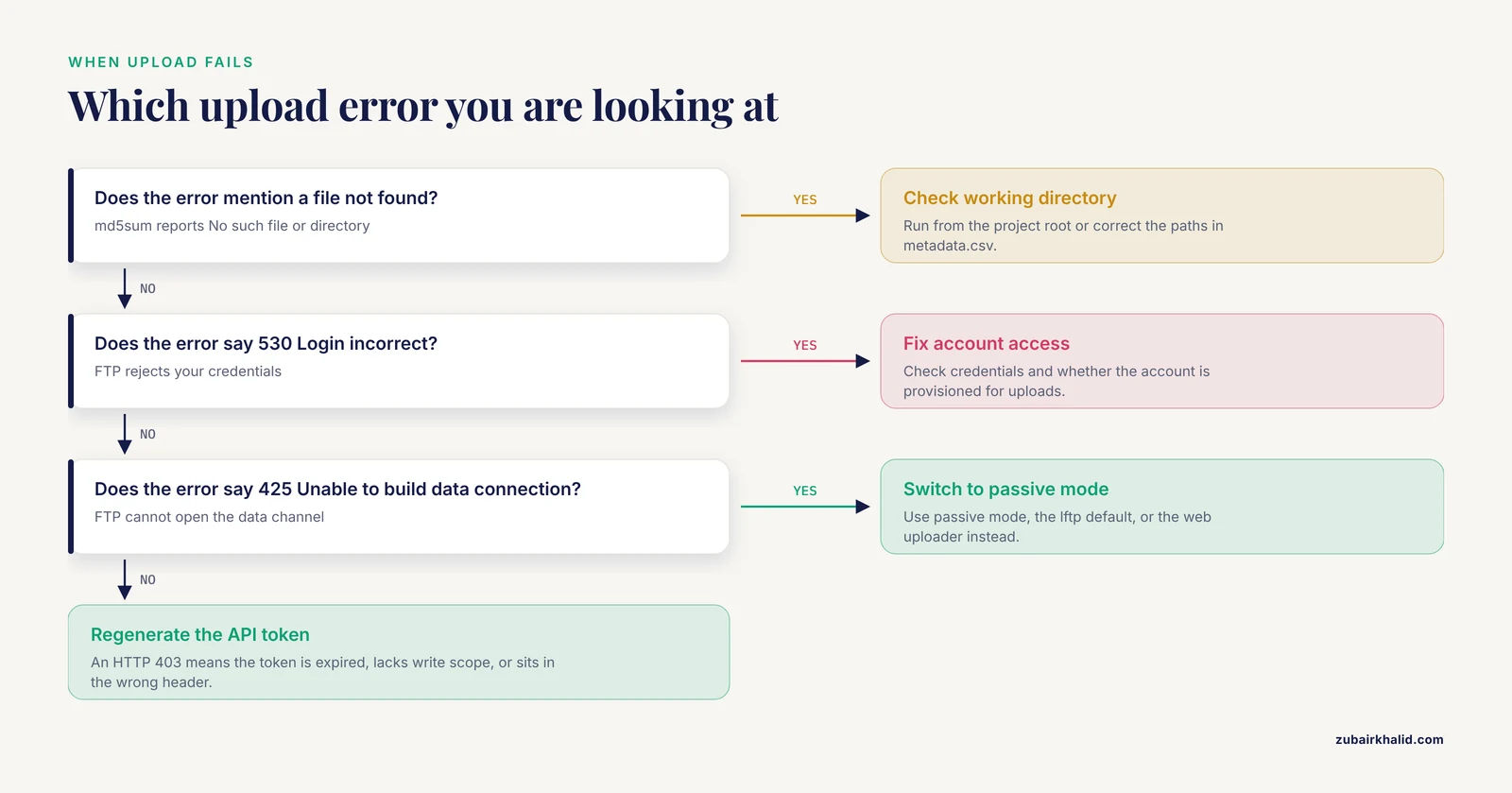
Ignoring the exact error messages. Four messages account for most failed depositions:
md5sum: sample01_R1.fastq.gz: No such file or directorymeans your script ran from the wrong working directory or the metadata paths are wrong. Fix by running from the project root or correcting the paths inmetadata.csv.530 Login incorrecton FTP means wrong credentials or an account that has not yet been provisioned for uploads. Check the repository account status page before debugging anything else.425 Unable to build data connectionindicates a firewall or passive-mode problem with FTP. Switch your FTP client to passive mode, which is the default in lftp, or use the repository's web-based uploader instead.HTTP 403 Forbiddenon an API upload means the token is expired, lacks write scope, or is being sent in the wrong header. Regenerate the token with write access and re-run.
Putting protected health information in file names. Identifiers hide in unexpected places, including file names, spreadsheet headers, and instrument run logs. The screening step in Step 4 exists because systematic re-identification risk assessment finds exposures that intuition misses [7].
Assuming automation replaces judgment. Automation handles mechanical steps reliably. It cannot decide whether a dataset is scientifically coherent, whether the right controls were sequenced, or whether a sharing model matches your ethics approval. A study of a FAIRification workflow for life cycle data explicitly identified skill and technology development, strategic funding, and recognition as ongoing community needs beyond tooling [5].
Forgetting that deposit is not the end. The repository accession must appear in the published paper, and the provenance record [3] must be stored somewhere you will find it in five years. Deposits that cannot be connected to their papers lose most of their reuse value.
A final limitation. Every repository has its own template, validator, and quirks, and those change over time. Always pull the current template and submission documentation from the repository itself before running your pipeline, and when a curator emails you, treat the exchange as free validation and update your scripts to catch that error class automatically next time.
Frequently Asked Questions
What does it mean to automate a data deposition workflow?
It means using scripts and tools to perform the mechanical steps of depositing research data, including inventorying files, generating checksums, validating metadata, screening for sensitive identifiers, packaging files, and uploading, so that the process is repeatable and produces a consistent submission every time.
Which repository should I choose for my data?
Choose a discipline-specific repository when one exists for your data type, a generalist repository for mixed or cross-disciplinary datasets, and an institutional repository when funder or university compliance is the main driver. Compare them on metadata requirements, identifier minting, and automation support before you commit.
Do I need to know how to code to automate deposition?
No. Tools such as GEO Uploader automate file uploads, checksum calculation, and metadata template completion through a browser interface, and they were built specifically for researchers without specialized bioinformatics expertise. Coding simply gives you more control and lets you chain the steps together.
How much time does an automated deposition save?
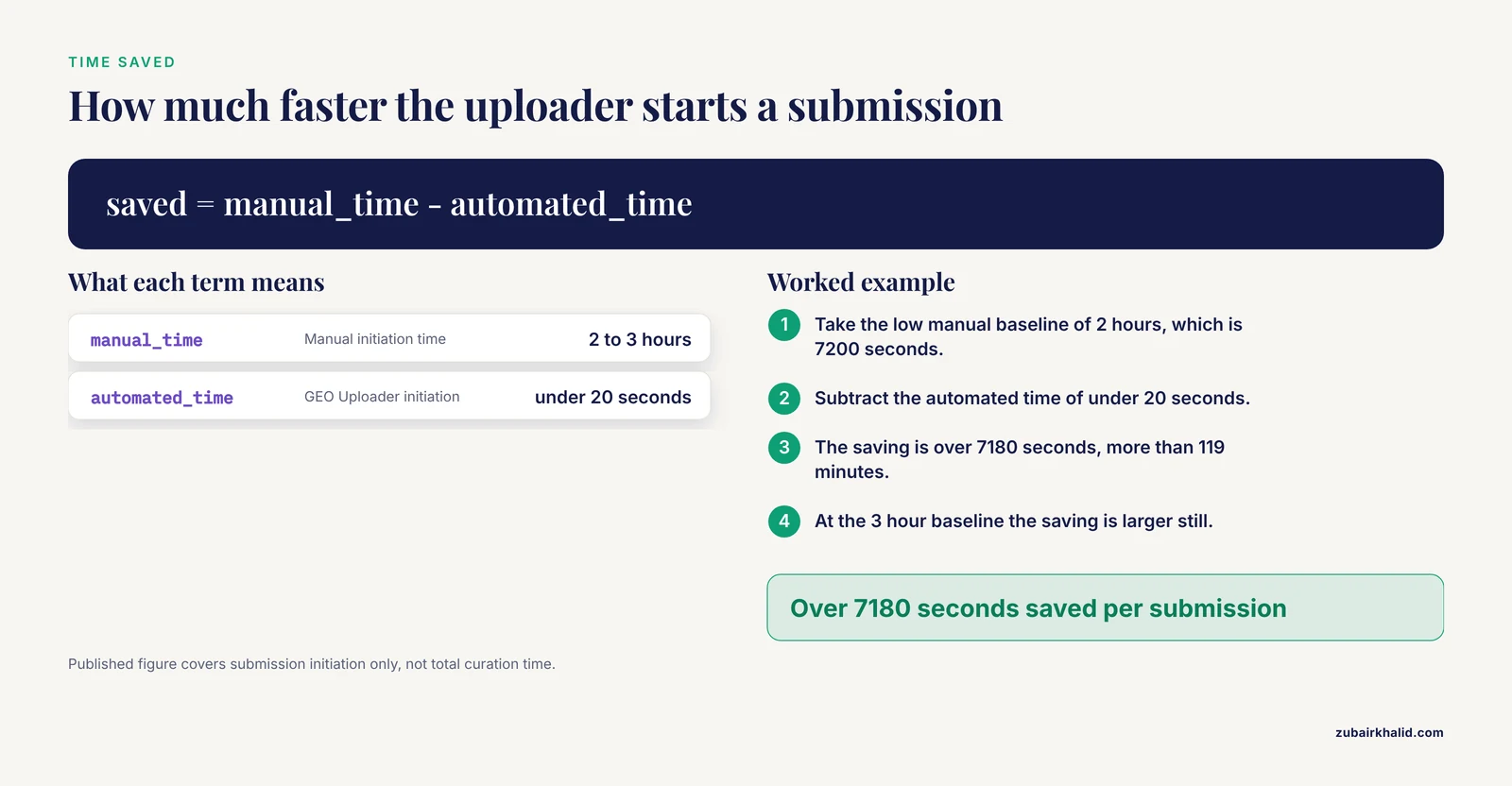
The published figure for GEO Uploader is a reduction in submission initiation time from 2 to 3 hours to under 20 seconds, with the tool handling uploads, MD5 calculations, and metadata population automatically. Your total savings depend on dataset size and how much curation your data require.
What metadata do I need before depositing?
At minimum you need sample identifiers, the experimental conditions, the protocol or method description, and the mapping between metadata rows and data files, in the exact template your chosen repository provides. The repository's current template always overrides any generic list.
How do I handle sensitive or human-subject data?
De-identify systematically rather than by eye, screen file names and metadata for identifiers, and use a published risk-reduction checklist to assess re-identification risk. If your institution is a covered entity under HIPAA and the data are genomic, the minimum necessary standard shapes what you may share and how the activity is characterized.
What is a checksum and why do repositories ask for one?
A checksum is a short fingerprint computed from a file that changes if even one byte changes. Repositories such as GEO use MD5 checksums to confirm that the file that arrived on their server is bit-identical to the file you intended to send.
When should I deposit, before or after publication?
Deposit as early as your funder, journal, and ethics approvals allow, using an embargo period if you need the data held privately until the paper appears. Discipline-specific repositories such as PKRxiv support optional embargo periods, and many journals require the accession number at submission time.
Sources
- GEO uploader: simplifying the data deposition in the GEO repository.
- Data sharing and re-use in the traumatic stress field: An international survey of trauma researchers
- Provenance Information for Biomedical Data and Workflows: Scoping Review
- PKRxiv: A Best Practice Model for Advancing Pharmacoequity Through Open Pharmacokinetic Data Sharing
- Can LCA be FAIR? Assessing the status quo and opportunities for FAIR data sharing
- Workflows Allowing Creation of Journal Article Supporting Information and Findable, Accessible, Interoperable, and Reusable (FAIR)-Enabled Publication of Spectroscopic Data
- Sharing traumatic stress research data: assessing and reducing the risk of re-identification
- Responsible Sharing of Qualitative Research Data: Insights From a Pioneering Project in the United States
- Impact of HIPAA’s Minimum Necessary Standard on Genomic Data Sharing
- Sharing and performance optimization of reproducible workflows in the cloud
- Addressing Pitfalls of Metabolomics for Toxicology: A Call for Standardization, Reproducibility and Data Sharing.