Web-Based ORF Finders: How to Locate Open Reading Frames
By Dr. Zubair Khalid, DVM, MS, PhD ·

By the end of this article you will be able to take any DNA sequence, run it through a web-based ORF finder, interpret the six-frame output, translate the open reading frames you care about, and verify the resulting protein with a sequence similarity search. You need only three things on hand: a DNA sequence in FASTA format, a web browser, and a basic understanding of start and stop codons. No software installation, no command-line skills, and no programming are required.
This guide walks through the biology behind open reading frames, a complete online ORF finder walkthrough with worked numbers, the parameters that change your results, the mistakes that trip up beginners, and the verification steps that turn a raw ORF list into a defensible biological conclusion.
What an Open Reading Frame Is
An open reading frame, usually abbreviated ORF, is a stretch of DNA that begins with a start codon, continues through a whole number of three-base codons, and ends with a stop codon. In the standard genetic code, the start codon is almost always ATG, which codes for the amino acid methionine. The three stop codons are TAA, TAG, and TGA. Because codons are read in groups of three, any double-stranded DNA molecule has six possible reading frames, three on the forward strand and three on the reverse strand. A six-frame translation examines all six at once.
A simple example makes the idea concrete. Take this 24-nucleotide sequence:
ATGAAATTTGGGCCCTAAReading it in frame gives five sense codons plus one stop codon:
ATG AAA TTT GGG CCC TAA
Met Lys Phe Gly Pro Stop
This ORF is 18 nucleotides of coding sequence plus the 3-nucleotide stop codon. It would encode a 5-amino-acid peptide, Met-Lys-Phe-Gly-Pro. Real ORFs of interest are far longer, and length is the main filter you will apply when using an ORF finder, because short ORFs occur constantly by chance in random sequence. In a random stretch of DNA, the chance that any given codon in a single frame is a stop codon is 3 out of 64, so the expected distance between stops in one frame is roughly 64/3, or about 21 codons, which is about 64 nucleotides. That is why an ORF finder reporting every stop-to-stop stretch would bury you in noise, and why minimum-length settings exist.
Two clarifications keep beginners out of trouble. First, an ORF is not the same thing as a gene. A gene is a biologically transcribed and regulated unit, which may contain introns, promoters, and regulatory regions. An ORF is purely a pattern in sequence. Second, the longest ORF in a sequence is a good candidate for a real protein-coding region, but it is a hypothesis, not a proof. Verification steps later in this article address that gap.
Why Use Web-Based ORF Finders
Web-based ORF finders solve a practical problem. Sequence analysis tools exist as command-line suites, desktop applications, and web servers. For a single sequence and a quick answer, the web route is usually fastest because nothing needs to be installed and the interface guides you through the options. A review of essential bioinformatics web services describes servers that bundle an ORF finder together with other sequence utilities, including reverse-complement generators, pattern searchers, restriction cutters, and melting-temperature calculators, all running through a browser interface [1]. This bundling matters in practice, because ORF discovery is rarely the last step. You usually want to translate the ORF, calculate the protein's molecular weight and isoelectric point, and search it against databases, all within the same working session.
The broader trend toward graphical web interfaces for bioinformatics is well documented. The Galaxy platform exists specifically to give web interfaces to command-line tools so that biologists without programming skills can build reproducible analyses [2]. Collections such as the Dundee Resource for Sequence Analysis and Structure Prediction expose multiple sequence analysis services through both web forms and programmatic interfaces, and their services have completed over 1.5 million jobs since 2016, which shows how heavily researchers rely on this mode of access [3]. An online ORF finder sits comfortably in this ecosystem: it is the quick, zero-setup entry point into sequence analysis.
Running an Online ORF Finder Step by Step
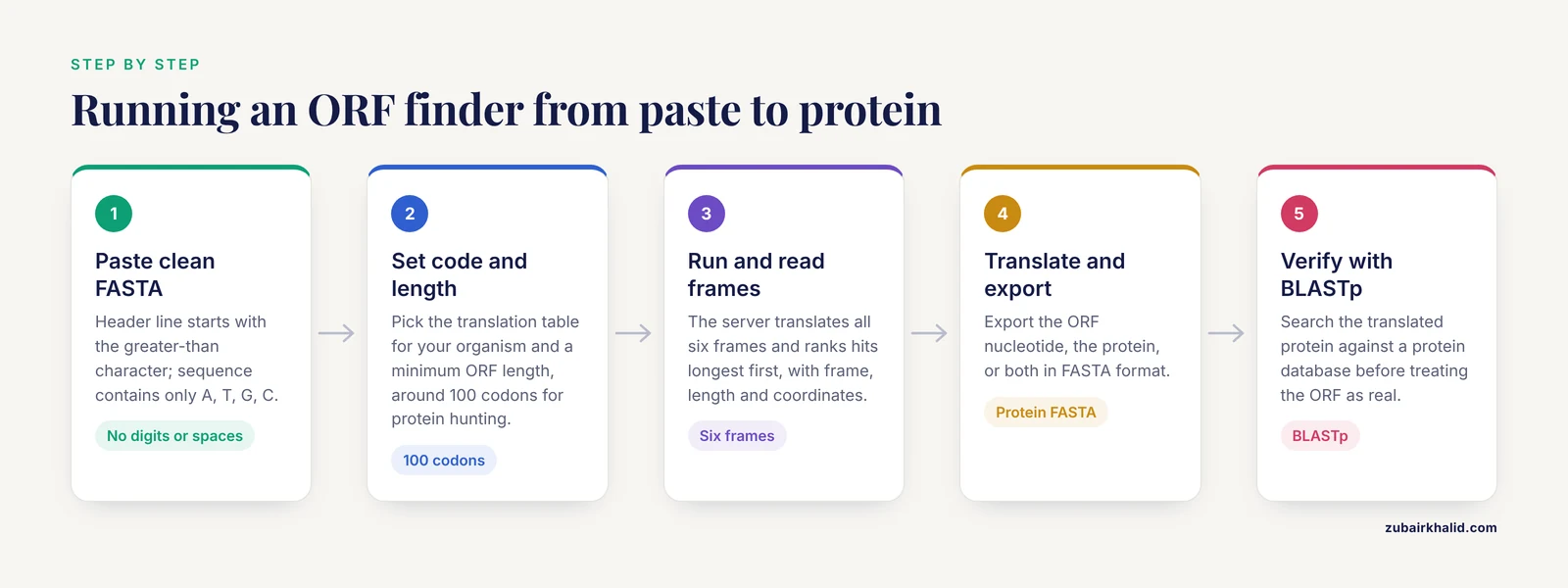
This walkthrough describes the general procedure that all major web-based ORF finders follow, using the NCBI ORFfinder as the reference example since it is the most widely used. Other web-based ORF finders, such as the prokaryotic ORF finder offered on the EBWS server, follow the same logic with different interface details [1].
Step 1: Prepare your sequence in FASTA format
FASTA format is plain text with a single header line beginning with the greater-than character, followed by the sequence itself. Here is a small example you can test with:
>my_sequence_1
ATGAAATTTGGGCCCTAAGGCTTAAGCGGATCCTAG
Clean the sequence first. Remove line numbers, spaces inside the sequence, and any characters other than A, T, G, C (and U if you are working with RNA). Most servers accept lower-case letters, but stray digits or comment text pasted into the sequence field will trigger errors.
Step 2: Open the ORF finder and paste your sequence
Go to the ORF finder page in your browser, click into the sequence input box, and paste your FASTA text. Most tools also accept a raw sequence without the header line. Some accept a file upload or an accession number, which lets the server fetch a record from a public database on your behalf.
Step 3: Set the genetic code
Choose the translation table that matches your organism. The default is the standard genetic code, which is correct for most bacteria, archaea, plants, and animals working with nuclear DNA. If your sequence comes from a mitochondrion, chloroplast, or certain bacteria, an alternative code may apply, in which some stop codons are reassigned to amino acids. Picking the wrong code shifts where the tool believes ORFs end, so this single setting can change your entire output.
Step 4: Set the minimum ORF length
Enter the shortest ORF you want reported. Most tools let you specify this in nucleotides or codons. A sensible exploratory setting for a protein-coding search is on the order of 100 codons, because ORFs shorter than that are usually chance events unless you have a specific small peptide in mind. If you are scanning a short PCR product or a synthetic construct, a lower threshold is reasonable, but expect many more hits.
Step 5: Run the search and read the six-frame output
Click the run or submit button. The server translates your sequence in all six frames, identifies every start-to-stop stretch that meets your length threshold, and ranks the results, typically with the longest ORFs first. Output for the example sequence above would look like this in outline form:
ORF 1 Frame +1 18 nt 6 codons (5 aa + stop) ATG...TAAIn a realistic run on a longer sequence, you would see something like:
ORF 1  Frame +3   1,143 nt  381 aa
ORF 2  Frame -2     402 nt  134 aa
ORF 3  Frame +1     285 nt   95 aa
Each line tells you the frame (plus or minus, and one of three offsets), the nucleotide length, the encoded protein length, and the start and stop coordinates. The tool usually draws these as colored bars along a graphical map of your sequence, one track per frame, so you can see at a glance which frame carries the dominant ORF.
Step 6: Translate and export
Select an ORF of interest and use the tool's export function. Most finders give you three choices: the nucleotide sequence of the ORF alone, the translated protein sequence, or both in FASTA format. A typical protein export for the example looks like this:
>my_sequence_1_orf1
MKFGP
Save the protein FASTA file, because the verification steps below consume it.
Step 7: Verify with a similarity search
Paste the translated protein into a BLAST search against a protein database. BLAST, the Basic Local Alignment Search Tool, categorizes query sequences by finding alignments against known sequences, and cloud-based implementations such as ElasticBLAST show how central this step is to essentially every sequence analysis project [4]. If your ORF is a real protein-coding region, a BLASTp search of the translated protein will typically return close matches with informative names. If every hit is labeled "hypothetical protein" or the search returns nothing significant, your ORF may be real but novel, or it may be a chance stretch of sequence.
Step 8: Continue into protein-level analysis
With a verified protein sequence in hand, you can compute physicochemical properties, predict domains, and assess localization. The literature provides a concrete template. In one published analysis, researchers recovered the ORF of an expressed sequence tag from the parasite Spirometra mansoni using an ORF finder, translated it, and then ran BLAST and a battery of online tools covering parameters, domains, signal peptides, transmembrane regions, and secondary structure, concluding that the 173-residue protein was a translationally controlled tumor protein candidate [5]. That workflow, ORF finder first and layered annotation second, is the standard pattern you should imitate.
Parameters That Matter
The settings you choose in a web-based ORF finder directly control what you see. The table below summarizes the ones worth checking on every run.
| Parameter | What it does | Practical guidance |
|---|---|---|
| Genetic code (translation table) | Defines which triplets are stops and how codons map to amino acids | Use the standard code unless your sequence comes from an organelle or an organism known to use an alternative code |
| Minimum ORF length | Filters out short chance ORFs | Start around 100 codons for protein hunting, lower for small peptides or short templates |
| Strand searched | Determines whether reverse-frame ORFs are reported | Always search both strands unless you have a specific reason not to |
| Start codon definition | Some tools accept only ATG, others accept near-cognate starts such as GTG and TTG | For bacterial sequences, consider tools that report alternative starts, then judge plausibility by context |
| Search range | Restricts analysis to a sub-region of the sequence | Useful when you already know the candidate region from prior mapping |
| Output format | Controls whether you receive nucleotide, protein, or graphical output | Export the protein FASTA for BLAST and parameter calculators |
Two of these deserve extra explanation. The genetic code question is easy to get wrong in reverse: if your organism genuinely uses an alternative code and you run the standard code, true ORFs will appear artificially truncated, chopped short at codons that are not actually stops in that organism. Minimum length, meanwhile, is a tradeoff. Set it too low and you wade through dozens of spurious hits, set it too high and you might miss a genuine small protein. Adjusting this one number is the single most effective way to tune an ORF finder run.
A Worked Calculation: From ORF to Protein Properties
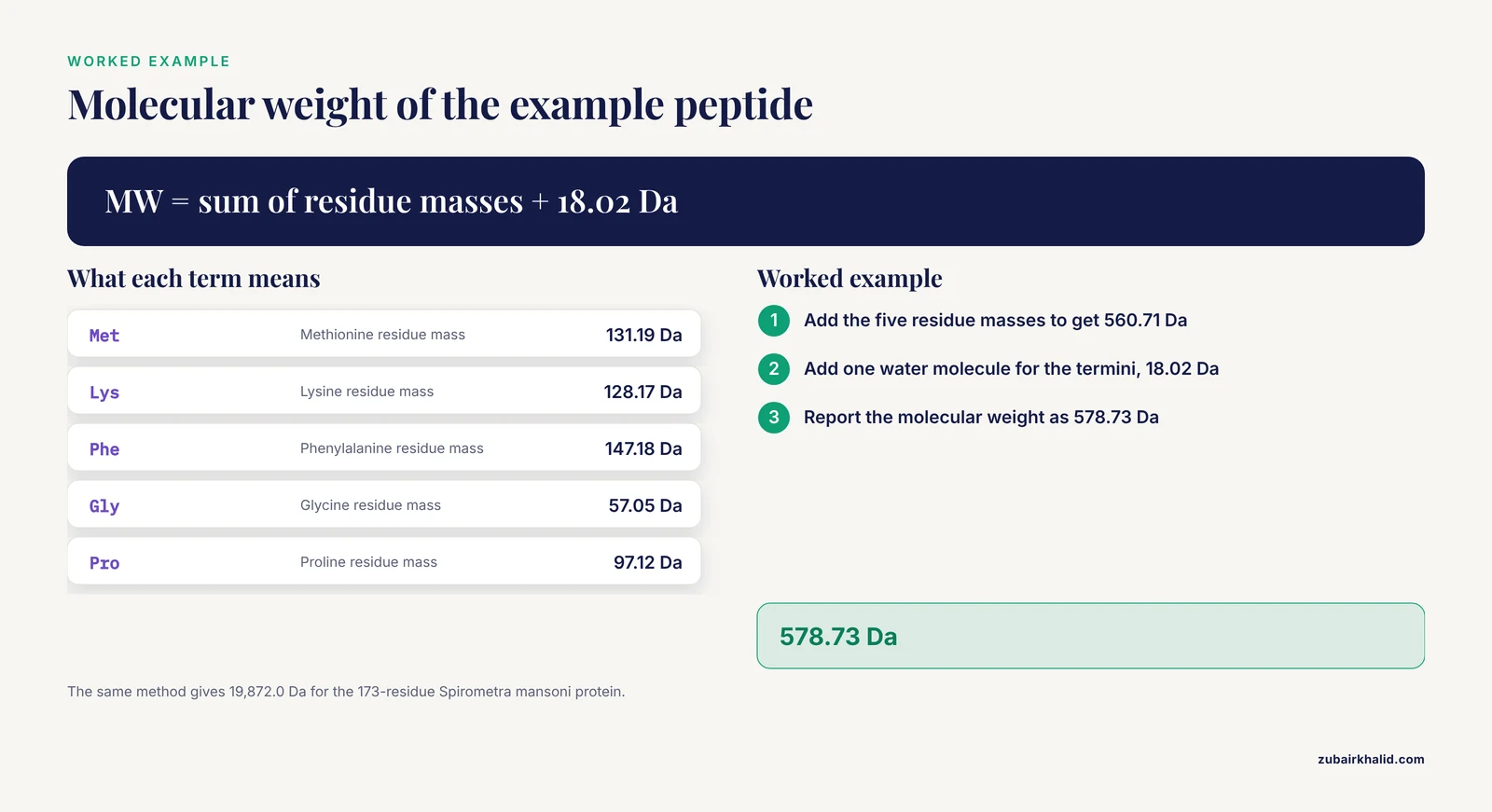
To show how the ORF finder connects to the wider toolkit of bioinformatics calculators, take the 5-amino-acid peptide Met-Lys-Phe-Gly-Pro from the example above. A protein parameter calculator, the kind bundled into web workstations and servers that compute molecular weight, isoelectric point, and related values [6][7], would compute the molecular weight from residue masses plus one water molecule for the termini:
Met  131.19 Da
Lys  128.17 Da
Phe  147.18 Da
Gly   57.05 Da
Pro   97.12 Da
Sum residues     560.71 Da
+ H2O             18.02 Da
Molecular weight  578.73 Da
The same principle scales up. The Spirometra mansoni study mentioned above reported a theoretical molecular weight of 19,872.0 Da for its 173-residue protein, calculated exactly this way from the ORF-derived sequence [5]. Every number in that chain, from the codon boundaries to the final mass, originates in the ORF coordinates, which is why sloppy ORF calls propagate errors into every downstream value.
Online ORF Finder Tips for Better Results
These tips come from the recurring patterns in published workflows that use ORF finders as their first step.
Tip 1: Start with the longest ORF, but do not end there. Longest-ORF-first is a reliable heuristic for a single gene cloned into a plasmid, but real genomes contain many genuine short genes. Sort your hits by length and inspect the top several, not just the first.
Tip 2: Sanity-check the frame pattern. A real protein-coding region usually dominates one frame for hundreds or thousands of nucleotides, and its stop codon is often followed by a region of frequent stops in the other frames. Long ORFs that nearly fill your sequence and end in a clean stop codon are strong candidates for clone inserts and PCR products.
Tip 3: Match the tool to your organism. Web servers often specialize. The EBWS server, for example, implements a specifically prokaryotic ORF finder alongside its other sequence applets [1], which suits bacterial plasmids and microbial genes. If you are working with a eukaryotic genomic sequence, an ORF finder is only the beginning, because introns will break the coding sequence into pieces that no ORF finder will connect for you.
Tip 4: Export in FASTA and keep a trail. Save the nucleotide ORF, the protein translation, and the exact parameter settings from each run. Web tools do not preserve your session, so your own records are the only reproducibility you have. This habit becomes essential when you move to multi-step platforms where workflows are explicitly designed for reproducibility.
Tip 5: Use the ORF finder output as a hypothesis generator, then annotate. Feature extraction and machine-learning platforms such as iLearn accept DNA, RNA, and protein sequences and compute descriptors, clustering, and predictive models from them [8]. A well-verified ORF is the correct input for that level of analysis. Running raw, unverified six-frame output into sophisticated downstream tools just multiplies noise.
Tip 6: Cross-check translation with a second tool. If a publication or a collaboration depends on your result, run the same sequence through a second ORF finder and compare coordinates. Agreement between two independently implemented tools is cheap insurance against an interface quirk or a setting you overlooked.
Common Mistakes and Limitations
Mistakes with online ORF finders cluster into a small set of categories, and knowing them in advance saves hours.
Pasting dirty sequence. The most frequent error is a paste that includes numbers, spaces within the sequence, or a header line typed into the wrong field. Servers typically respond with a message such as "invalid characters found in the sequence" or refuse to run at all. The fix is to re-copy the sequence from a clean text file, confirm that the only non-ACGT characters are in the header line, and paste again.
Choosing the wrong genetic code. As described above, an organelle sequence run under the standard code will lose its true ORFs at reassigned stop codons. If your BLAST results show a plausible protein repeatedly truncated at the same amino acid, suspect a code mismatch and rerun with the appropriate translation table.
Applying ORF finders to intron-containing genomic DNA. This is the biggest conceptual error. A eukaryotic gene with several exons will not appear as a single long ORF in genomic DNA, because introns interrupt the frame with stop codons. ORF finders work beautifully on mature messenger RNA, complementary DNA, expressed sequence tags, and many viral and bacterial genomes, and poorly on raw eukaryotic genomic sequence. For genomic gene finding, you need gene-prediction or RNA-seq evidence rather than a simple ORF scan.
Confusing an ORF with a verified gene. Every ORF is a candidate. Without expression data, similarity support, or conserved domains, a long ORF remains a computational prediction. The verification workflow in this article, especially the BLAST step, exists because of this distinction.
Trusting short ORFs in small searches. On a 200-nucleotide query, chance ORFs of 30 to 60 nucleotides will dominate the output simply because the expected gap between stops in random DNA is only about 64 nucleotides. Length-based filtering loses its power on short inputs, so interpret small-template results with extra care.
Ignoring the reverse strand. Sequences cloned in the opposite orientation, or analyzed from the wrong end, hide their ORFs on the minus-strand frames. If a forward-strand search gives nothing but you know the insert should encode a protein, check whether the tool searched both strands before concluding that no ORF exists.
Uploading confidential data carelessly. Public web servers are shared infrastructure. For proprietary or pre-publication sequences, review the server's data policy before submitting, or run the analysis locally. This is the same tradeoff that motivates containerized and locally deployable versions of web analysis frameworks in the literature [9].
One overall limitation deserves a plain statement: an ORF finder finds patterns, not biology. Its output tells you where a start codon, an open frame, and a stop codon line up. Whether that region is transcribed, translated, and functional in a cell is an experimental question, and individual research cases need domain-specific judgment and, where relevant, experimental validation.
ORF Finders Within the Broader Bioinformatics Calculator Toolkit
An ORF finder is best understood as one instrument in a bench of online calculators. The EBWS review lists, on a single server, a reverse-complement generator, random sequence generators, a regex-based pattern searcher, a restriction enzyme cutter with a database of 1,502 restriction enzymes, melting-temperature calculators for DNA and RNA hybrids, a guide RNA generator, and an annealing-temperature calculator for multiplex PCR, alongside its prokaryotic ORF finder [1]. A typical plasmid-cloning session moves through several of these in sequence: find the ORF, check the restriction sites flanking it, calculate the melting temperature of your primers, and design a guide RNA if you are editing rather than cloning.
Protein-level calculators continue the chain. Web resources for post-translational modification analysis let you query modification databases, search protein sequences and structures, and calculate the pI and molecular mass of modified isoforms [6]. Integrated protein workstations go further, offering one-click structure modeling, parameter calculation, and visualization in a single interface designed to lower the technical barrier for students and teaching labs [7]. The ORF finder sits at the head of all of it, converting raw nucleotides into the protein sequence that everything downstream consumes.
Frequently Asked Questions
What does an online ORF finder actually detect?
It detects stretches of sequence that begin with a start codon, proceed in-frame without stop codons, and terminate at a stop codon, searching all six reading frames of both strands. It reports the coordinates, frame, and length of each such stretch, and usually the translated protein.
Is an ORF the same as a gene?
No. An ORF is a sequence pattern, while a gene is a transcribed biological unit that may include introns, regulatory elements, and untranslated regions. A long ORF is evidence that a coding gene might exist, not proof that one does.
How long should the minimum ORF length be?
For a general protein-coding search, a threshold around 100 codons is a reasonable starting point, then adjust based on how many hits you get. Shorter thresholds are appropriate for small peptides or short templates, but expect many chance hits below roughly 64 nucleotides, which is the average stop-to-stop distance in random DNA.
Can an ORF finder handle eukaryotic genes with introns?
No, a standard ORF finder cannot connect exons across introns, so genomic eukaryotic DNA will not yield full-length gene ORFs. Use complementary DNA, mature transcript sequences, or dedicated gene-prediction methods for intron-containing genes.
Which genetic code should I choose in the tool?
Choose the standard code for ordinary nuclear and bacterial sequences. Choose the appropriate alternative translation table if your sequence comes from a mitochondrion, chloroplast, or an organism known to reassign codons, because the wrong code truncates real ORFs at codons that are not actually stops.
What should I do after finding an ORF?
Translate it, export the protein in FASTA format, and run a BLASTp search against protein databases to see whether similar proteins are known. Then proceed to protein-level analysis such as domain prediction, molecular weight, isoelectric point, and structure modeling.
Do I need to check the reverse strand?
Yes, in almost every case. An insert cloned in the opposite orientation, or a gene on the complementary strand, will only appear in the minus-strand frames, so a one-strand search can miss it entirely.
Are web-based ORF finders suitable for unpublished sequences?
They are technically suitable, but public servers are shared resources, so check the privacy and data-retention policy before submitting pre-publication or proprietary data. For sensitive sequences, a locally installed tool is the safer choice.
Sources
- EBWS: Essential Bioinformatics Web Services for Sequence Analyses.
- Galaxy mothur Toolset (GmT): a user-friendly application for 16S rRNA gene sequencing analysis using mothur.
- The Dundee Resource for Sequence Analysis and Structure Prediction.
- ElasticBLAST: accelerating sequence search via cloud computing.
- Bioinformatic analysis for structure and function of TCTP from Spirometra mansoni.
- Web-Based Computational Tools for the Prediction and Analysis of Posttranslational Modifications of Proteins.
- PROFASA-a web-based protein fragment and structure analysis workstation.
- iLearn: an integrated platform and meta-learner for feature engineering, machine-learning analysis and modeling of DNA, RNA and protein sequence data.
- EpiMOLAS: an intuitive web-based framework for genome-wide DNA methylation analysis.