Laboratory Calculator Apps: A Comparison of the Best Tools
By Dr. Zubair Khalid, DVM, MS, PhD ·
A laboratory calculator app is software that runs a bench calculation or a lab-style measurement on a phone, tablet, or web browser, while a traditional laboratory result comes from dedicated instruments operated by trained staff. The rule of thumb for choosing between the two is simple. Reach for an app when you need speed, portability, or a quick answer to a defined calculation, and treat any app result that will steer a diagnosis, a treatment decision, or a publication as preliminary until it agrees with a validated instrument or an accredited laboratory.
The tools covered here are not interchangeable. Some are formula wrappers for bench math, some are measurement devices with published agreement studies behind them, and some are research prototypes that belong in a methods section rather than a production workflow. This guide sorts laboratory calculator apps into five working categories, compares nine documented tools side by side, explains the agreement statistics that separate serious tools from novelties, and works through the scenarios where each option wins. Picking the best lab calculator app for your work means matching the tool to the decision it will inform, and the sections below supply the evidence for that match. Students setting up their first bench calculations, researchers choosing a measurement platform, and career planners mapping the digital skills of a modern life science lab all face the same choice.
What Laboratory Calculator Apps Actually Do
Laboratory calculator apps fall into five categories, and the category determines what kind of evidence you should demand before trusting one.
Bench math calculators, the classic biology calculator
A biology calculator in the classic sense wraps textbook formulas in a friendly interface. Typical functions include molarity, which is moles of solute per liter of solution, dilution planning with the relation C1V1 = C2V2, serial dilution design, buffer preparation, unit conversion, cell culture doubling time, oligonucleotide melting temperature, the temperature at which half of a DNA duplex separates into single strands, GC content, and molecular weight computed from a DNA or protein sequence. The math is deterministic and standard, so these apps rarely carry validation studies and do not need them. Accuracy depends almost entirely on the user entering the right numbers in the right units. The practical test for this category is whether the app shows its formulas and units clearly, not whether it publishes an agreement study.
Bioinformatics calculators and data explorers
A bioinformatics calculator performs computations on biological sequences or omics datasets, from molecular weights and melting temperatures up to gene set enrichment analysis, which tests whether a defined set of genes shows coordinated behavior in a dataset. The most useful tools in this category now go beyond single calculations and put entire public datasets behind a point-and-click interface. ShinyTHOR is a documented example. Built in Shiny, a framework for interactive web applications written in the R language, it opens the Cancer Cell Line Encyclopedia (CCLE), a reference collection of multi-omic and drug response data covering more than 1,000 cancer cell lines, to researchers who cannot code [1]. The gap is real, because extracting comparable views from DepMap, the standard dependency portal built on CCLE data, requires bioinformatics expertise that most wet-lab researchers do not have [1].
Measurement apps that shadow a laboratory instrument
A second group uses the phone camera, microphone, or motion sensors to reproduce a measurement that normally requires dedicated hardware. My Jump Lab estimates jump performance from slow-motion video and is benchmarked against force platforms, the laboratory standard for measuring ground reaction forces [2]. FUDAN VOICE records and analyzes voice acoustics and is benchmarked against the Computerized Speech Lab (CSL), the traditional hardware and software reference for voice analysis [3]. App-based 3D scanning has been benchmarked against dedicated scanners for capturing foot and ankle shape [4]. In each case the validation study, not the store description, tells you how much accuracy you are trading away.
Point-of-care diagnostic and analysis apps
Point-of-care means testing at the site of sample collection rather than in a central laboratory. Apps in this category pair a phone or tablet with a simple sample preparation step and an algorithm that reads the result. Documented examples include a mobile sperm analysis system that reads droplet-loaded microfluidic chips, palm-sized devices with channels that handle droplet-scale fluid volumes [5], a machine-learning app that counts parasite eggs in livestock fecal samples from video [6], and a prototype Android app that quantifies colorimetric sensor zones on a smart wound dressing, using printed fiducial markers to correct for camera angle and label curvature [7]. These tools target decisions that a central laboratory cannot support because turnaround time is too long.
Lab paradigms and teaching apps
A final group ports established laboratory paradigms onto the phone so that data collection can leave the building. The Neurophone app delivers the N-Back, Stop Signal, and Stroop tasks, standard behavioral neuroscience measures of working memory, response inhibition, and attentional interference, to participants in their own homes [8]. FLARe delivers a fear conditioning paradigm, in which participants learn to expect a loud noise after a cue, on a smartphone [9]. An open-source mobile sleep lab records and synchronizes consumer wearable and ambient sensors to mimic the functions of a clinical sleep laboratory [10]. In the classroom, a smartphone app measuring heart rate variability (HRV), the beat-to-beat timing variation that reflects parasympathetic nervous system activity, let students in an asynchronous online biopsychology course run a real intervention study [11].
How the Best Lab Calculator Apps Are Evaluated
Three kinds of evidence separate a serious laboratory calculator app from a novelty, and all three come from the published literature rather than the store listing.
Agreement with a reference standard
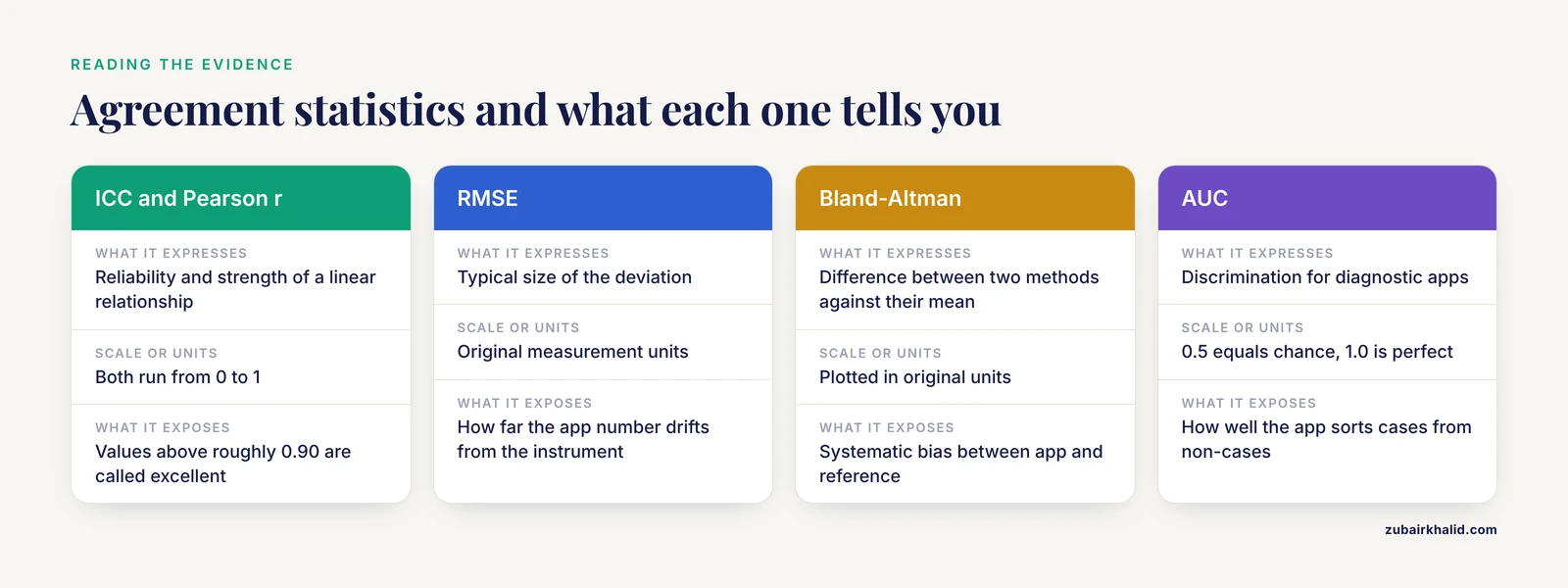
The core question is whether the app's number matches the number a validated instrument would produce on the same sample. Method comparison studies answer this with a standard vocabulary. The intraclass correlation coefficient (ICC) expresses reliability on a scale from 0 to 1, with values above roughly 0.90 conventionally described as excellent. Pearson's r expresses the strength of a linear relationship on the same scale. Root mean square error (RMSE) states the typical size of the deviation in the original measurement units. Bland-Altman analysis plots the difference between two methods against their mean to expose systematic bias, and Passing-Bablok regression is a robust form of method comparison that tolerates outliers. For diagnostic apps, the area under the receiver operating characteristic curve (AUC) summarizes discrimination, where 0.5 equals chance and 1.0 equals perfect classification. Every tool in the comparison table below has been tested against at least one of these standards, which is more than most store listings can claim.
Usability and content quality
Agreement statistics say nothing about whether a human can operate the tool correctly. The Mobile Application Rating Scale (MARS) is a structured questionnaire that scores apps from 1 to 5 on engagement, functionality, aesthetics, and information quality, and the System Usability Scale adds a standardized usability score. In a benchmarking study of patient-oriented laboratory medicine apps, 25 lay evaluators from six European countries and a panel of laboratory medicine specialists rated the same 16 apps, and the lay group scored every dimension significantly lower except information quality, with median total scores of 2.73 for lay users against 3.78 for specialists on the 5-point scale [12]. The benchmarks the specialists proposed are practical: an app should build understanding of laboratory results, use understandable terminology, and be easy to use [12]. A polished interface can hide weak content, and a structured specialist review tells you more than a star rating.
The app store problem
Store search is not curation. In one ecological review of mobile health apps, a systematic search of Google Play and iTunes returned 5,606 candidates, of which 112 were reviewed in detail and 86.6 percent were excluded for problems such as the wrong language, the wrong focus, or the wrong target audience [13]. Laboratory calculator apps live in the same ecosystem, so the same discipline applies. Before trusting any app, look for a published validation study that names its reference standard, check who developed the tool, and prefer tools whose calculation logic is published or open source.
Side-by-Side Comparison of Laboratory Calculator Apps
The table compares nine documented tools at a glance. Exact agreement statistics for each tool appear in the profiles that follow, so the table can stay focused on fit.
| Tool | Platform | What it measures or calculates | Validation evidence | Best fit |
|---|---|---|---|---|
| ShinyTHOR | Web browser (R Shiny) | Multi-omic and drug response data for more than 1,000 cancer cell lines, six analysis modules | Utility demonstrated on a gastric cancer prognosis dataset | Wet-lab researchers mining public cancer data without code |
| My Jump Lab | Smartphone camera app | Jump height, reactive strength index, limb symmetry index from video | Excellent test-retest reliability and strong agreement with a force platform after knee ligament reconstruction | Return-to-sport and asymmetry testing |
| iSperm | Tablet with optical module and microfluidic chip | Sperm concentration, total motility, progressive motility | Agreement with CASA and a hemocytometer across 77 farm samples | On-farm semen evaluation in swine |
| FUDAN VOICE | WeChat mini-program | Voice features including fundamental frequency, jitter, shimmer, CPP, and CSID | Concordance with the Computerized Speech Lab for core acoustic features | Voice recording and analysis where a speech lab is unavailable |
| App-based fecal egg count | Smartphone app with machine learning | Strongyle egg counts from sample video | Split-sample comparison against an accredited laboratory on 105 sheep samples | Same-day parasite screening on farms |
| Open-source mobile sleep lab | Modular mobile app plus consumer sensors | Overnight movement, cardiac activity, snoring, and brightness | Full-night recordings of usable quality in a clinical trial on primary snoring | Low-cost sleep research |
| Neurophone | iPhone app | N-Back, Stop Signal, and Stroop cognitive tasks | Phone-based N-Back matched a validated computer platform in the lab | Field cognitive testing |
| FLARe | Smartphone app | Fear conditioning with loud-noise expectancy ratings | Fear acquisition and extinction demonstrated in a trauma-exposed sample | Remote fear learning studies |
| Trnio 3D Scanner | Smartphone camera app | 3D scans of the foot, ankle, and lower leg | Fell outside the accuracy range that dedicated 3D scanners achieved in the same study | Quick visual capture, not orthosis fabrication |
The Best Lab Calculator App Options, With Pros and Cons
Each profile explains the tool on its own terms and then lists the strengths and weaknesses that decide real choices.
ShinyTHOR, a bioinformatics calculator for public cancer data
ShinyTHOR integrates CCLE with the miRTarBase, circInteractome, and Genomics of Drug Sensitivity in Cancer datasets and offers six modules: ranking the top and bottom ten cell lines by marker expression or drug IC50, the concentration that halves cell growth, single-sample gene set enrichment analysis, multi-analyte expression evaluation, microRNA-target interaction analysis across cancer types, microRNA effects on protein output, and circular RNA modulation of microRNA activity [1].
Pros
- No programming required, with four public datasets reachable from one interface
- Source code published on GitHub, so the analysis logic can be inspected
- Free access for non-commercial use [1]
Cons
- Scope is limited to the integrated datasets, so it cannot analyze your own sequencing files
- It runs in a browser and needs an internet connection
- The non-commercial license rules out proprietary pipelines
My Jump Lab for jump and asymmetry testing
My Jump Lab derives jump height, reactive strength index (jump height divided by ground contact time), and limb symmetry index, which compares performance between limbs, from slow-motion smartphone video using flight time, the interval between takeoff and landing [2].
Pros
- In 102 people tested six to 24 months after anterior cruciate ligament reconstruction, test-retest reliability was excellent, with ICCs of 0.992 to 0.997 and measurement error of a few tenths of a centimeter
- Correlations with a force platform were strong to very strong for jump height, reactive strength index, and limb symmetry, and inter-instrument reliability was excellent for flight time and reactive strength index [2]
Cons
- The calculation method inside the app changes the answer. In a study of 22 healthy adults performing single-leg countermovement jumps, the standard flight-time method agreed poorly with a force platform, while a marker-based variant that tracks a reflective sacrum marker showed moderate to good agreement [14]
- For single-leg testing, the marker method is the one the agreement data support
iSperm for on-farm semen analysis
iSperm pairs a tablet with an optical module, a heater, and a droplet-loaded microfluidic chip, then runs a real-time image analysis app that reports sperm concentration, total motility, and progressive motility, the fraction swimming forward purposefully, in under one minute [5].
Pros
- Across 77 farm-collected boar samples, results agreed with computer-assisted sperm analysis (CASA), the laboratory standard for automated semen evaluation, and with manual hemocytometer counts, the gridded counting chambers used for manual cell counts, through Passing-Bablok regression and Bland-Altman analysis
- Diagnostic accuracy was high, with AUC values above 0.95 for every parameter
- Trained and untrained users produced minimal differences, which supports delegation to farm staff [5]
Cons
- The system requires proprietary chips and optical hardware
- It was developed and validated for boar semen, and use with another species would need fresh validation [5]
FUDAN VOICE for voice acoustics
FUDAN VOICE is a WeChat mini-program, an application that runs inside the WeChat platform without a separate install, and it extracts acoustic features including fundamental frequency (F0), the acoustic correlate of pitch, jitter and shimmer, which measure cycle-to-cycle variability in frequency and amplitude, the noise-to-harmonic ratio, cepstral peak prominence (CPP), and the cepstral/spectral index of dysphonia (CSID), two widely used voice quality indices [3].
Pros
- In simultaneous recordings with the Computerized Speech Lab in both a soundproof room and a quiet office, signal agreement was favorable, with low RMSE and preserved spectral structure below 5 kHz
- F0 mean, CPP, and CSID showed excellent concordance, with correlation and ICC values above 0.82 in both environments [3]
Cons
- Frequencies above 5 kHz were attenuated, and extreme F0 values were less concordant
- Analyses that depend on high-frequency energy or pitch extremes still need the reference instrument [3]
App-based fecal egg counting for livestock
A strongyle is a common parasitic roundworm of grazing animals, and the fecal egg count (FEC), the number of parasite eggs per gram of feces, is the standard test for deciding which animals need anthelmintic treatment, the drugs commonly called dewormers. The tested system uses a smartphone app with machine learning to count Strongyle eggs from video footage of a prepared sample, replacing the trained microscopist [6].
Pros
- The design attacks the real bottleneck, turnaround time, which stretches over days when samples travel to an accredited laboratory
- The split-sample comparison against an accredited laboratory on 105 sheep samples is exactly how such a tool should be benchmarked [6]
Cons
- Egg counting performance depends on sample preparation and on the egg burden in the local parasite population
- An on-site count that will guide treatment deserves periodic spot-checks against accredited results from the same operation [6]
The open-source mobile sleep lab
This open-source framework turns consumer-grade wearable and ambient sensors into a modular recording system that mimics the functions of a clinical sleep laboratory, where polysomnography, the multi-sensor overnight sleep test, normally requires trained staff and dedicated equipment [10].
Pros
- The framework was validated in three phases, from sensor functionality through full-night self-experiments to a clinical trial in people with primary snoring
- The recorded data were of sufficient quality to detect and measure body movements, cardiac activity, snoring, and brightness [10]
Cons
- The framework records and processes signals, but it is not a diagnostic service, and interpretation of a sleep disorder still belongs to clinical polysomnography
- Assembling the sensor set takes more effort than installing a consumer sleep app [10]
Neurophone and FLARe for phone-based lab paradigms
Both apps move a validated laboratory paradigm out of the lab. Neurophone delivers the N-Back, Stop Signal, and Stroop tasks on an iPhone, and FLARe delivers a fear conditioning paradigm with loud-noise expectancy ratings [8][9].
Pros
- Neurophone's in-lab phone performance showed no clear differences from a validated computerized platform for the N-Back task
- Participants completed 84.3 percent of field N-Back tasks and 90.4 percent of field Stop Signal tasks on average, and they rated the app easy to use [8]
- FLARe produced statistically significant fear acquisition and extinction, both immediately and the next day, in a trauma-exposed sample [9]
Cons
- The Stop Signal parameters differed enough between computer and phone versions to prevent comparison, and Stroop response timing measured through speech recognition lacked the precision to yield quantifiable results, so task equivalence has to be checked paradigm by paradigm [8]
- The FLARe results are a feasibility study, and the authors noted preliminary evidence that the app version may not function identically to the laboratory version in trauma-exposed participants [9]
How to Choose: Six Criteria That Decide Real Choices
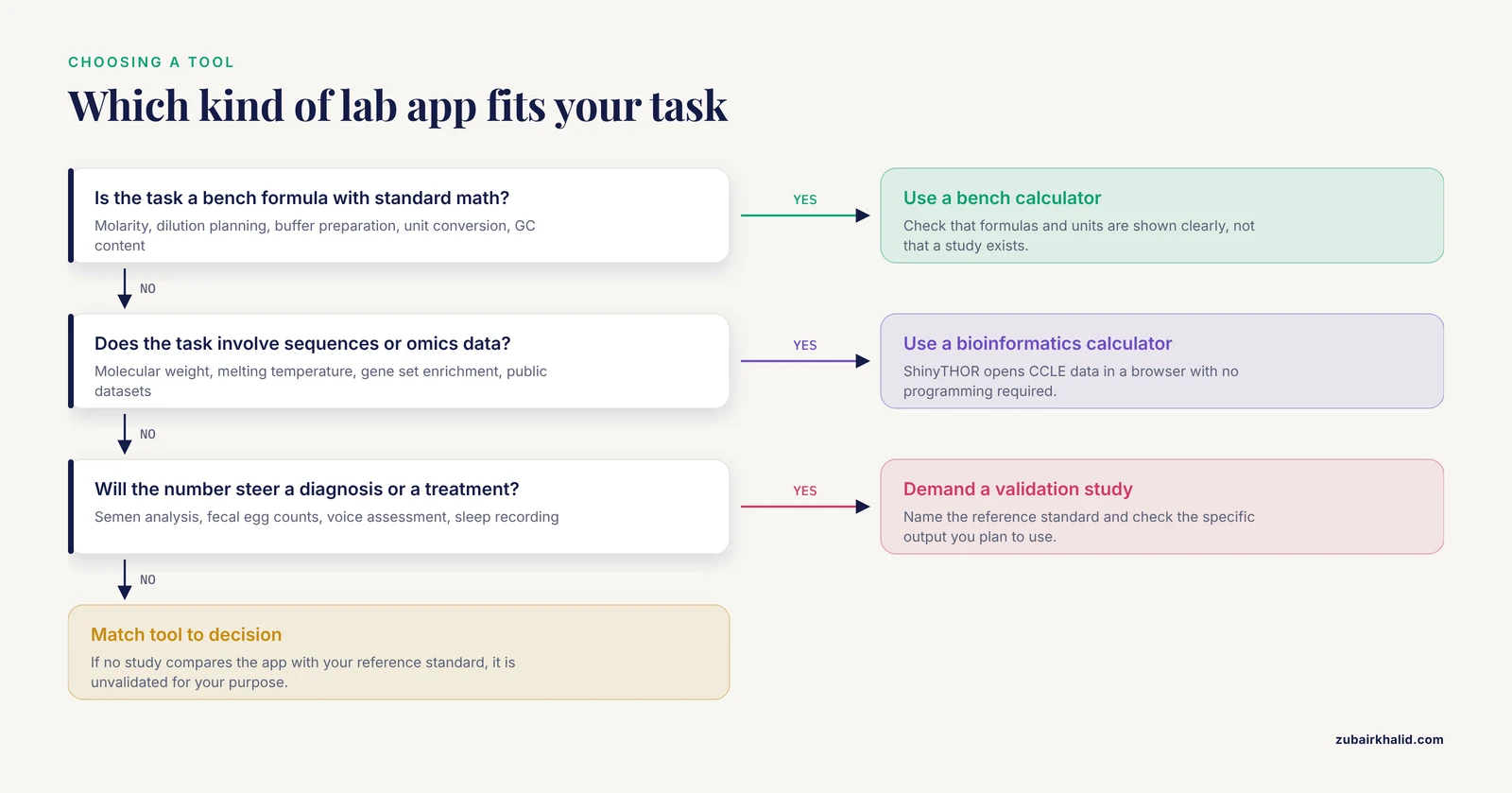
- Match the validation standard to your decision. A force platform validates jump apps, CASA and a hemocytometer validate semen apps, an accredited laboratory validates diagnostic apps, and the Computerized Speech Lab validates voice apps. If no study has compared the app with the reference standard you care about, the app is unvalidated for your purpose, whatever its store rating says.
- Check which calculation method the app is using. The same app can offer several methods with different accuracy, and the validation that applies is the one for the method you select.
- Know the hardware budget. Video and microphone apps need nothing but the phone. Chip-based systems need proprietary consumables, and sensor-based frameworks need the sensor set they were designed around.
- Ask who can operate it. A tool that gives the same answer in trained and untrained hands supports delegation, while a tool that needs an expert touch does not.
- Respect the measurement envelope. Every app has limits, in frequency response, in pitch range, and in the size of the signal it can resolve, and outputs near those limits are the first to lose agreement with the reference instrument.
- Check the license and the data path. Open-source code lets you verify the calculation, non-commercial licenses constrain company use, and any app that transmits data deserves a look at where the data go.
Worked Scenarios
Mining public cancer data without code. A wet-lab master's student wants to know which cancer cell lines express her receptor of interest and which drugs are most potent against them. ShinyTHOR's ranking module returns the top and bottom ten cell lines by marker expression or drug IC50, and the enrichment module tests her gene signature, all in a browser [1].
Return-to-sport testing. A physical therapy resident needs single-leg jump symmetry numbers for an athlete cleared for return-to-sport testing after ACL reconstruction. My Jump Lab supplies jump height, reactive strength index, and limb symmetry from an iPhone, and the marker-based tracking option is the choice supported by the force platform comparison for single-leg jumps [2][14].
Same-morning breeding decisions. A swine operation must decide which boars to collect before noon. iSperm returns concentration, motility, and progressive motility from a single chip in under a minute, with no specialist required [5].
Parasite triage in a flock. A sheep farmer sees diarrhea spread through the flock, and an accredited laboratory would take days to return egg counts. An app-based FEC system screens the flock the same morning and flags which animals to treat, with the accredited lab used to spot-check the app's counts [6].
Voice recording without a speech lab. A speech science student collects voice samples in a quiet office with no access to a CSL. FUDAN VOICE captures the recording and yields F0 mean, CPP, and CSID with documented CSL concordance, while any analysis hinging on energy above 5 kHz waits for the reference instrument [3].
Real research in an online course. An instructor teaching an asynchronous online biopsychology course wants students to experience genuine research. Students propose a stress-reduction intervention, measure HRV and mood before and after with a smartphone app, and present the results, an approach that improved reported mastery of course learning outcomes [11].
Common Mistakes and Limitations
Common mix-ups between app types
Three confusions cause most of the trouble. A biology calculator for bench math is not a bioinformatics calculator for sequence and omics work, and competence at one says nothing about the other. A screening app is not a diagnostic laboratory, even when the interface looks like a lab report. A measurement app with a published validation study is not the same thing as a research framework still being tested, and the paper describing the tool usually makes the difference clear.
Mistakes that cost accuracy
- Trusting store ratings as quality evidence. Popularity and quality are different measurements, and structured specialist assessment remains the only reliable proxy for content quality.
- Assuming every output of an app is equally solid. Validation studies routinely find that some features agree with the reference instrument while others do not, so check the published comparison for the specific output you plan to use.
- Ignoring the method toggle. An app that offers several calculation methods can produce different answers from the same recording, and switching methods between visits creates artificial changes.
- Generalizing across species, populations, and tasks. An app validated for boar semen, sheep fecal samples, or athletes after knee surgery is validated for that use, and extension to a new setting needs new evidence.
- Using a research prototype as a production tool. Frameworks validated in small clinical trials are steps toward a product, not finished products.
- Skipping input discipline on bench calculators. A molarity or dilution calculator amplifies whatever you type, so a wrong unit or an extra order of magnitude flows straight through to the bench.
The deeper limitation is scope. Every validation study tests a specific population, a specific reference instrument, and a specific range of conditions, and none of these apps has been validated for every use a reader might imagine. Results that will guide treatment for a patient or an animal belong with a qualified professional, and app output should support that judgment rather than replace it.
Frequently Asked Questions
What is the best lab calculator app for biology students?
For coursework, the best lab calculator app is usually a general bench calculator that covers molarity, dilutions, unit conversions, and sequence-based quantities. Add a specialized app only when your assay or measurement demands one, and prefer tools with a published validation study when a number will appear in a report.
Can a laboratory calculator app replace the lab instrument it mimics?
Sometimes for screening and routine tracking, rarely for the final decision. Published comparisons show strong agreement for some outputs and weaker agreement for others, so the answer depends on the specific measurement, the calculation method used, and how close the number sits to a decision threshold.
What is a bioinformatics calculator?
A bioinformatics calculator is software that computes quantities from biological sequences or omics data, ranging from molecular weights and melting temperatures to gene set enrichment and mining of public datasets. Web apps such as ShinyTHOR extend the idea by making entire public cancer datasets explorable without programming.
How do I know whether a lab app has been validated?
Search the scientific literature for the app name together with terms such as validation, agreement, or comparison with the reference instrument. A real validation study names the reference standard, reports the sample size, and gives agreement statistics such as intraclass correlation coefficients, correlation coefficients, or AUC values.
Are free laboratory calculator apps safe to use for research data?
They can be, provided you check three things first: what permissions the app requests, where data are stored and transmitted, and whether the calculation code is published or open source. Open-source tools let you verify the math yourself.
Do I need special hardware for app-based lab measurements?
Not always. Video-based and microphone-based apps need only the phone or tablet you already own, while chip-based systems such as microfluidic semen analyzers require proprietary consumables and an optical module, and sensor frameworks require the sensor set they were designed for.
Sources
- ShinyTHOR app: Shiny-built tumor high-throughput omics-based roadmap.
- Reliability and validity of the My Jump Lab app for assessing vertical jump performance after anterior cruciate ligament reconstruction.
- Validation of FUDAN VOICE: Signal and Acoustic Feature Comparison with Computerized Speech Lab (CSL).
- Comparison of multiple 3D scanners to capture foot, ankle, and lower leg morphology.
- A Mobile Sperm Analyzer with User-Friendly Microfluidic Chips for Rapid On-Farm Semen Evaluation.
- Comparison of ovine faecal Strongyle egg counts from an accredited laboratory and a rapid, on-site parasite diagnostic system utilising a smartphone app and machine learning.
- Multifunctional smart wound dressing with hydrogel-embedded colorimetric-electrochemical fabric sensors as a prototype for point-of-care wound monitoring via a wireless miniaturized circuit and ArUco markers/app-based optical sensing.
- Development and Testing of a Smartphone-Based Cognitive/Neuropsychological Evaluation System for Substance Abusers.
- Use of the FLARe Smartphone App in a Trauma-Exposed Sample: A Feasibility Study.
- The mobile sleep lab app: An open-source framework for mobile sleep assessment based on consumer-grade wearable devices.
- Use of a Smartphone-Based App in an Online Behavioral Neuroscience Lab Course.
- Quality benchmarking of smartphone laboratory medicine applications: comparison of laboratory medicine specialists' and non-laboratory medicine professionals' evaluation.
- Comparison of a User-Centered Design, Self-Management App to Existing mHealth Apps for Persons Living With HIV.
- Accuracy of the My Jump Lab App for Two Methods of Single-Leg Countermovement Jump Height Assessment.